
LAKEWAY, Texas, Oct. 29, 2026
Google Business Profile News
Google has started inviting local businesses to turn on an AI agent that answers customer messages from their Business Profile on Search and Maps. The pilot is free, it books appointments, and it hands harder questions back to the owner.
Invite emails from Google Business Profile, headed “Meet your business’ AI agent,” are reaching owners this week. The agent sits behind a new Message button on the profile. It answers routine questions in the customer’s own texting app, offers open booking times, and passes anything it cannot handle to the business. Search Engine Roundtable reported the rollout on Oct. 29, four months after the button briefly appeared on profiles in June.
Here is the part owners should not skip: the agent can only say what Google can find about you. If your profile, website, and listings are thin or out of date, that is what it will tell your next customer.
Key takeaways
What to Know in 60 Seconds
- What happened: Google is inviting businesses into a pilot that puts an AI agent behind a Message button on their Business Profile.
- What it does: answers common questions, helps with bookings, and passes complex questions to you. You can take over at any time.
- Cost: no cost, per Google. Standard messaging rates may apply.
- Who gets it: invited businesses only, for now. Google has not published eligibility rules.
- The catch: it works for customers whose phones and carriers support RCS. Other messages go to your phone.
- What to do today: fix your profile, services, prices, hours, FAQs, and booking link before an AI starts repeating them.
Get My Free Market Report Free and no pressure · Call (512) 991-3840 · Text us
What Google Announced
The invite comes from Google Business Profile with the subject line “You’re invited: Be the first to get an AI agent for your business.” Inside, Google offers owners the chance to:
“get early access to the AI-powered messaging pilot on your Business Profile on Search and Maps at no cost. You can allow an agent to handle common customer questions and help with bookings, allowing your team to dedicate more time to running the business. Your agent will redirect complex questions to you.”
The email has two short sections. “Automate repetitive questions” says the agent can answer common questions “right when they’re ready to book, directly in their phone’s native messaging apps.” “Stay in control” covers handing off to the owner. The sample chat in the email is about as ordinary as it gets: a customer asks if the business takes credit cards, and the agent says yes and links to the services menu.
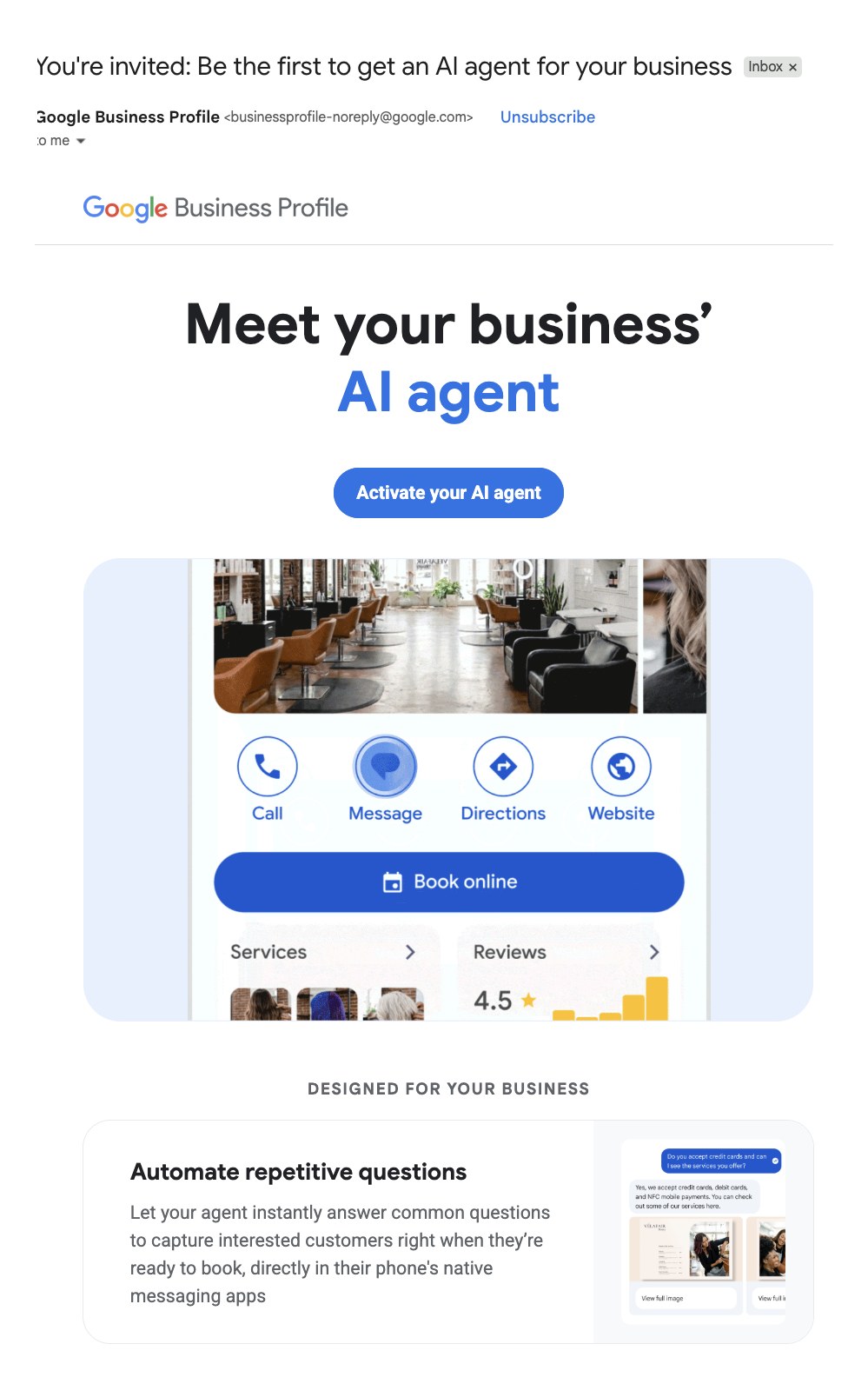
Google’s statement, as quoted by Search Engine Roundtable, says businesses can “connect with customers from Search and Maps and let them message your business on their phone’s native messaging app.” It adds that the AI agent “will answer routine questions from customers, instantly and at no cost.”
That is the whole official story so far. There is no public Google Help page for the pilot yet, no published list of eligible categories, and no date for a wider launch. We will update this post when Google publishes one.
How the AI Agent Works
Google’s demo shows the flow from the customer’s side. Someone finds a salon on Search, taps Message, and asks a real question. The agent answers, offers Saturday times, and finishes with a link to book.

From what Google and the early reports describe, here is how it works:
- The entry point is a Message button on your Business Profile in Search and Maps, next to Call, Directions, and Website.
- The conversation runs in the customer’s texting app, not in a Google chat window. Google calls it “native messaging.”
- The agent replies first. It handles routine questions and booking help.
- Hard questions come to you. Google says the agent redirects complex questions to the business, and you can take over a conversation whenever you want.
- Messages live in your profile. Search Engine Roundtable reports that conversations show up in the Business Profile.
Claudia Tomina, who posted about the pilot on LinkedIn, told owners to “look for the red dot on Messages in your profile.” She described the agent pulling up menu items with photos and prices and offering reservation times. She also made the point we keep coming back to: “The agent can only answer as well as your profile does.” Those quotes come from Search Engine Roundtable’s write-up.
The RCS fine print
The agent is not for every phone. The invite’s footnote, which yesweblog.fr also published, reads: “Your agent is available to customers on participating mobile networks whose phones support RCS. The agent will not reply to other customers, and their messages will go straight to your phone. Standard messaging rates may apply.”
RCS is the upgraded texting standard behind rich messages on Android and newer iPhones. Google has not said which carriers or devices count as participating. In practice, plan for some customers getting the AI and some texting you directly, and make sure somebody answers those.

Quick answer
Is the Google Business Profile AI agent live for everyone?
No. It is an invite-only pilot as of Oct. 29, 2026. Google has not published eligibility rules or a public launch date. Watch your email and your profile for a Messages prompt.
Who Has Reported It So Far
This did not come out of nowhere, and a handful of people have been on it. Credit where it is due:
- Search Engine Roundtable, June 26, 2026. Barry Schwartz reported that a Message button and a “Handled by your AI agent” section showed up on some profiles for a few hours. Muhammad Hussain spotted it and called it part of an “exclusive pilot program.”
- Whitespark, June 29, 2026. Darren Shaw led his newsletter with “Google is bringing back GBP Messaging”, writing that it looks like Google is giving businesses an AI chatbot “that can answer questions about your business from your GBP (and your website?)” and then hand the chat to the owner.
- Dr. Web, June 29, 2026. The German publication covered the same test for European readers.
- yesweblog.fr, Oct. 21, 2026. Wrote up the invite, including the RCS footnote.
- Search Engine Roundtable, Oct. 29, 2026. Reported the pilot expanding, with Google’s statement, Claudia Tomina’s notes, and Mike Blumenthal sharing the restaurant version of the invite.
Joy Hawkins of Sterling Sky made the bigger point in September. Her piece “AI is Quietly Taking Over” argues that “business information needs to be accessible and consistent wherever search engines and AI systems may encounter it.” That is the right frame for what comes next.
Timeline: From Dead Chat to AI Agent
Google has tried business messaging before. Here is the verified path, with sources for each date.
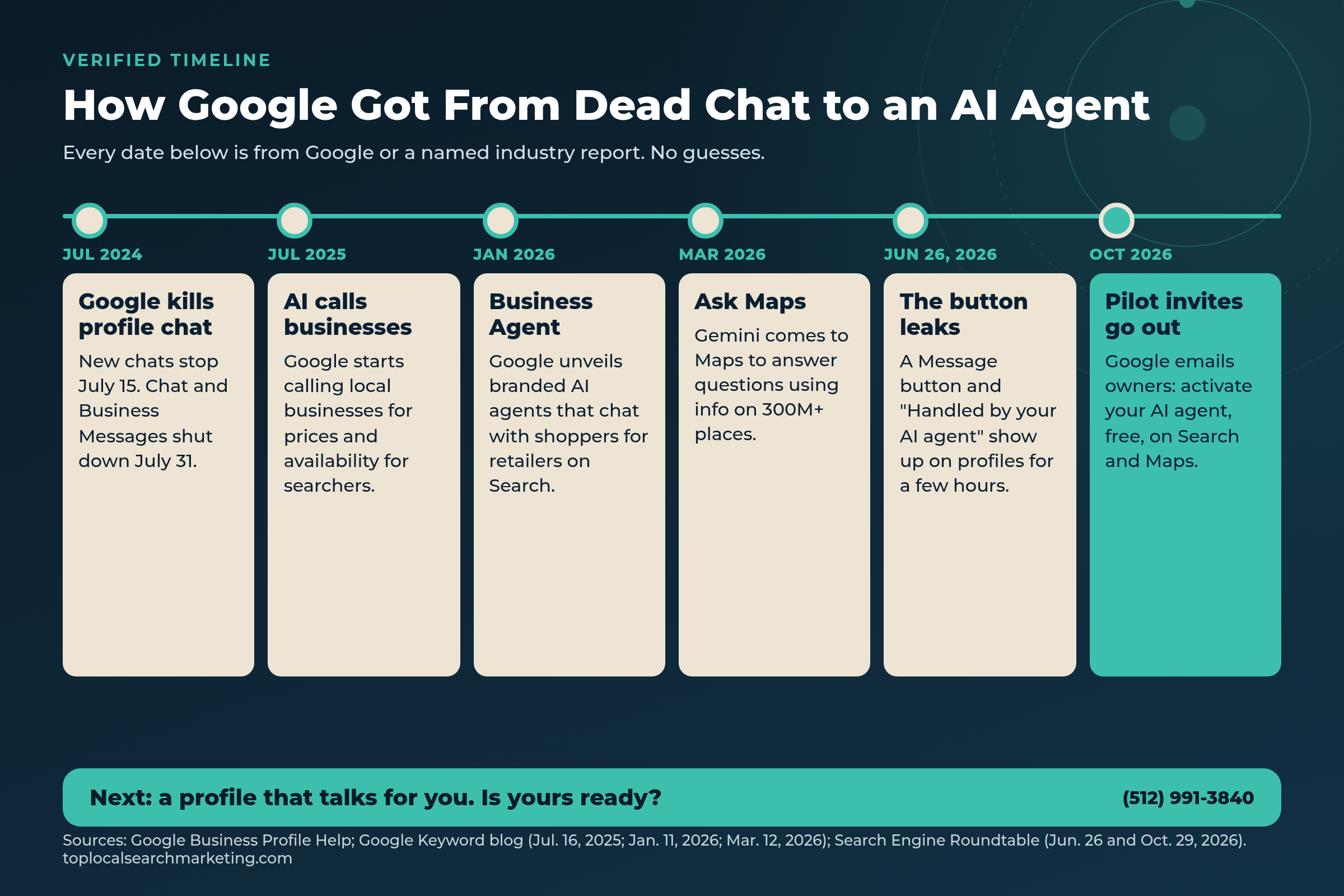
- July 15, 2024: Google stops new Business Profile chats. History is removed July 31 (Google Help). Business Messages is discontinued the same day (Google for Developers). Search Engine Land covered the shutdown.
- After the shutdown: Google lets some businesses add WhatsApp or text chat links, in select regions (Google Help).
- July 16, 2025: Google announces that Search can call local businesses to check prices and availability for searchers. Owners can opt out under Advanced settings (Google Help).
- Jan. 11, 2026: Google introduces Business Agent, a branded AI agent that lets shoppers chat with retailers on Search.
- March 12, 2026: Ask Maps launches in the U.S. and India, answering questions using information from over 300 million places and reviews from more than 500 million contributors.
- June 26, 2026: The Message button and “Handled by your AI agent” section appear briefly on profiles (Search Engine Roundtable).
- October 2026: Pilot invites reach owners. yesweblog.fr on Oct. 21; Search Engine Roundtable on Oct. 29.
Put those in a row and the direction is obvious. Google killed a chat feature that needed humans to reply. Then it taught its AI to call businesses, to chat for retailers, and to answer questions about places in Maps. Now it is putting that AI on your profile.
Our analysis and prediction
Your Profile Is About to Become a Spokesperson
Our view, not Google’s
We have been telling owners this was coming. Earlier this month we wrote that your Google Business Profile is the new website and that messaging readiness belongs on every profile checklist. When we covered Google’s AI calling businesses, our advice was to publish the facts an agent should not have to ask.
Here is our prediction. Today, the pilot answers from what Google shows in its demo: services, menus, photos, prices, payment, and open times. Over time, we expect Google to feed this agent everything it knows about your business, on your profile and across the web. Your website. Your FAQs. Your reviews and your replies. Your listings on Yelp, Facebook, BBB, and industry sites. Then it puts all of that into an “Ask [Your Business Name]” conversation that runs on Google’s terms.
Why we think so:
- Google’s AI already reads all of it. A BrightLocal study of 1.9 million AI citations found Google Business Profile made up 28.63% of local citations and was cited for 94% of businesses. It also found that around 93% of cited domains were individual business websites.
- Ask Maps already does it for places. Google says Ask Maps analyzes information from over 300 million places and reviews from its contributors to answer questions.
- Darren Shaw raised the same question. His June note flagged the agent answering “from your GBP (and your website?).”
- Google keeps narrowing the click. Sterling Sky reported AI Local Packs appearing on roughly 8% of keywords, citing Places Scout data, and surfacing 32% fewer unique businesses than regular packs.
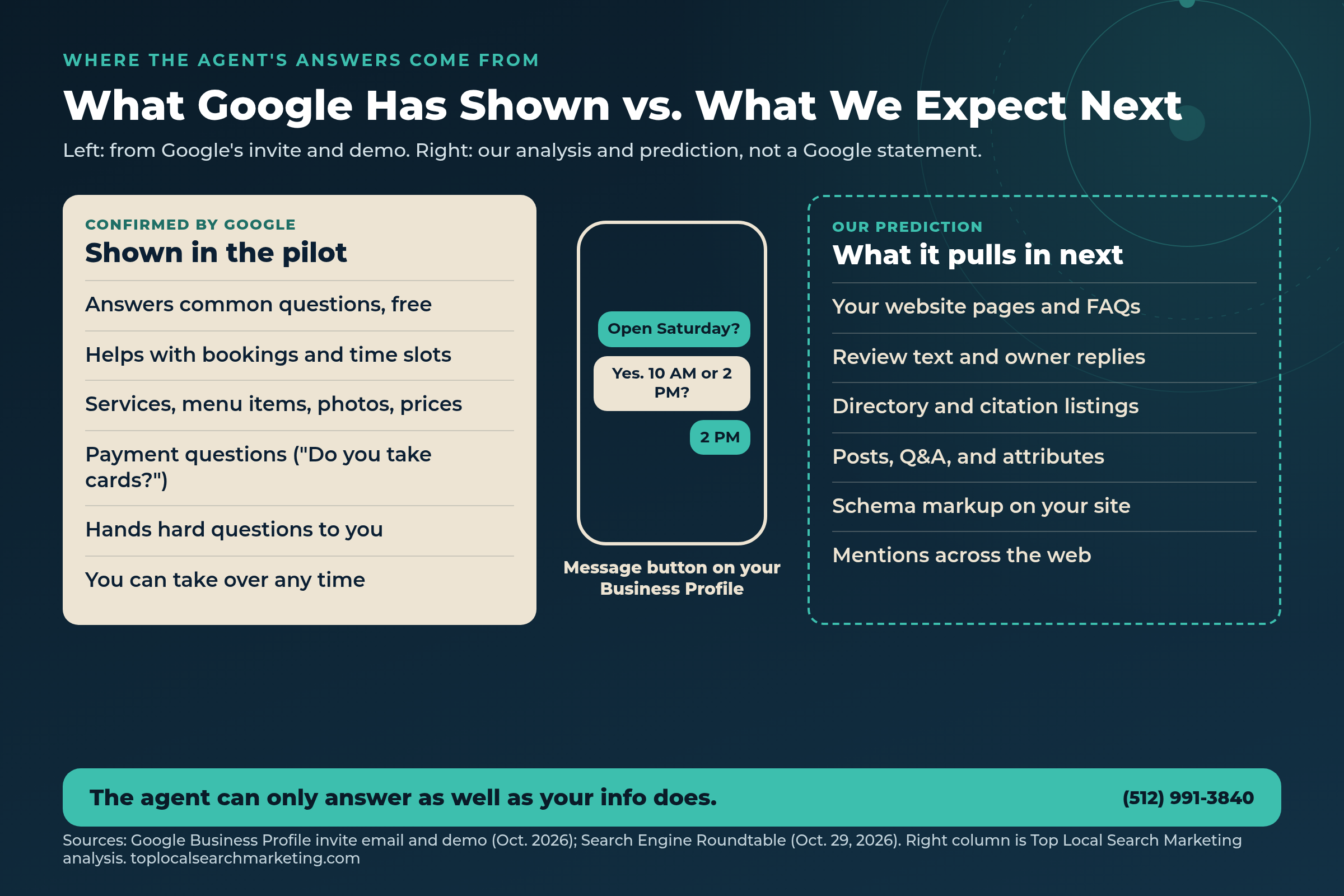
If we are right, this flips how local search works. Customers will not have to read your reviews, compare your site, and call. They will just ask your profile. And the profile will answer with whatever Google has gathered, true or not.
That is a big opening for businesses that keep their facts tight. It is a real problem for businesses whose website says one price, whose profile says another, and whose Yelp page still lists last year’s hours.
What the AI Agent Can and Cannot Do
Here is what we can back with a source today, and what is still unknown.
What it can do (confirmed)
- Answer routine questions, instantly, at no cost (Google)
- Help with bookings and show open times (Google invite and demo)
- Pull up services or menu items with photos and prices (demo, Claudia Tomina)
- Answer payment questions (Google invite)
- Send complex questions to the owner (Google invite)
- Let the owner take over at any time (Search Engine Roundtable)
What it cannot do (or we do not know yet)
- Reply to customers without RCS. Those messages go to your phone.
- Work for every business. It is invite-only.
- Guarantee correct answers. Google has not published accuracy or review controls.
- Tell you which categories qualify. No eligibility list is public.
- Explain exactly which sources it reads. Google has not said.
- Replace your phone. Callers still call.
What It Will Say About You, and How to Feed It
Ask yourself one question: if a customer messaged your profile right now and asked the top five questions you get on the phone, what would a machine say back? Then go fix the sources it would use. Start with these.

1. Business Profile completeness
Primary and secondary categories, business description, service area, attributes, and photos that show the real place and the real team. The demo shows the agent leaning on profile details, so empty fields are missed answers. Our Business Profile optimization guide walks through each field.
2. Services, products, and prices
Fill in the services or menu section with names, short descriptions, and prices or price ranges where you can. Claudia Tomina saw the agent pull menu items with photos and prices. If your services list is three generic words, the agent has nothing to quote.
3. FAQ content on your website
Write the real questions customers ask, with short, direct answers. Payment, warranties, service area, how far out you book, parking, cancellations, what a visit costs. Put them on your site in plain text. Our view: this is the most likely next source the agent reads.
4. Reviews and your replies
Reviews are already a main input for Google’s AI. Ask every happy customer, reply to every review, and use replies to correct the record (“We now open at 7 AM on Saturdays”). Ask Maps already uses reviews from Google’s contributors to answer questions.
5. Citations and listings
BrightLocal found Yelp, Facebook, BBB, and industry directories among the most cited sources for local AI answers. Same name, address, phone, hours, and services everywhere. One stale listing is one wrong answer.
6. Booking links
The demo ends with a booking link. Set the booking or appointment link on your profile, make sure it works on a phone, and make sure the times it shows are real.
7. Hours and special hours
Regular hours, holiday hours, and closures. “Are you open Saturday?” is the first question in Google’s own demo. With Thanksgiving four weeks out, set holiday hours now.
8. Schema markup
Add LocalBusiness structured data to your site with your name, address, phone, hours, and price range, and mark up your FAQs. Google has not said the agent reads schema. Our view: clean, machine-readable facts are cheap insurance either way.
What will Google AI say about your business?
Get the free Market Report: how your profile, reviews, and listings look to Google AI, and what to fix first.
- Who Google Maps and AI (ChatGPT, Gemini, AI Overviews, Ask Maps) recommend in your market
- The competitor getting the calls you should be getting, by name
- Your 4-point conversion check + 90-day roadmap
Prefer to talk? Call (512) 991-3840
Prep Checklist: Get Your Profile Ready for the AI Agent
Do this whether or not you have an invite yet. Every item also helps you in Maps, AI Overviews, and AI Mode today.

- Check your email and your profile for a Messages prompt or the pilot invite.
- Confirm you are the primary owner of your Business Profile, and remove old managers you do not know.
- Update the business description, categories, attributes, and service area.
- Fill in every service or product with a description and a price or range.
- Set regular hours and holiday hours through New Year’s.
- Add or test your booking link on a phone.
- Add 10 to 20 recent photos of the real place, team, and work.
- Write your top 10 customer questions and answers on your website.
- Reply to every review from the last 90 days.
- Audit your Yelp, Facebook, BBB, Apple, Bing, and top industry listings for matching name, phone, hours, and services.
- Add LocalBusiness and FAQ schema to your website.
- Decide who on your team answers handed-off messages, and how fast.
- Write down what the agent should never answer for you, like custom quotes or legal and safety questions, and plan to handle those yourself.
- Ask your own profile five common questions once the agent is live, and fix whatever it gets wrong.
Get My Free Market Report Free and no pressure · Call (512) 991-3840 · Text us
Should You Turn It On?
Our take: for most local businesses, yes, once your facts are clean. Here is the honest trade-off.
Reasons to turn it on. Customers who message at 9 PM get an answer instead of silence. Routine questions stop eating your front desk’s day. Booking happens while the customer is ready. And it is free.
Reasons to wait a week. If your profile, prices, or hours are wrong, the agent will repeat them confidently. Fix the facts first. If your work is mostly custom quotes, like roofing or remodeling, expect most chats to hand off to you, so staff for it.
Reasons to be careful. Google has not published how to review or correct the agent’s answers. Check your Messages often for the first few weeks, take over when it drifts, and keep a list of what it got wrong so you can fix the source.
One more thing. Even if you never turn the agent on, Google’s AI is already answering questions about you in AI Overviews, AI Mode, and Ask Maps. We covered that in what AI says when people search your business name and how Ask Maps picks one name. The prep work is the same.
Want to know what Google AI will say about you?
Get a free Market Report. We will check your profile, reviews, listings, and website the way Google AI reads them, and show you what to fix first.
Get My Free Market Report Free and no pressure · Call (512) 991-3840 · Text us
FAQ
Frequently Asked Questions
Straight answers for owners. Sources are linked above and listed below.
It is a pilot feature that adds a Message button to a Business Profile on Google Search and Maps. When a customer sends a message, an AI agent answers routine questions, such as hours, services, prices, and payment, and can offer booking times. Questions it cannot answer get passed to the business, and the owner can take over the conversation at any time.
Google’s invite email describes early access to the pilot as available at no cost. Search Engine Roundtable quotes Google saying the agent answers routine questions instantly and at no cost. Google’s fine print adds that standard messaging rates may apply.
Not yet. Right now it is an invite-only pilot. Google has not published a Help page with eligibility rules, so the only sure sign is an invite email or a Messages prompt inside your profile.
Google has not published a full list. Its demo shows answers built from Business Profile details like services, menu items, photos, prices, payment methods, and open booking times. Our view is that it will lean on your website, reviews, and listings around the web too, because Google’s AI already cites those sources heavily.
Google’s fine print says the agent works for customers on participating mobile networks whose phones support RCS messaging. Other customers’ messages go straight to the business’s phone instead of to the agent. Google has not said which phones or carriers qualify.
You can step in at any time, and messages show up in your Business Profile so you can read what was said. The best protection is upstream: keep hours, services, prices, and policies correct on your profile and your website so the agent has nothing old to repeat.
No. Google shut down Business Profile chat in July 2024. That version needed a person to reply. This version uses an AI agent to reply first and runs through the customer’s own messaging app instead of a separate chat window.
Sources
Google sources first, then industry reports. The invite email quotes come from a pilot invite we reviewed, with the recipient business removed. Anything labeled our view, our take, or our prediction is analysis, not a Google statement.
- Search Engine Roundtable: Google Business Profiles AI-Powered Messaging (Oct. 29, 2026)
- Search Engine Roundtable: Google Business Profiles Message Button (June 26, 2026)
- Whitespark newsletter, Darren Shaw: Google is bringing back GBP Messaging (June 29, 2026)
- Dr. Web: Google AI chatbot for Business Profiles (June 29, 2026, German)
- yesweblog.fr: AI messaging on Search and Maps for Google Business Profile (Oct. 21, 2026)
- Google Business Profile Help: Chat and call history changes
- Google for Developers: Update on Google Business Messages
- Search Engine Land: Google Business Profile chat and call history going away
- Google Business Profile Help: Chat with customers through WhatsApp or text
- Google Keyword blog: Search announcement on AI calling local businesses (July 16, 2025)
- Google Business Profile Help: Automated calls from Google
- Google Keyword blog: Agentic commerce tools for retailers, including Business Agent (Jan. 11, 2026)
- Google Keyword blog: How we’re reimagining Maps with Gemini (March 12, 2026)
- BrightLocal: Top sources and directories for local AI search
- Sterling Sky, Joy Hawkins: Local SEO and AI, AI is Quietly Taking Over (Sept. 21, 2026)
- Google Search Central: Local business structured data
Next step
Get Your Facts Straight Before Google’s AI Repeats Them
The agent is coming to more profiles. Clean up your profile, your services and prices, your FAQs, your reviews, and your listings now, so the answers customers get are the ones you would give.
Want a plain read on where you stand? Get the free Market Report or contact us. We will tell you what to fix first, whether you hire us or not.
Get My Free Market Report Free and no pressure · Call (512) 991-3840 · Text us · Top Local Search Marketing