
Google Business Profile Update · October 2026
When someone looks up your business on Google, the box that pops up is often the first thing they see. Your name, your stars, your hours, and a row of buttons. This month, Google started changing two parts of that box.
First, on October 7, 2026, Search Engine Roundtable reported that Google is showing a WhatsApp button next to Call, Directions, and Website on some business panels. Then on October 19, it reported that Google is testing a higher spot for the posts you share on your Business Profile.
Neither change needs you to panic. Both are good reasons to spend a few minutes on your listing this week. Here is what changed, what it means in plain English, and a simple routine any local business can follow.
Start here
The Short Answer
- Posts may be moving up: Google is testing the posts section higher on some business panels. In 2018 it moved posts down to the bottom.
- It is a test for now: One local expert saw posts move up for about three days, then back down.
- A WhatsApp button is showing: Some panels now show WhatsApp next to Call, Directions, and Website.
- Google may have added a number for you: Search Engine Roundtable says Google added WhatsApp numbers on its own for some businesses a few months ago.
- What to do: Check every button on your listing, post one real update a week, and only turn on chat if someone will answer it.
Get My Free Market Report Free and no pressure · Call (512) 991-3840 · Text us
Quick answer
Do I need to do anything about these changes?
Nothing is broken, so there is no emergency. But if your posts start showing higher, an old or empty posts section will be easier to notice. Our take: check your buttons today, and get one fresh post up this week.
Not sure what your Google listing looks like to a customer right now?
Start with your Free Market Report. We will pull up your listing, test each button, and tell you plainly what is working and what is not.
Get My Free Market Report Free and no pressure · Call (512) 991-3840 · Text us
What Changed in October 2026
Two changes showed up on the business panel, the box with your details that appears when people search for you. Here is the timeline from the reports we read.
October 7: a WhatsApp button. Search Engine Roundtable reported that Google is showing WhatsApp buttons on business panels in Google Search, either in place of the old chat option or next to the Call, Directions, Website, and Share buttons. Local search expert Sachin Patel spotted it first. The site’s editor said he could see it too, “so it might be rolled out fully.”
That same report gave a little history. A couple of years ago, Google started asking businesses to add a WhatsApp number to their profile. And a few months ago, Google added WhatsApp numbers by itself for some businesses. So it is possible your listing has a WhatsApp button you never set up.
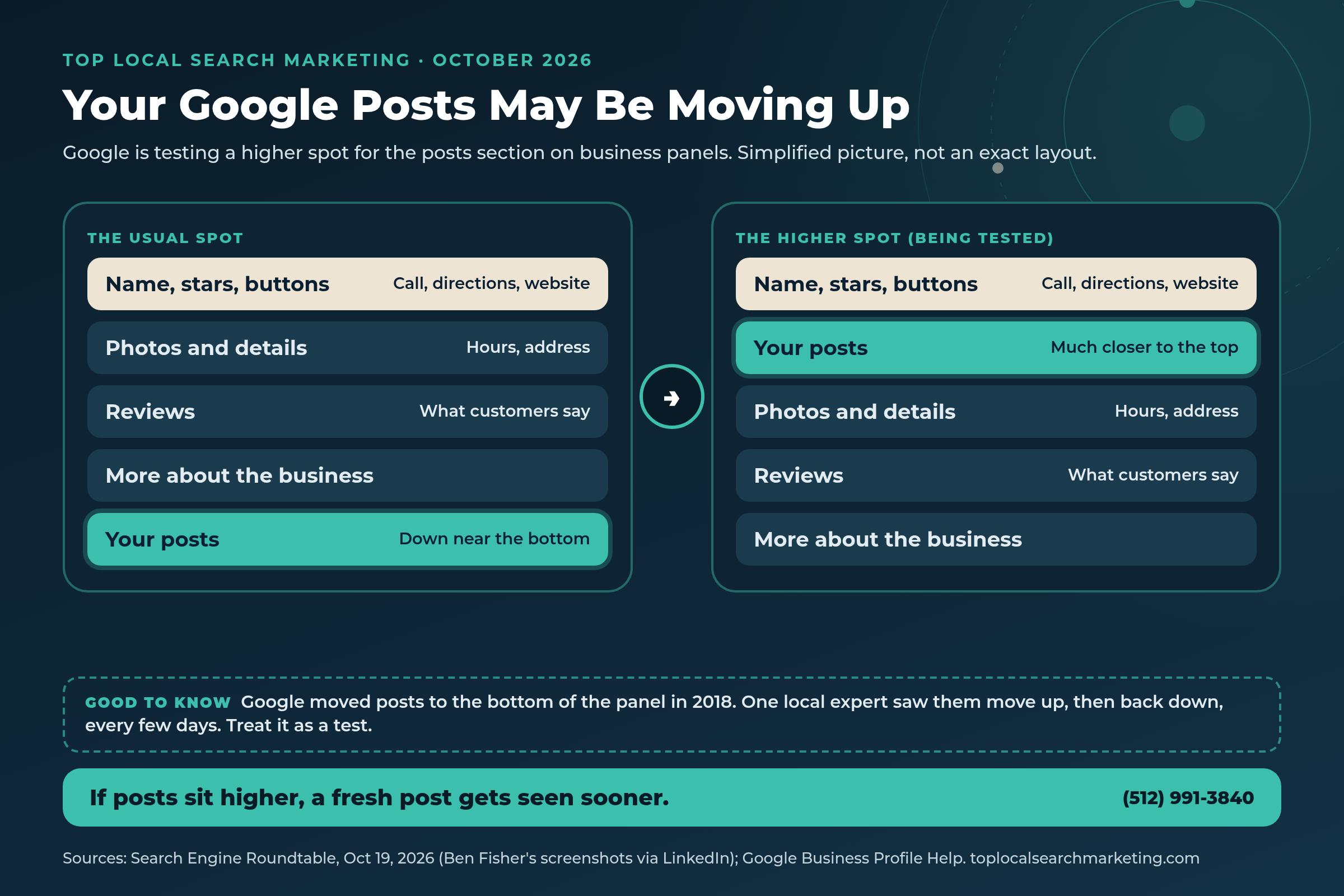
October 19: posts in a higher spot. Search Engine Roundtable reported that Google seems to be moving the posts section higher on the business panel. In 2018, Google moved posts down to the bottom. Ben Fisher, a Business Profile expert, first shared it on LinkedIn. He wrote that he was seeing posts “move up and then 3 days later they move down.” The editor added that if posts sit that high, more businesses will likely start using them.

Our honest view: Google tests things all the time, and some tests never stick. But neither change asks you to do anything risky. Both reward the basics: correct buttons and fresh, real posts.
AI Answer Block
What Google Business Profile Posts and Chat Buttons Mean (Plain English)
Business Profile: your free business listing on Google Search and Maps. It holds your name, address, hours, phone number, photos, reviews, and posts.
Posts: short updates you share on your profile. Google’s posts help page lists three kinds: updates, offers, and events. Each can have a photo or video, and updates and events can carry a button like Book, Order, or Learn more. On phones, customers find posts in the Updates or Overview tabs. On a computer, they show in a section called From the owner.
Posts expire: Google says posts older than six months are archived unless you set a date range. That is why some listings look empty even though the owner posted last year.
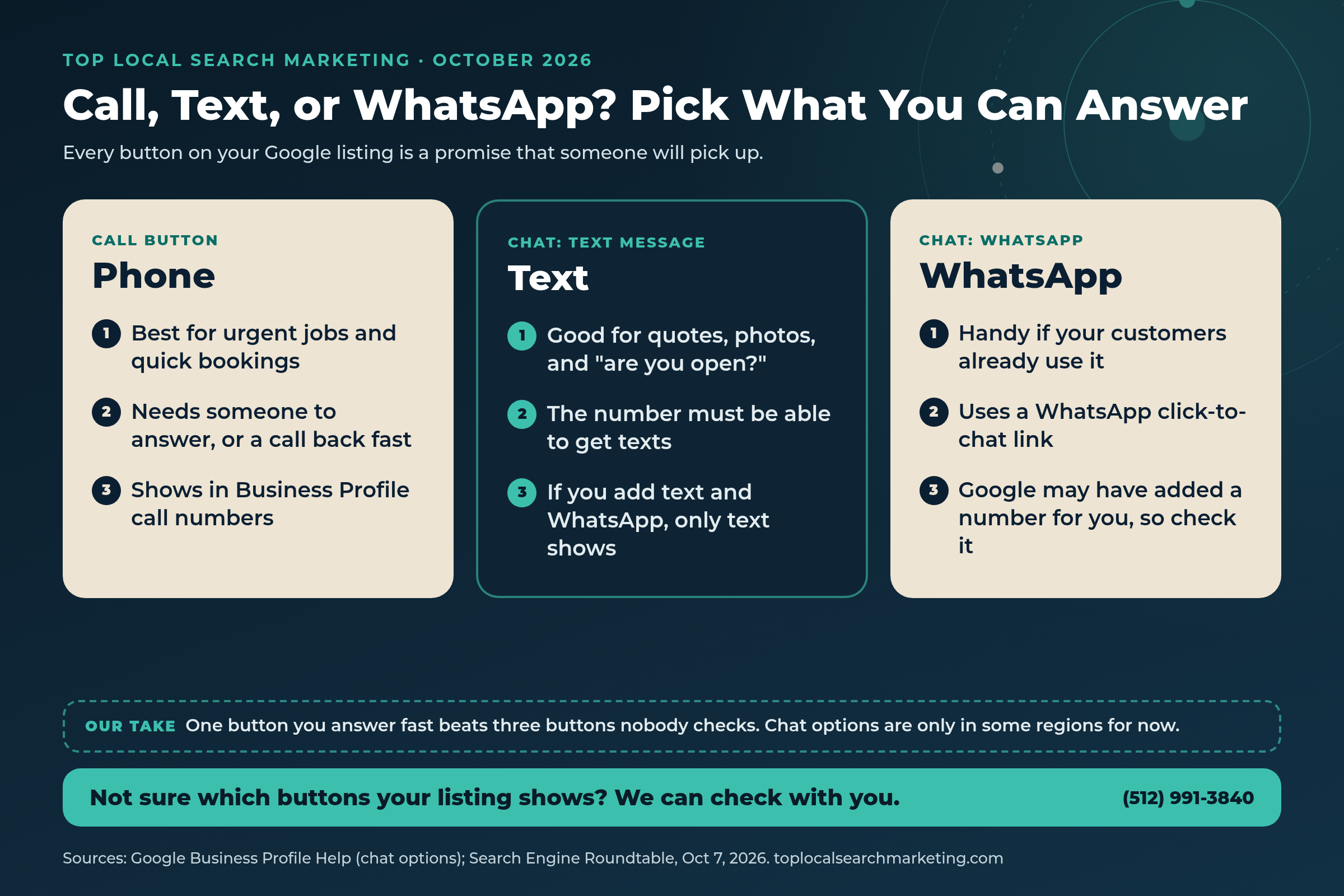
Chat button: Google’s chat help page says a claimed and verified profile can add a WhatsApp link or a phone number that can get text messages. If you add both, only the text option shows. Google also says chat options are only available in select regions, so you may not see it yet.
WhatsApp click-to-chat link: a web link that opens a WhatsApp chat with your business. It starts with wa.me and ends with your full number, country code first.
Our reading: none of this changes how Google ranks you. It changes what a customer sees, and how easily they can reach you, once they find you.
Quick answer
Will posting on Google help me show up higher in search?
Google has not said that posts affect ranking. Its local ranking page says local results are mainly based on relevance, distance, and popularity. What posts do is give a customer a reason to pick you once they see you, and that is worth a lot.
Why Local Owners Should Care
Your business panel works like a storefront window. Most people decide in a few seconds whether to call, get directions, or keep scrolling. If the posts section moves closer to the top, it becomes part of that first look.
That can help or hurt. A post from this week that shows a finished job, today’s special, or your holiday hours tells people you are open and active. A post from last spring, or no post at all, says nothing. And Google says posts older than six months get archived, so the section can quietly empty out.
The chat button matters for a different reason. Every button on your listing is a promise. If a customer taps WhatsApp or Text and nobody answers, they will likely move on to the next business. Picture a roofer in Buffalo or anywhere in Western New York who never knew Google had added a WhatsApp number to the listing. Or a nail salon in Austin, a moving company in Nashville, or a bakery in Lexington, KY getting messages on a phone nobody checks.
There is good news here too. Google’s chat help page points owners to their Business Profile performance numbers to see how chat is used, and the performance help page counts calls, website clicks, and direction requests. So you can see whether people are using the buttons you offer.
Our take: you do not need every button. You need the ones you can answer, and a few fresh posts that show the real you.
You run the business. Keeping a Google listing fresh is one more job on a long list.
We will walk through your listing with you, fix what is off, and set up a simple posting routine you can keep up with, or that we can help with.
Who does AI name in YOUR market?
Get the free $500 Market Report — Map Pack gaps, Ask Maps visibility, and the competitor capturing your calls.
- Who Google Maps and AI (ChatGPT, Gemini, AI Overviews, Ask Maps) recommend in your market
- The competitor getting the calls you should be getting, by name
- Your 4-point conversion check + 90-day roadmap
Prefer to talk? Call (512) 991-3840
Myth vs. Reality
A calm reset on what these changes do and do not mean.
Myth: Google moved posts to the top for everyone.
Reality: Not yet. Search Engine Roundtable called it a move Google seems to be testing, and Ben Fisher saw posts go up and back down every few days.
Myth: If I never added WhatsApp, my listing cannot have it.
Reality: Search Engine Roundtable reported that a few months ago Google added WhatsApp numbers by itself for some businesses. Check your Contact section.
Myth: More buttons always means more customers.
Reality: A button nobody answers can cost you the customer. Google shows only text if you add both text and WhatsApp, so pick the one you will answer.
Myth: Old posts stay up forever.
Reality: Google says posts older than six months are archived unless a date range is set.
Myth: I should put my phone number in every post.
Reality: Google says posts with a phone number in the description might get rejected if the number cannot be verified. Let the call button do that job.
Myth: Posting on Google is only for restaurants and shops.
Reality: Most businesses with a verified profile can post updates, offers, and events. A plumber’s finished job is as good a post as a cafe’s new menu.
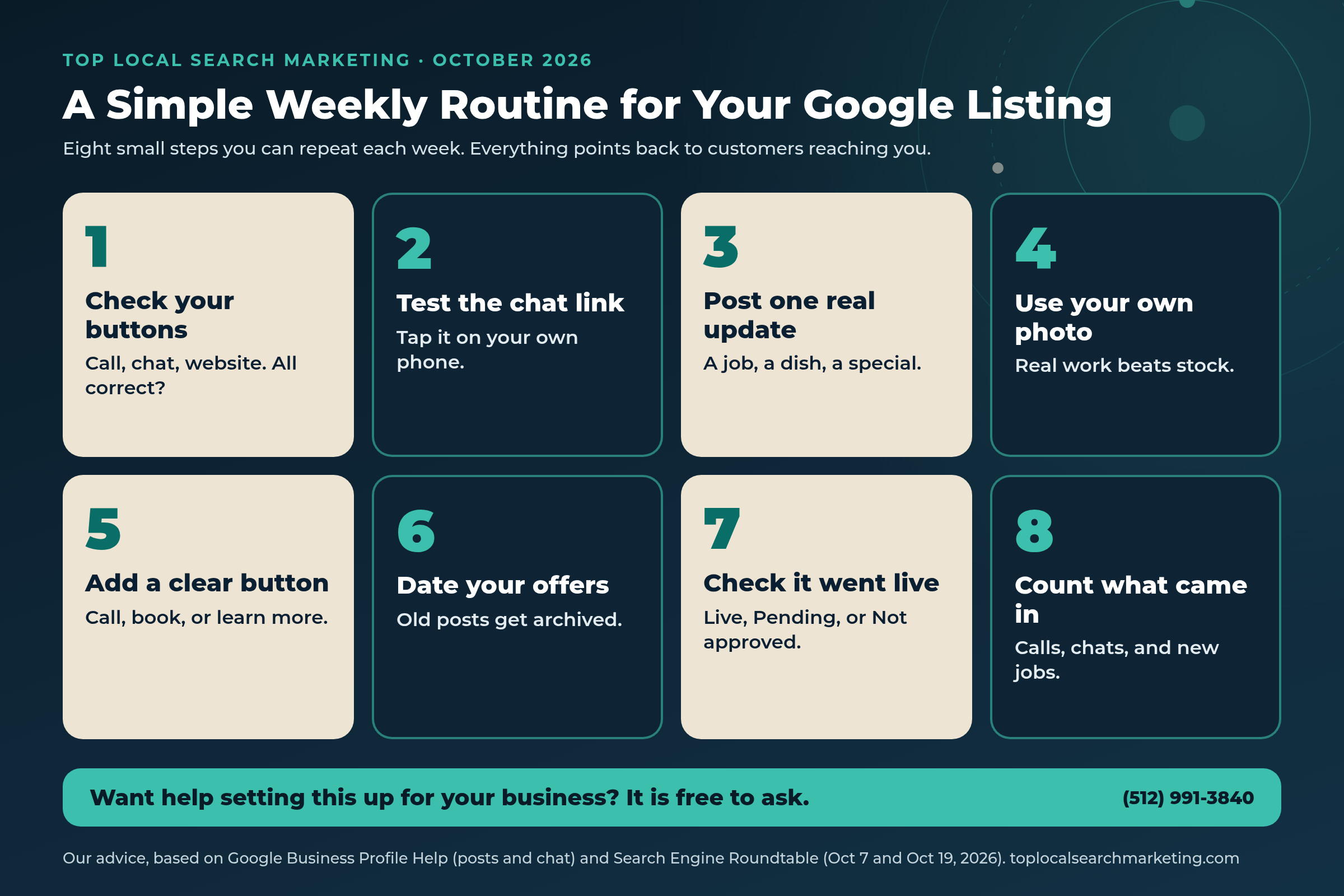
A Simple 8-Step Weekly Routine for Your Google Business Profile Posts and Buttons
These are our steps, not a Google product. Most take a few minutes, and none of them cost anything.
-
Check every button on your listing
Search your business name on your phone. Tap Call, Directions, Website, and any chat button. Each one should reach you, not an old number or a broken page.
-
Look for a chat button you did not add
In your Business Profile, open Edit profile, then Contact, and look next to Chat. If there is a WhatsApp link or number you did not set up, fix it or remove it.
-
Pick one chat option you will answer
Text or WhatsApp, not both, since Google shows only text when both are set. If nobody can answer chats during the day, it is fine to skip chat for now.
-
Post one real update this week
Share a finished job, a new item, a staff member, or a seasonal tip. Use the Update type and add a button like Call, Book, or Learn more.
-
Use your own photos
A clear phone photo of your real work tells customers more than a stock image. Keep it bright and simple.
-
Put dates on offers and events
Offers and events need start and end dates. Google says posts older than six months are archived unless a date range is set.
-
Make sure it went live
After you post, check the status. Google lists three: Live, Pending, and Not approved. Leave phone numbers out of the post text.
-
Count what comes in
Once a month, check Business Profile performance for calls, website clicks, and directions, and ask new customers how they found you.

Every Way a Customer Can Reach You From Your Listing
Keep this handy when you check your Google listing. Details come from the pages in Sources.
| Way to reach you | What you set up | Best for | Good to know |
|---|---|---|---|
| Call button | Your profile phone number | Urgent jobs and quick bookings | Calls counts taps on the call button in your performance numbers |
| Text message chat | A number that can get texts | Quotes, photos, and quick questions | If you add text and WhatsApp, only text shows |
| WhatsApp chat | A WhatsApp click-to-chat link | Customers who already use WhatsApp | Google may have added a number for you; check it |
| Website button | Your website address | Prices, services, and booking | Make sure the page loads fast on a phone |
| Post with a button | A post with Book, Order, Call, or Learn more | Specials, events, and fresh news | Posts older than six months are archived unless dated |
One note on chat: Google says chat options are only available in select regions and might not be available for your profile yet. If you do not see the option, nothing is wrong with your listing.
If this feels like one more thing on your plate, you do not have to sort it out alone.
With your Free Market Report, we will look at your listing in plain English and show you which buttons and posts matter most for your kind of business.
Get My Free Market Report Free and no pressure · Call (512) 991-3840 · Text us
What NOT to Do
Do not turn on WhatsApp or text chat if nobody will check it. A customer who gets no reply will likely call the next business on the list.
Do not add both text and WhatsApp and expect both to show. Google’s help page says only the text option is shown to customers.
Do not post the same stock photo every week, or stuff posts with keywords. Google’s tips ask for posts that are professional, relevant, and free of text that adds no value.
Do not put a different phone number in your posts. Google says posts with a phone number in the description might get rejected if it cannot be verified.
Do not panic if your posts do not move up. Google is testing it, and the spot may change from day to day.
Our advice: keep it simple. Correct buttons, one real post a week, and quick replies.

The real question is simple: when people find you on Google, can they reach you?
If you would like help making sure they can, and turning more of those taps into customers, we are easy to reach.
Get My Free Market Report Free and no pressure · Call (512) 991-3840 · Text us
FAQ
Frequently Asked Questions
Straight answers for owners. Sources are linked above and listed below.
It looks like a test. On October 19, 2026, Search Engine Roundtable reported that the posts section of some business panels is showing higher up. Local expert Ben Fisher said he saw posts move up for about three days and then back down. Google has not announced a change.
Google’s help page says customers can find posts in the Updates or Overview tabs of your profile on phones, in Search and Maps, and in the From the owner section on a computer. Posts older than six months are archived unless you set a date range.
You need a claimed and verified Business Profile. Go to Edit profile, then Contact, then Chat, choose WhatsApp, paste your WhatsApp click-to-chat link, and save. Google says chat options are only available in select regions for now.
Not at the same time. Google’s help page says that if you add both options, only the text message option is shown to customers. Pick the one your team will answer fastest.
We would not. Google says posts that include a phone number in the description might get rejected if the number cannot be verified as connected to the business. Use the call button and your profile phone number instead.
Google does not set a number. Our advice: one real, useful post a week is a good habit for most businesses, and you can schedule posts ahead in the Business Profile post tool. Real photos of your work, your team, or your specials beat stock images.
Sources
Every fact in this post comes from the pages below. The posts test was reported by Search Engine Roundtable and Ben Fisher, not announced by Google. Opinion is labeled as ours.
- Search Engine Roundtable: Google local panel gains WhatsApp button (Oct 7, 2026)
- Search Engine Roundtable: Google moves Google Posts higher up on local panel (Oct 19, 2026)
- Google Business Profile Help: Chat with customers from your Business Profile
- Google Business Profile Help: Create and manage posts on your Business Profile
- Google Business Profile Help: Understand your Business Profile performance
- Google Business Profile Help: Tips to improve your local ranking on Google
Next step
Let’s Make Your Google Listing Easy to Act On
This month, Google started testing posts higher on the business panel and showing WhatsApp buttons on some listings. Our steps turn that into a calm habit: check your buttons, answer the chats you offer, post one real update a week, and count what comes in.
If you would like a second set of eyes, get your Free Market Report. We will go through your listing and leave you with a short, plain list either way.
Get My Free Market Report Free and no pressure · Call (512) 991-3840 · Text us · Top Local Search Marketing
Where this fits: Your Business Profile is often your busiest storefront. See how we handle Google Business Profile optimization as part of our local search marketing services.