
Google AI Search Update · October 2026
More of your customers now get an AI answer at the top of Google before they see a list of websites. A lot of owners have been asking the same thing: if Google answers the question, does anyone still click through to my site?
On October 15, 2026, Google announced changes meant to send more people from those AI answers out to websites. More links inside the answer, placed higher. And a new test that puts the one or two official pages for a task right at the top. Search Engine Journal and Search Engine Land covered it the same day.
Here is what changed, what it means in plain English, and simple steps to help your website be the link Google points to when people ask about your kind of business.
Start here
The Short Answer
- More links in AI answers: Google says it has made “continued and substantial increases” to inline links in AI Mode and AI Overviews, and is showing them higher up more often.
- A test for official pages: When only one or two official sites can finish a task, Google is testing a section at the top that shows them, with a note on why each is useful.
- Preferred Sources keep growing: Google says the number of people using them has grown more than 7x since the start of the year.
- No special code needed: Google says there are no extra requirements to appear in AI features beyond normal Search basics.
- What to do: Make your website the clear, current, official place for your business, and check it in Search Console.
Get My Free Market Report Free and no pressure · Call (512) 991-3840 · Text us
Quick answer
Does this mean more customers will click to my website?
Maybe. Google is adding more links and putting them higher, but it has not shared how many more clicks that brings. Our take: more links means more chances, and your website has to be worth the click when someone lands there.
Wondering whether Google points people to your website, or past it?
Start with your Free Market Report. We will look at your site and your Google numbers and tell you plainly what is helping and what is in the way.
Get My Free Market Report Free and no pressure · Call (512) 991-3840 · Text us
What Google Changed on October 15, 2026
In a post on its blog, Hema Budaraju, a vice president of product at Google, listed five updates to AI Mode and AI Overviews, the AI answers you see in Google Search. Here they are in plain words.
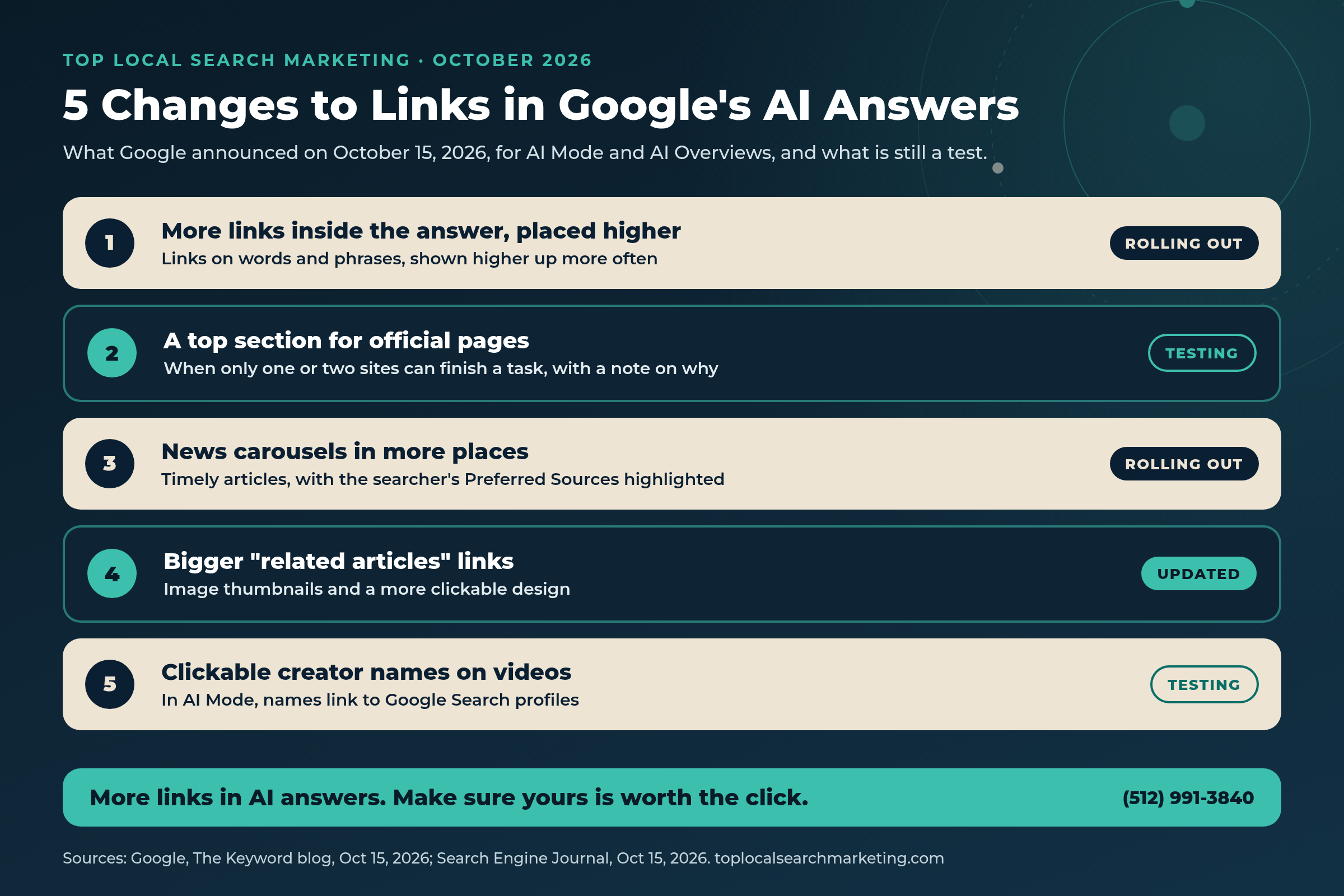
1. More links, placed higher. Inline links are links on words or phrases inside the AI answer. Google says it has added many more of them and is now showing them “higher up in responses more frequently.” Search Engine Journal noted that Google did not say how big the increase is.
2. A top section for official pages (a test). Google wrote that “sometimes, there are only one or two official places on the web to complete a specific task or get the exact info you need.” It is testing a section at the top of the answer for those links, with a note on why each one is useful.
3. News carousels in more places. Carousels of timely articles are rolling out to more locations and languages, and they highlight the searcher’s Preferred Sources.
4. Bigger related articles. Links at the end of some answers now get image thumbnails and “a more clickable design.”
5. Clickable creator names. In AI Mode, Google is testing names on video results that open a creator’s Google Search profile.
Then on October 19, Search Engine Roundtable reported a test of a “Source preferences” button inside the AI Mode citations panel, so people can add or remove preferred sites without leaving the answer.

Our honest view: Google is clearly trying to send more people out to websites. Whether they click is still an open question. Search Engine Land’s Barry Schwartz wrote that he is not sure searchers will click, and that Google still does not break out AI click data in Search Console.
AI Answer Block
What More AI Mode Links Mean for Your Website (Plain English)
AI Overviews: the short AI answer that sometimes shows at the top of regular Google results.
AI Mode: a separate, chat-style Google search for longer questions and comparisons. Google’s guide for site owners says both may run several related searches behind the scenes to build one answer, which lets them show a wider set of links.
Inline links: links on words inside the answer itself, not just in a list at the end. These are the ones Google says it is adding and moving higher.
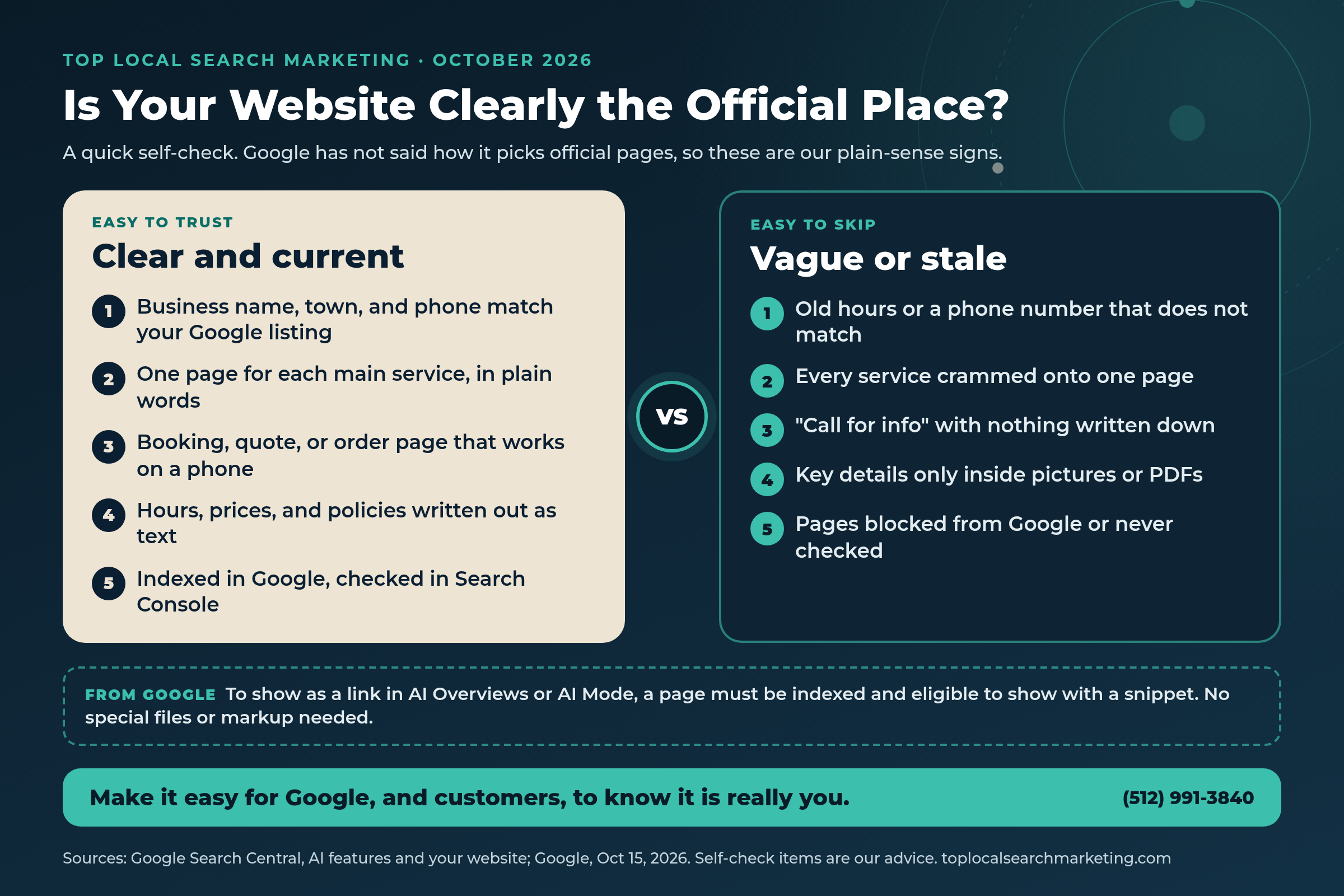
How a page gets picked: Google says there are no extra requirements. A page has to be indexed and eligible to show in Google Search with a snippet. It also says you do not need new machine-readable files, AI text files, or special schema markup.
Preferred Sources: a setting where searchers choose websites they want to see more of. Google’s Preferred Sources guide says that to be eligible in AI features, your site must be included in Search generative AI features in Search Console.
Our reading: the way in is the same as it has always been. A clear, honest website that Google can read and customers can use.
Quick answer
What counts as an official page for a local business?
Google has not said how it will pick them. Its example was a task with only one or two right places to go. For a local business, that is likely your own site for things like booking, ordering, getting a quote, or checking your hours. That part is our reading, not Google’s.
Why Local Owners Should Care
Think about the questions people ask Google about a business like yours. What time does the bakery open on Sunday? Does this plumber do weekend calls? How do I book with that salon? Many of those questions have one right answer, and it lives on your website.
If Google’s test for official pages grows, the business whose website states those answers plainly may be the one linked at the top. If your hours, services, and booking page are vague, out of date, or hidden inside a picture, the answer may point somewhere else, like a directory or a competitor.

Picture an electrician in Buffalo or anywhere in Western New York whose service area and emergency hours are written out on the site. Or a dog groomer in Austin, a landscaper in Nashville, or a coffee shop in Lexington, KY with a menu and hours page that matches its Google listing. Those are the kinds of pages that answer a question in one click.
Google also says AI answers draw on more than websites. Its guide lists “checking that your Merchant Center and Business Profile information is up-to-date” as a best practice. So your website and your Google listing should tell the same story.
And there is a reason to care about the clicks you do get. Google says that when people click from results pages with AI Overviews, those clicks are “higher quality,” meaning people are more likely to spend more time on the site. That is Google’s claim, and your own numbers are the best check.
Our take: you cannot control what Google shows. You can make sure that when it looks for the official place for your business, your website is the obvious answer.
You should not have to guess whether your website is doing its job.
We will look at your site, your Google listing, and your Search Console numbers with you, then hand you a short, plain list of what to fix first, if anything.
Who does AI name in YOUR market?
Get the free $500 Market Report — Map Pack gaps, Ask Maps visibility, and the competitor capturing your calls.
- Who Google Maps and AI (ChatGPT, Gemini, AI Overviews, Ask Maps) recommend in your market
- The competitor getting the calls you should be getting, by name
- Your 4-point conversion check + 90-day roadmap
Prefer to talk? Call (512) 991-3840
Myth vs. Reality
A calm reset on what these changes do and do not mean.
Myth: AI answers never send anyone to websites.
Reality: Google says it has made substantial increases to inline links and is placing them higher. How many people click is still unclear, so track your own numbers.
Myth: I need a special AI file or new code to show up.
Reality: Google’s guide says there are no additional requirements, and no AI text files or special schema markup are needed.
Myth: The official pages section is live everywhere.
Reality: It is a test. Search Engine Journal noted that Google did not say when the official pages section or the profile links might expand.
Myth: Search Console shows exactly which AI answers sent me clicks.
Reality: AI feature traffic is counted inside the Web search type, not split out. All links in one AI Overview share a single position.
Myth: Preferred Sources is only for big news sites.
Reality: Google says any website that publishes fresh content is eligible. It helps most if you post regularly, but it is not required.
Myth: If I meet Google’s rules, I am guaranteed a link.
Reality: Google says indexing and serving are not guaranteed, even when a page meets every requirement.
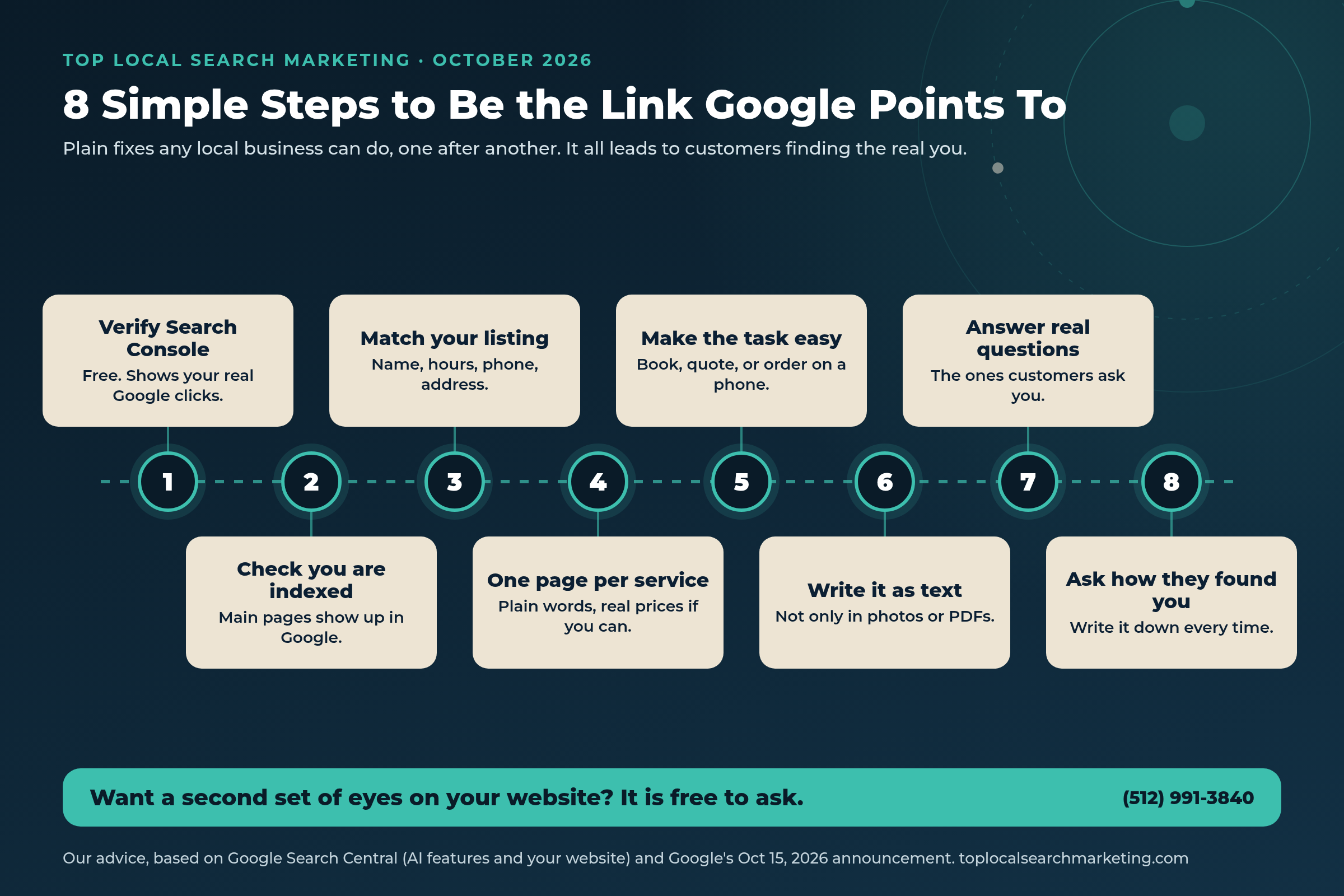
8 Simple Steps to Be the Link in AI Mode and AI Overviews
These are our steps, not a Google product. Most take a few minutes, and none of them cost anything.
-
Verify your site in Search Console
It is free. Google says AI feature clicks are counted in the Performance report under the Web search type, next to your regular search clicks.
-
Make sure your main pages are indexed
Use the URL Inspection tool on your home page, service pages, and contact page. Google says a page must be indexed and eligible for a snippet to be linked in AI answers.
-
Match your website to your Google listing
Business name, address, phone, and hours should be the same on both. Google lists keeping Business Profile info up to date as a best practice.
-
Give each main service its own page
Use plain words a customer would use. Say what you do, where you do it, and roughly what it costs if you can.
-
Make the main task easy on a phone
Booking, ordering, a quote form, or a tap-to-call button. If the task is hard to finish, the official link is less useful.
-
Write key details as text
Google asks site owners to make important content available in text form. Hours, prices, and policies should not live only in photos or PDFs.
-
Answer the questions customers ask you
Add a short FAQ with real questions from your phone and front counter, written the way you would answer in person.
-
Ask every new customer how they found you
Write it down. Pair it with Search Console and your calls each month so you know what is really working.

Where Your Site Can Show Up in Google AI Answers
Keep this handy. Details come from the pages in Sources; the last column is our advice.
| Where | What it is | Status | What a local owner can do |
|---|---|---|---|
| Inline link | A link on words inside the AI answer | Rolling out, shown higher more often | Clear pages that answer one question well |
| Official pages section | The 1 or 2 official links for a task, shown at the top | Testing | Make your site the clear place to book, order, or get info |
| News carousel | Timely articles, with Preferred Sources highlighted | Rolling out to more places | Mostly for sites that publish fresh content |
| Related articles | Links at the end with image thumbnails | Updated design | Good photos and clear page titles |
| Preferred badge | A label on links from sites a searcher picked | Live since May 2026 | Must be included in AI features in Search Console |
One note on measuring: Search Engine Journal points out that Search Console gives all links in one AI Overview the same single position, so moving a link higher inside the answer does not change the position you see in your report.
If this feels like one more thing on your plate, you do not have to sort it out alone.
You run the business. With your Free Market Report, we will walk through your website in plain English and show you the few fixes that matter most.
Get My Free Market Report Free and no pressure · Call (512) 991-3840 · Text us
What NOT to Do
Do not pay for an “AI ranking” add-on or a special AI file. Google says no extra files or special markup are needed to appear in AI features.
Do not block Google from your site by accident. Google lists making sure crawling is allowed in robots.txt, and by your host or CDN, as a basic step.
Do not hide your key details in pictures, menus as PDFs, or pop-ups. Write them out as text on the page.
Do not let your website and your Google listing disagree on hours, phone, or address. Mixed signals make it harder to tell which page is official.
Do not judge your site on a single week. The official pages section is a test, and AI answers change from search to search.
Our advice: keep your website simple, current, and easy to use on a phone. That is what helps with both people and Google.

The real question is simple: when Google sends someone your way, does your website help them say yes?
If you would like help making sure it does, and getting more of those people to call, we are easy to reach.
Get My Free Market Report Free and no pressure · Call (512) 991-3840 · Text us
FAQ
Frequently Asked Questions
Straight answers for owners. Sources are linked above and listed below.
On October 15, 2026, Google said it is showing more inline links, placing them higher in answers more often, testing a top section for official pages, rolling out news carousels to more places, giving related articles a more clickable design, and testing clickable creator names on videos in AI Mode.
It is a test. Google said that when there are only one or two official places on the web to complete a task or get exact info, it will try showing those links in a section at the top of the AI answer, with a note on why each link is useful.
No. Google’s guide for site owners says there are no additional requirements and no special schema markup or AI text files needed. A page must be indexed and eligible to show in Google Search with a snippet.
They are included, but not split out. Google says sites that appear in AI features are counted in the Performance report under the Web search type. Search Engine Journal adds that all links in one AI Overview share that overview’s single position.
Preferred Sources lets searchers pick websites they want to see more of. Google says the feature has grown more than 7x this year. It mainly helps sites that publish fresh content, such as a business that keeps a regular blog. It is not required to show up in AI answers.
No one can promise that. Google says meeting its requirements does not guarantee a page will be crawled, indexed, or shown. Our advice: make your website the clear, current, official place for your business, and track the calls it brings in.
Sources
Every fact in this post comes from the pages below. The official pages section and the Source preferences button are tests, not full launches. Opinion is labeled as ours.
- Google, The Keyword: More ways to connect with the web from Search (Oct 15, 2026)
- Search Engine Journal: Google puts inline links higher in more AI search responses (Oct 15, 2026)
- Search Engine Land: Google updates AI Mode and AI Overview with more links, context, carousels, and information on creators (Oct 15, 2026)
- Search Engine Roundtable: Google AI Mode citations with source preferences (Oct 19, 2026)
- Google Search Central: AI features and your website
- Google Search Central: Guide to Preferred Sources for web publishers
- Google, The Keyword: New ways to find your favorite sources and original content in AI Search (May 27, 2026)
Next step
Let’s Make Your Website the Obvious Answer
This month, Google added more links to its AI answers and started testing a top spot for official pages. Our steps turn that into a calm habit: check Search Console, keep your site and your Google listing in sync, write the important details out plainly, and track the calls that come in.
If you would like a second set of eyes, get your Free Market Report. We will go through your website and leave you with a short, plain list either way.
Get My Free Market Report Free and no pressure · Call (512) 991-3840 · Text us · Top Local Search Marketing
Where this fits: When AI answers link out, you want the link to be you. That’s the work behind our AI search optimization and a website built to turn visits into calls.