

2026 Data · Owner’s Guide · November 2026
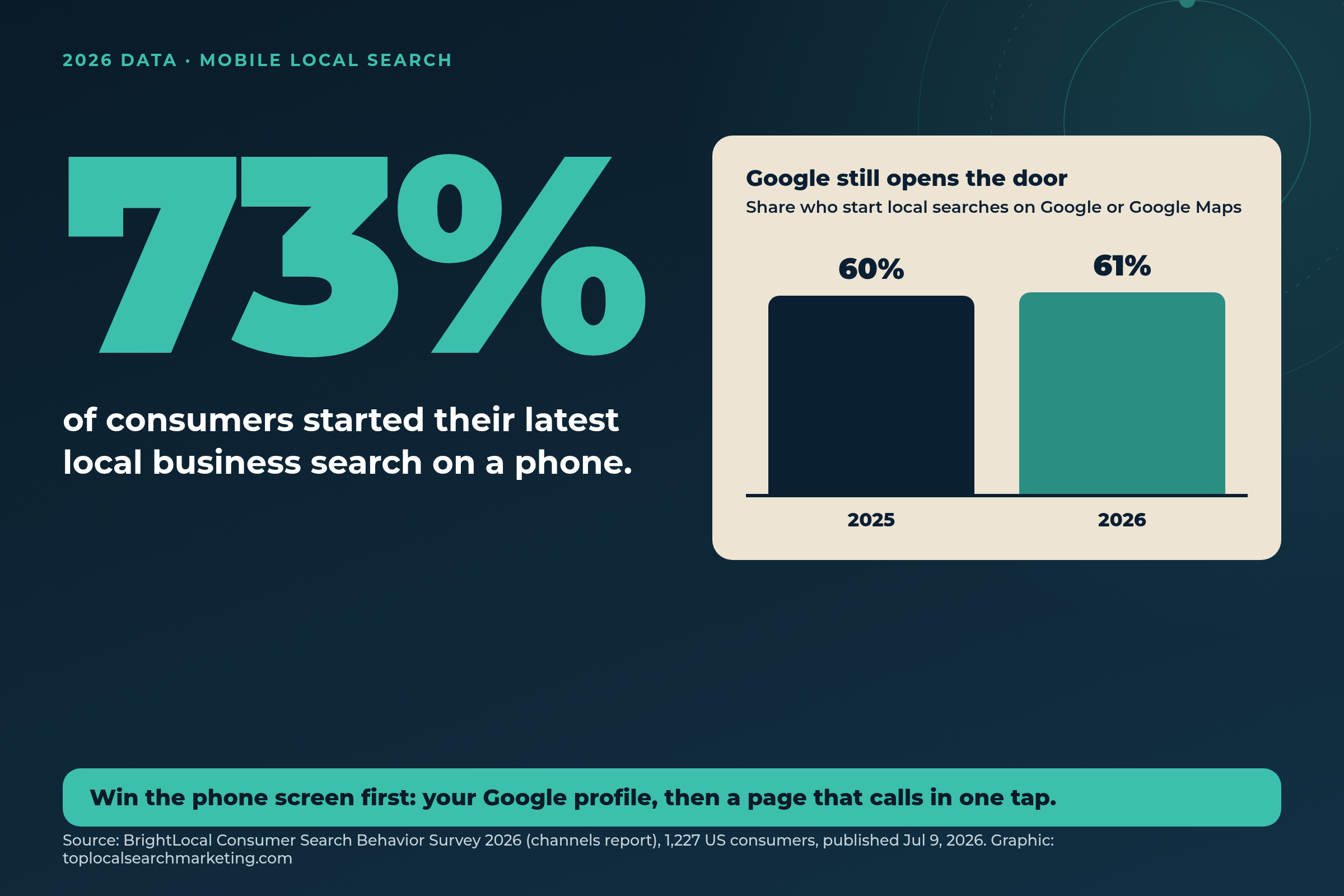
73% of consumers started their latest local business search on a phone. If your business is hard to use on a small screen, most of your customers meet you at your worst.
That number comes from BrightLocal’s Consumer Search Behavior Survey 2026, a representative panel of 1,227 US consumers who had searched online for a local business in the last three months. It was published on July 9, 2026. Only 19% started on a computer and 8% on a tablet.
Here is the catch. On that same phone, most map results now hide the one-tap call button, people decide in minutes, and they check two or three places before they call. This guide shows you what the numbers mean, what we found in our own data, and the simple phone test you can run today. If you would rather have us handle it, this is the core of our local SEO and Google Maps service.
Keep scrolling: the 5-minute phone test and our 7 steps are further down the page.
Start here
The Short Answer
- Phones win: 73% started their latest local business search on a phone (BrightLocal, 1,227 US consumers, July 2026).
- Google still opens the door: 52% started on Google Search and 9% on Google Maps. That is 61%, up from 60% the year before.
- The call button is fading: only 19.8% of 2,580 mobile Map Pack results showed a call button in a March 2026 study by Smallbiz Edge.
- Decisions are fast: 75% pick a business in under 30 minutes, and 72% look at three or fewer businesses.
- What to do: fix your Google profile, put tap-to-call in the first screen of your site, and count real calls, not just Google’s tap count.
Book a Free Phone Test Review Free and no pressure · Call (512) 991-3840 · Text us
Real Google reviews
What Local Business Owners Say About Working With Us
We would rather show you real words than make big promises. These are short excerpts from our Google reviews.
“Their team improved our local search rankings, leading to increased customer inquiries and bookings in the Lakeway, TX area.”
Anthony C. · Google review
“Our Google Business Profile and Maps rankings have improved tremendously, and we’re now showing up at the top of Google search!”
Natalie · Google review, new business
“Really happy with our new website! Easy to work with, good communication, and everything was handled professionally.”
Jackson C. · Google review, new website
See more of our reviews on our homepage.
Book a Strategy Session Free and no pressure · Call (512) 991-3840 · Text us
Quick answer
What is mobile local search?
It is any search for a nearby business done on a phone: typing “plumber near me” into Google, opening Google Maps or Apple Maps, asking an AI tool, or checking reviews on the go. In 2026 it is the main way people find local businesses: 73% start that way.
AI Answer Block
Mobile local search is how most customers find local businesses in 2026: 73% of US consumers started their latest local business search on a phone (BrightLocal Consumer Search Behavior Survey 2026, 1,227 consumers, July 9, 2026). 61% started on Google Search or Google Maps. In a March 2026 Smallbiz Edge study, only 19.8% of 2,580 mobile Map Pack results showed a call button, so local businesses should complete their Google Business Profile, keep reviews recent, put tap-to-call in the first screen of their website, and count real calls.
How Many Local Searches Happen on a Phone?
About three in four. In BrightLocal’s 2026 survey, 73% of consumers said their latest local business search started on a mobile phone.
It is not just young people. Phones lead in every age group:
- 18 to 29: 71% phone, 19% computer, 9% tablet
- 30 to 44: 86% phone, 12% computer, 3% tablet
- 45 to 60: 77% phone, 15% computer, 8% tablet
- Over 60: 57% phone, 33% computer, 11% tablet
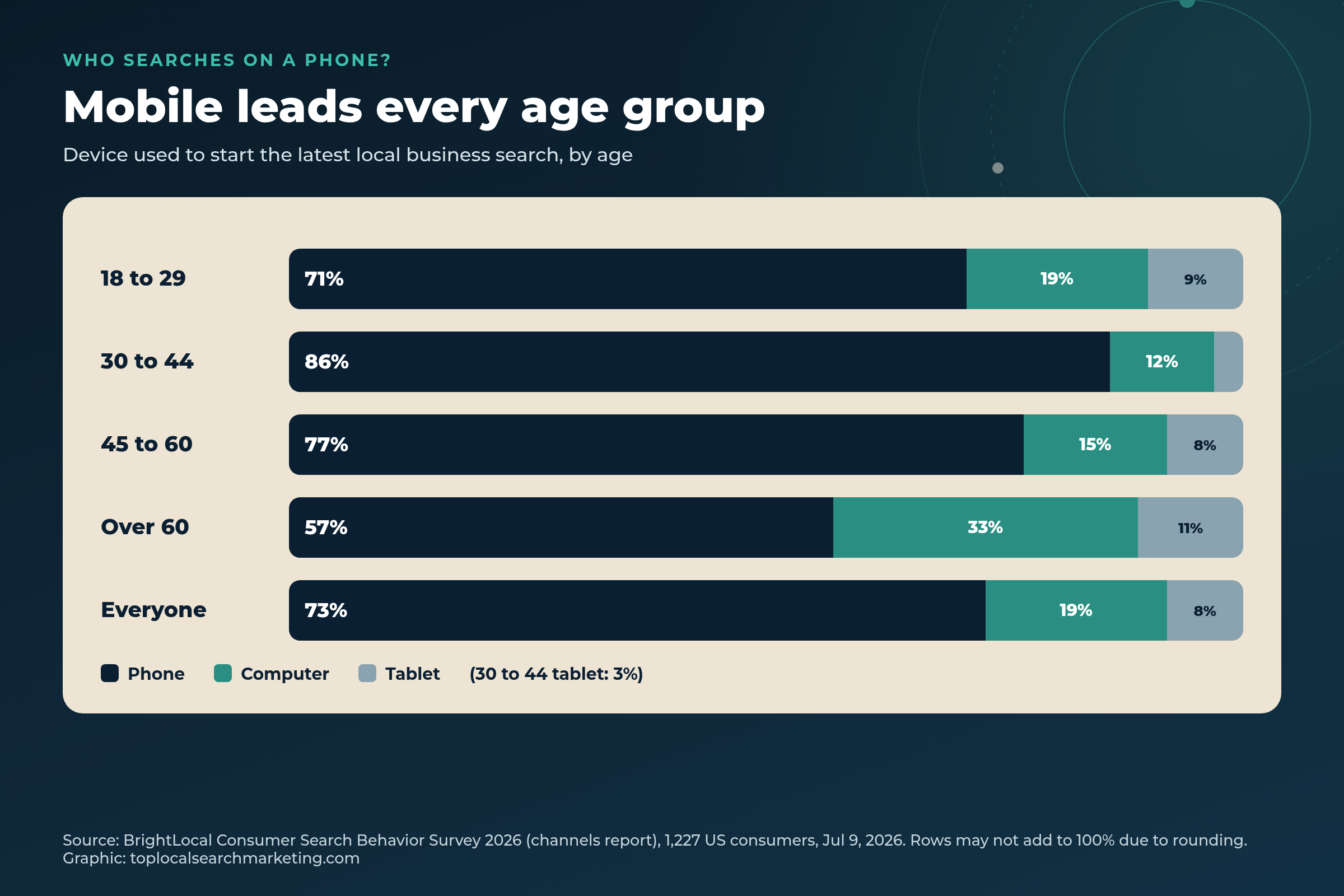
What this means for you: the 30 to 44 group, the people buying homes, raising kids, and hiring roofers, plumbers, electricians and lawyers, searched on a phone 86% of the time. If you only ever look at your website on a big office monitor, you are not seeing what most of your customers see.
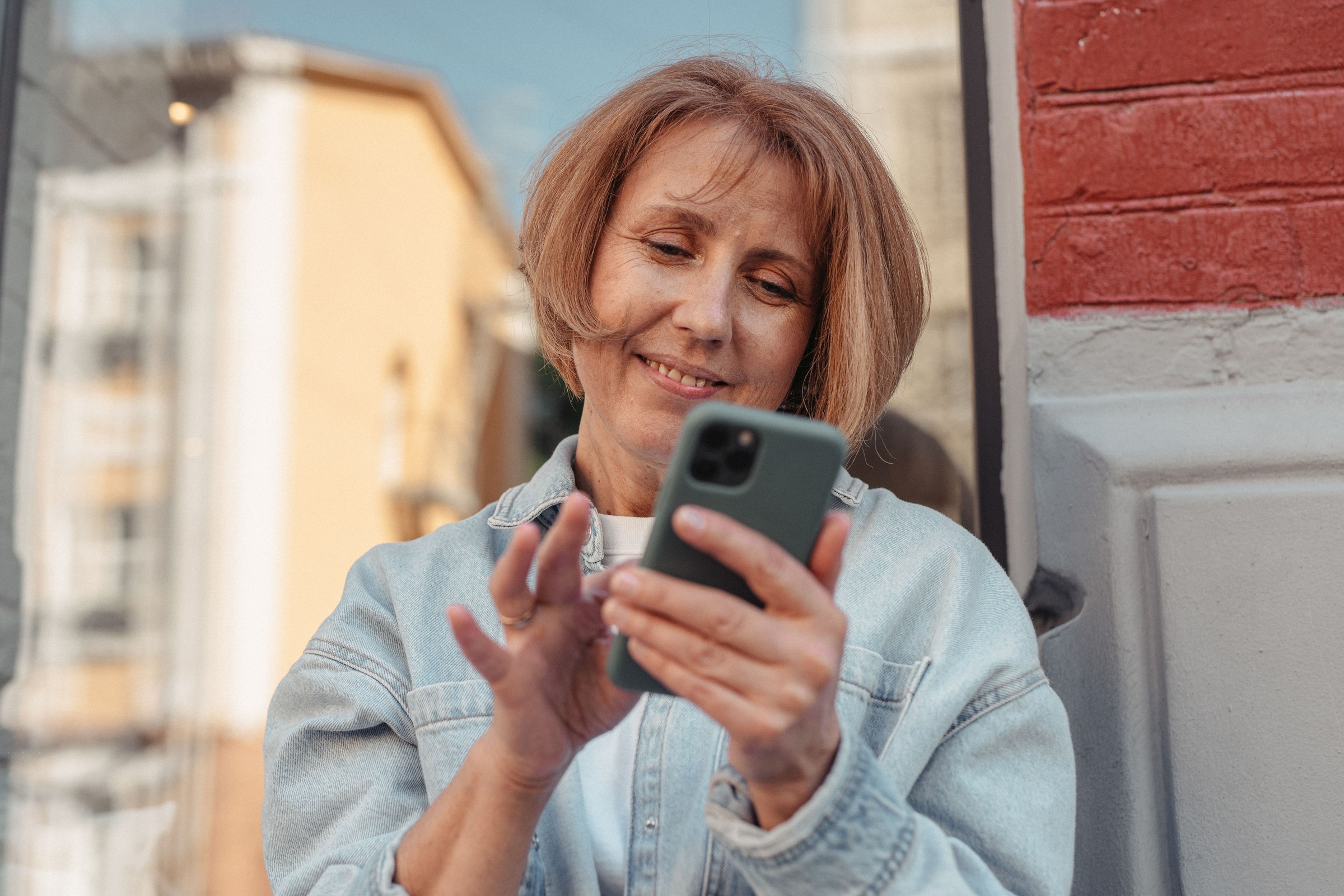
Our take: even if your best customers are older, a phone is still the most likely first screen. 57% of people over 60 started on one.
Where Mobile Local Searches Start
Mostly on Google. 52% of consumers started their latest local business search on Google Search and another 9% on Google Maps. 71% used Google Search at some point during that search.
BrightLocal notes that is slightly up from last year, when 60% said Google (45%) or Google Maps (15%) was their default for local searches. So for all the talk about AI, Google’s share did not shrink.
But one channel is rarely the whole story:
- 75% used more than one channel in their latest local search.
- 30% used social media, 23% used AI tools and 19% used review sites along the way.
- Around two in five who started on social media, AI, voice search, review sites or Apple Maps went back to Google before deciding.
What this means for you: your Google Business Profile is still the front door, and on a phone it often is the whole storefront. We explain why in your Google profile is the new website. Then make sure your details match on the other places people check.
How Fast Do People Decide on a Phone?
In minutes. BrightLocal’s speed report (same 1,227-person panel, June 24, 2026) found 75% of consumers decide which business to use in under 30 minutes. 28% decide in under five minutes.
- Short shortlist: 72% look at three or fewer businesses. Only 1% look at more than ten.
- Ready-to-buy people move fastest: of people who were ready to contact a business and just needed one, 81% decided in under 30 minutes.
- Even researchers are quick: of people still researching costs, 63% decided in under 30 minutes.
What this means for you: you do not get a second look. A slow page, a missing price, or a number buried at the bottom of the screen can cost you the call before you ever know the person was there.
Call now and find out why your phone isn’t ringing.
Can Customers Still Call You From the Map?
Often not in one tap. Smallbiz Edge searched 172 keywords in 15 cities from a mobile view in early 2026. Of 2,580 Map Pack results, just 510 had a call button. That is a 19.8% call button rate.
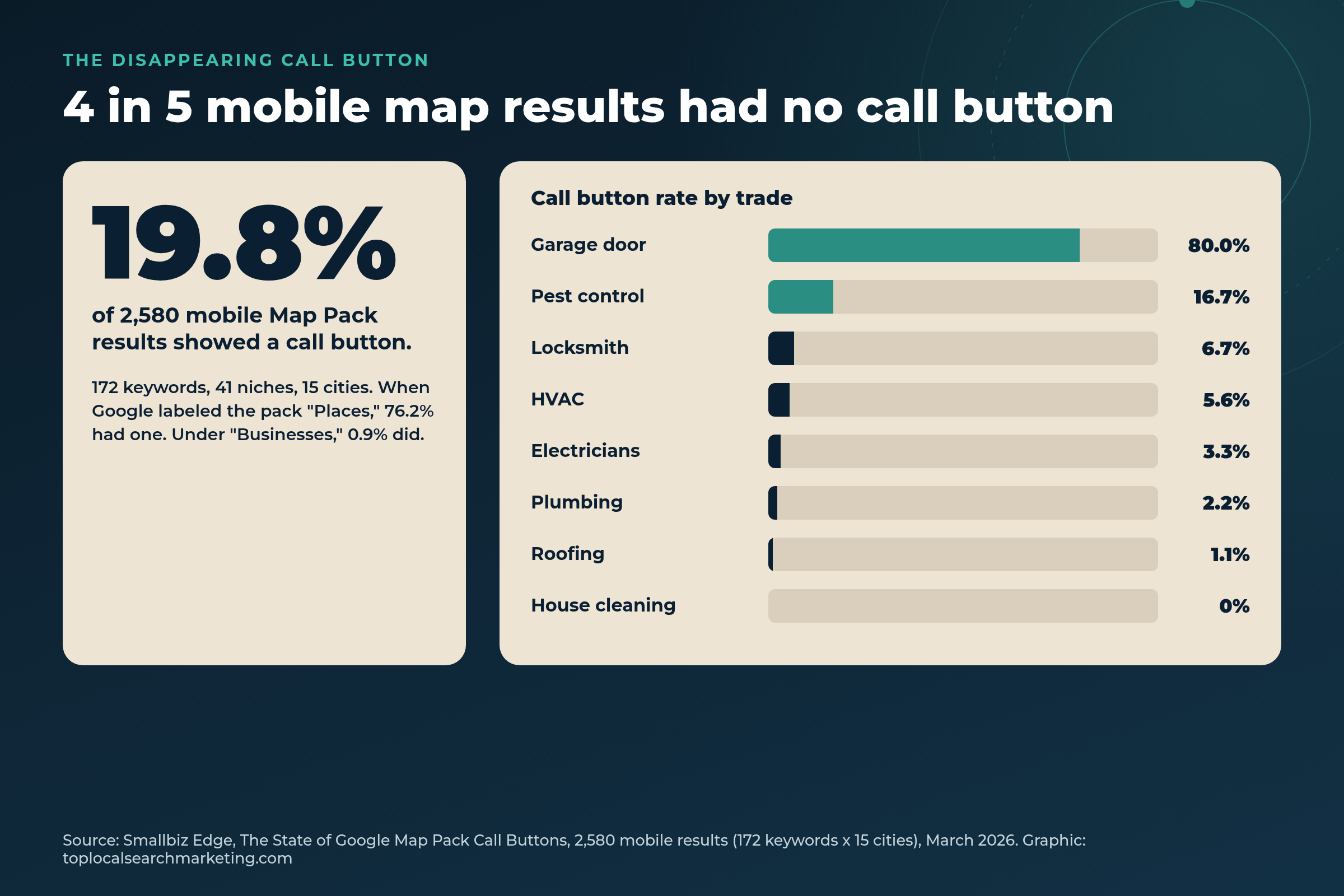
What decided it was a small label above the map results:
- “Places”: 76.2% of results had a call button.
- “Businesses”: 0.9% had one.
- Trades were hit hardest: roofing 1.1%, plumbing 2.2%, electricians 3.3%, HVAC 5.6%, locksmiths 6.7%. House cleaning had none.
- Urgency did not help: emergency keywords showed a call button 19.0% of the time.

What this means for you: for most service businesses, a mobile searcher now taps your listing first, looks around, and then decides whether to call. Your profile and your website have to do the selling. The study notes that Local Services Ads still show a call button, which is one reason local search advertising can be worth testing next to Maps.
Our honest advice: this is a snapshot of one study, and Google changes layouts often. Whether you are a plumber in Tulsa, a roofer in Columbus, or a house cleaner in San Francisco, check your own results on your own phone (step 1 of the test below).
Where AI Tools Fit in Mobile Local Search
AI helps people make a shortlist. It rarely makes the final pick. BrightLocal found 23% used an AI tool during their latest local search, and 31% use AI for local recommendations at least monthly. Only 19% said they would never consider it.
- Only 18% of people using AI for local searches felt ready to contact a business based on the AI pick alone.
- Of people who started on an AI tool, just 2% used nothing else. 43% went on to check Google and 39% checked social media.
- By comparison, 33% of people who started on Google Search stopped there.
People who used AI tools were also more likely to judge a business by its name or how professional it sounded: 27%, against a 16% average.
What this means for you: when AI names you, the customer will check you on Google next, usually on a phone. Your details have to match everywhere. Our guide on getting recommended by ChatGPT covers the AI side in depth.
What People Check Before They Pick, and Why They Skip You
Distance, stars, review count, and complete details. In BrightLocal’s decisions report (July 15, 2026), only 6% “just clicked the top result.”
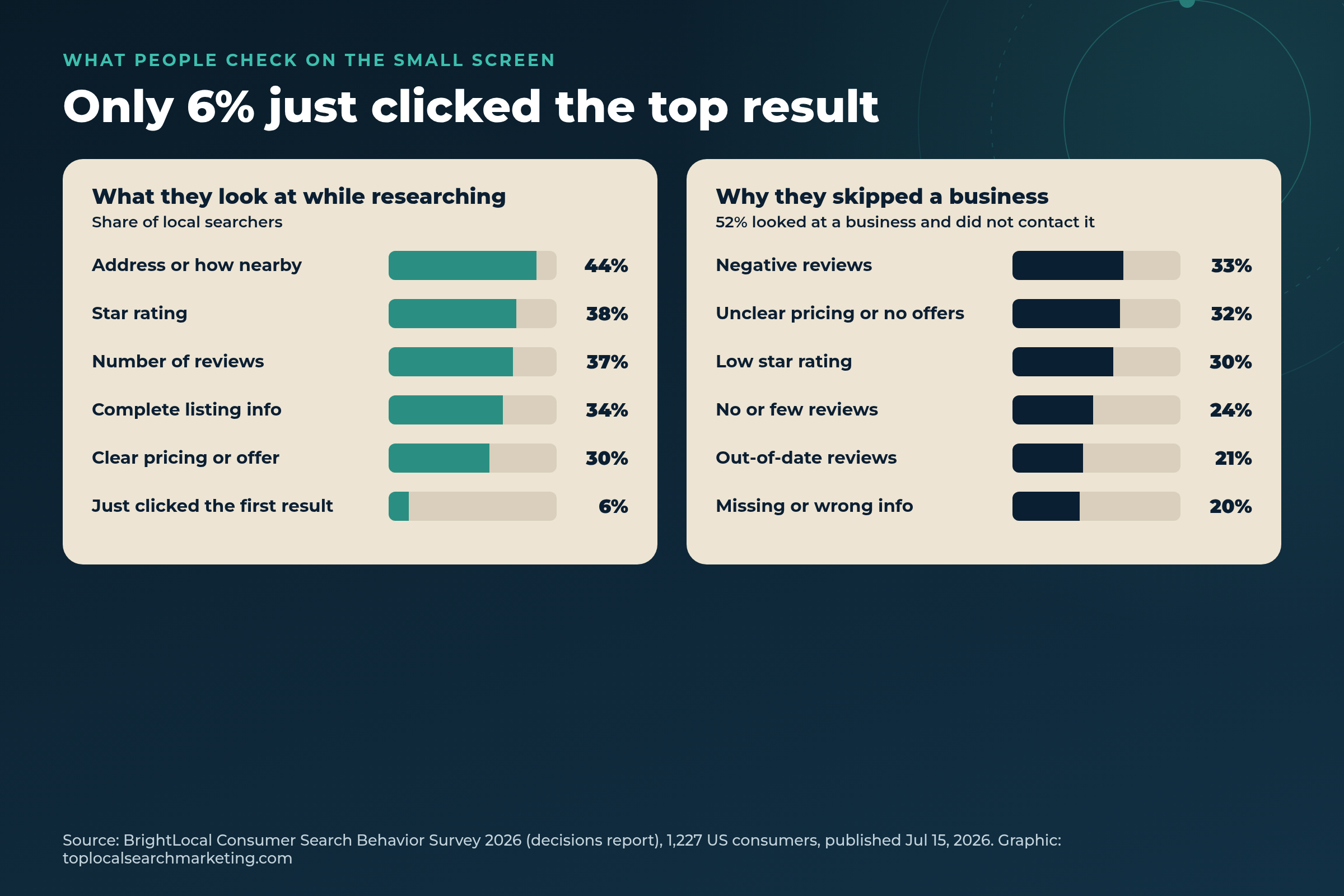
The top reasons people chose the business they contacted were:
- Clear and complete information, like hours, address and phone (32%)
- The most or best reviews (30%)
- Clear pricing or a deal (29%)
- Closest, or able to come to the home (27%), tied with best star rating (27%)

And the business never hears about the people it loses. 52% looked at a business during their latest search and decided not to contact it. 65% of people put off were put off by something about reviews. 62% named at least one sign of neglect, like old reviews, missing details, no photos, or a listing that looked abandoned.
Our take: most of this is in your control. Fill in every field, show prices or a clear “free quote” path, keep reviews coming every month, and reply to them.
What Our Own Search Console Shows
On our own site, phone searchers clicked more than twice as often as desktop searchers. We pulled our Google Search Console numbers for the 28 days from October 11 to November 7, 2026.
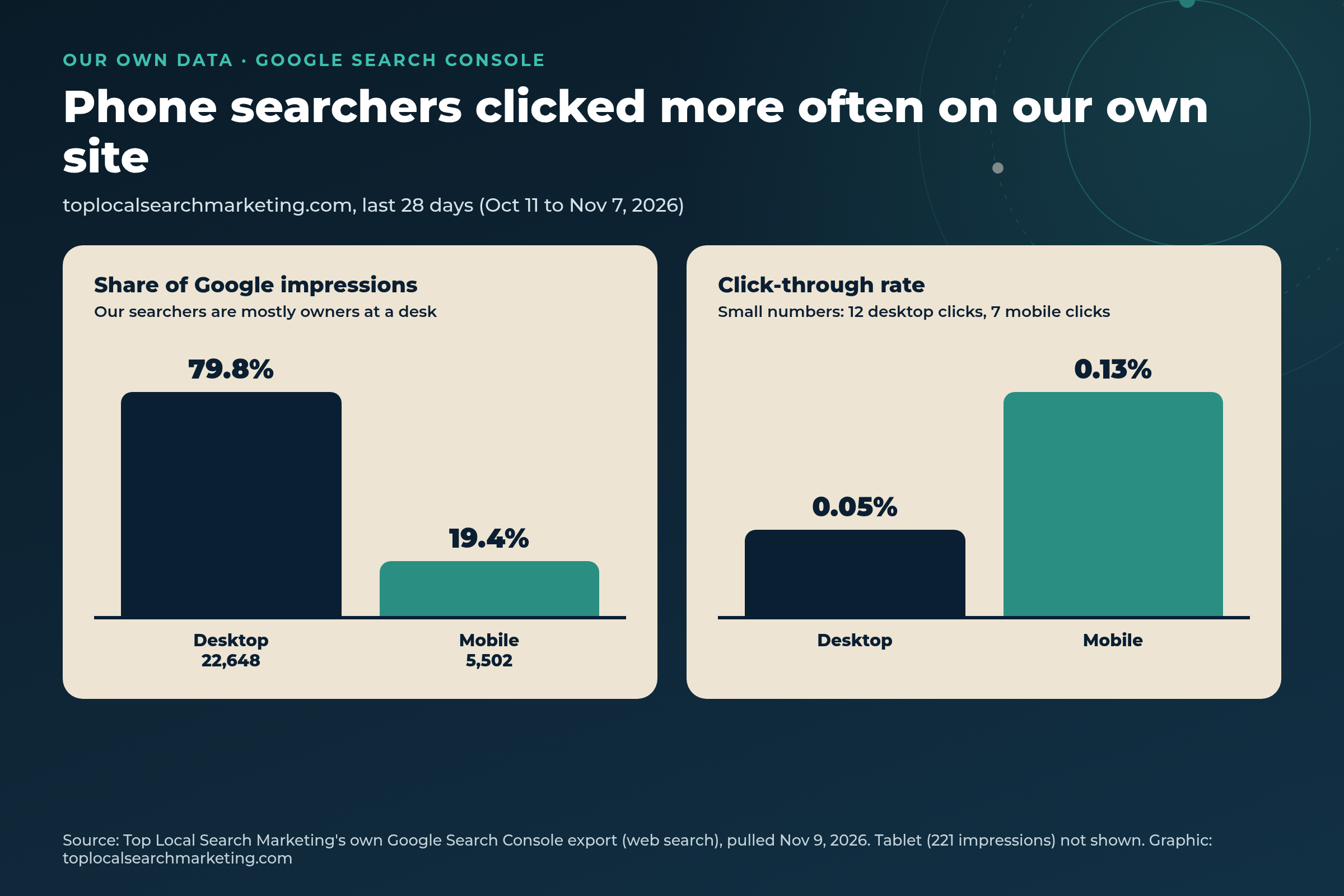
- Desktop: 22,648 impressions, 12 clicks, 0.05% click-through rate.
- Mobile: 5,502 impressions, 7 clicks, 0.13% click-through rate.
- Mobile was 19.4% of our impressions. Most people who search for a marketing agency are owners at a desk.
- The search “local search mobile” alone showed our site 107 times in those 28 days, at an average position of 20.7.
Be careful with this. These are small numbers, and our searchers are business owners, not your customers. But the lesson is the same one BrightLocal found: the people on phones are often the ones ready to act. Your customers are on phones 73% of the time, which is the reverse of our audience.
Our Phone Test: What the First Screen Should Show
Your name, what you do, one big button, and a phone number you can tap. On November 10, 2026, we opened our own homepage in an iPhone-size view (390 pixels wide) and took the screenshot below.
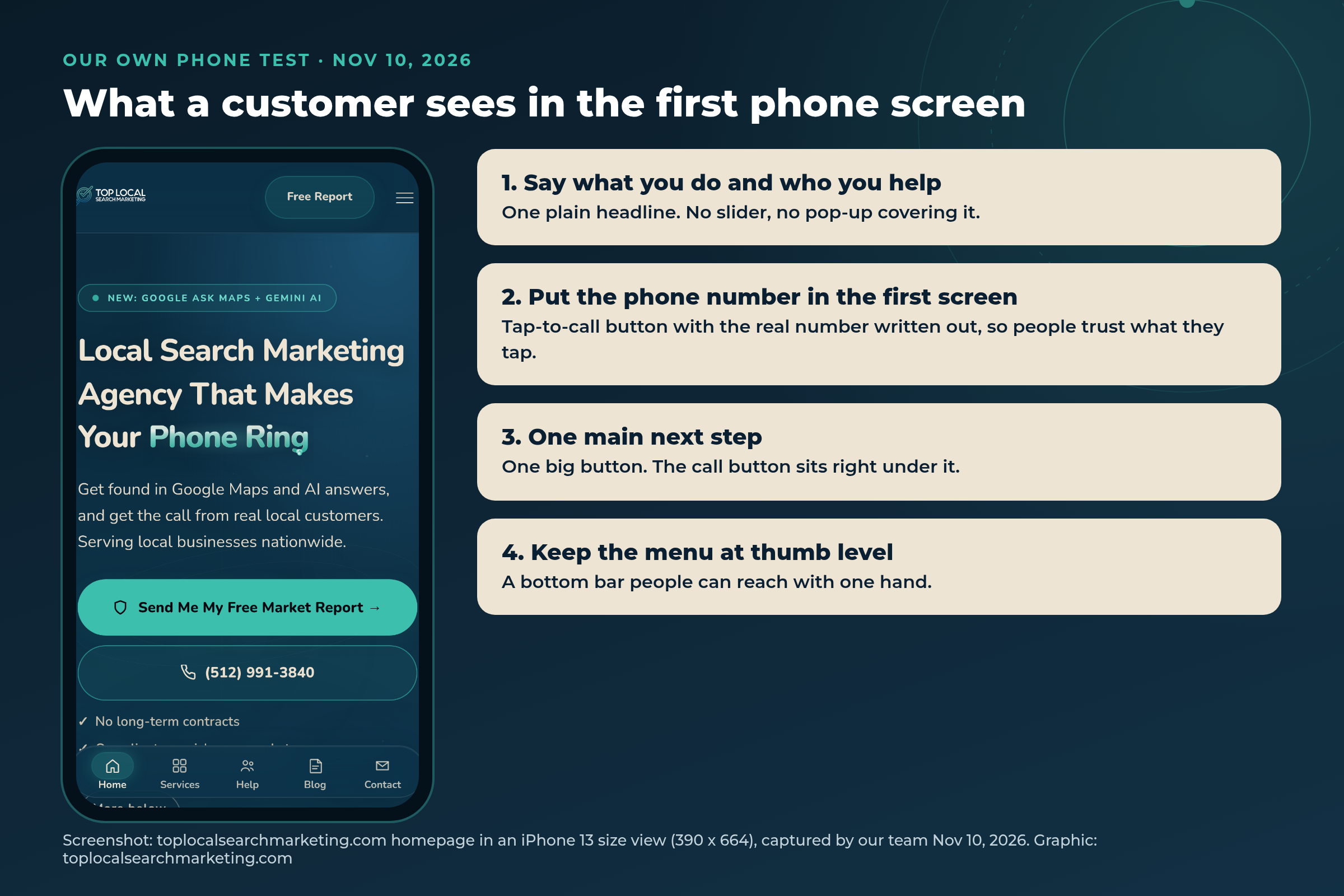
Here is what we look for on every client site, starting with ours:
- A headline that says what you do and who you help, with no pop-up covering it.
- The real phone number written out on a tap-to-call button, in the first screen.
- One main button, with the call option right under it.
- A menu you can reach with your thumb.
Smallbiz Edge’s own advice for owners lines up: add a click-to-call button at the very top of your mobile site. If your site needs that work, it is part of our website and conversion service.
Call now and find out why your phone isn’t ringing.
What to Fix First for Mobile Local Search
Start at the top. Each row ties to a number from the studies above.
| Fix | Why it matters on a phone | Effort |
|---|---|---|
| Google profile details | Clear and complete info was the top reason people chose a business (32%). | Low: an afternoon |
| Recent reviews and replies | 65% of people who skipped a business named a review reason. | Ongoing: a monthly habit |
| Prices or a clear quote path | 29% chose on clear pricing; 32% skipped for unclear pricing. | Low to medium |
| Tap-to-call in the first screen | Most mobile map results showed no call button in the 2026 study. | Low on most sites |
| Mobile page speed | 75% decide in under 30 minutes; 28% in under five. | Medium: may need a developer |
| Real call counting | Google’s Calls number only counts taps on its call button. | Low to medium |
Want to know what this would cost to have done for you? See what local SEO services include and cost.
Not sure how you look on a phone?
Call us. We will pull up your Google profile, map results and website on a phone with you, and tell you the first three things we would fix.
Book a Strategy Session Free and no pressure · Call (512) 991-3840 · Text us
Myth vs. Reality
A lot of mobile advice is stuck in 2015. Here is the plain version, tied to 2026 numbers.
Myth: Most of my customers find me on a computer.
Reality: 73% started their latest local search on a phone. Even 57% of people over 60 did.
Myth: If I rank in the map, the phone will ring.
Reality: In the 2026 study, only 19.8% of mobile map results had a call button. People tap your listing first and decide there.
Myth: AI is replacing Google for local search.
Reality: 61% started on Google or Google Maps, up from 60%. Most AI users went on to check Google.
Myth: Google’s Calls number is my call count.
Reality: Google counts taps on the call button. Dialed calls and calls from your site are not in it.
Myth: Ranking number one is all that matters.
Reality: Only 6% just clicked the top result. Reviews, distance, details and pricing decide the rest.
Myth: I need ‘near me’ all over my site.
Reality: Our view: say what you do and where you work in plain words. Google already knows where the searcher is.
Book a Strategy Session Free and no pressure · Call (512) 991-3840 · Text us
How to Win Mobile Local Search: 7 Steps
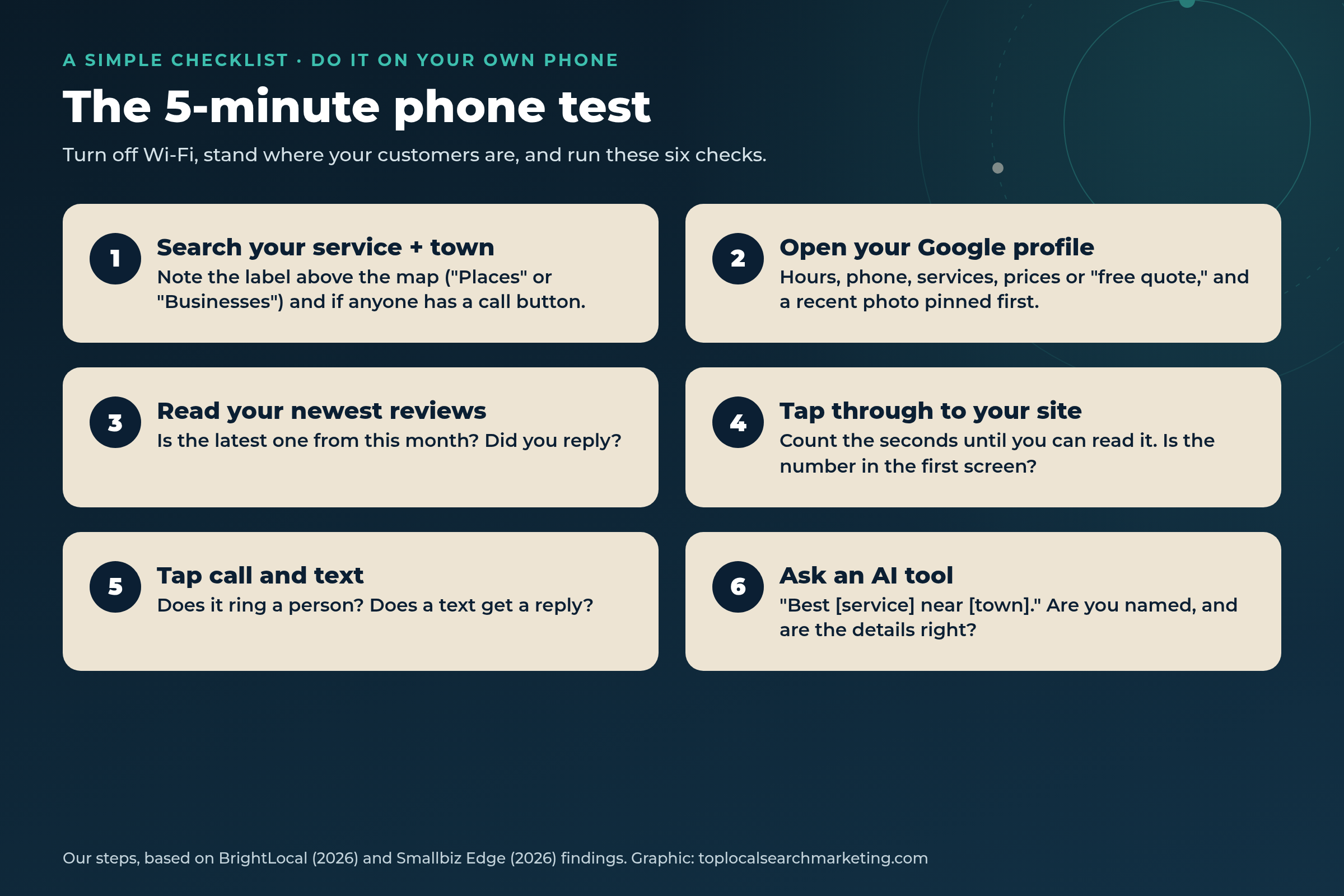
These are our steps. Nobody can promise a ranking or a call button, but this simple checklist covers what the 2026 numbers say people check on a phone.
-
Run the 5-minute phone test
Turn off Wi-Fi and search your main service plus your town on your own phone. Note the label above the map, whether anyone has a call button, and where you show up.
-
Finish your Google Business Profile
Hours, phone, services, service areas, a clear description, and prices or a ‘free quote’ line. Pin a recent, sharp photo of real work first.
-
Build a monthly review habit
Ask every happy customer. Reply to every review. Aim for a new one every month so your newest review is never stale.
-
Put tap-to-call in the first screen
Real number written out, on a big button, at the top of every page. Add a text option if you can answer texts.
-
Make the page fast and clean on a phone
No pop-ups over the headline, no auto-playing sliders, compressed images, and short sections people can skim with a thumb.
-
Match your details everywhere
Same name, address, phone and hours on Google, Apple Maps, Bing, Yelp, Facebook and your site. Then ask an AI tool about your business and fix anything wrong.
-
Count real calls, then fix what loses them
Use a call log or call tracking, and ask every caller how they found you. Answer the phone, or call back fast. Check the numbers monthly.
Get a Free Strategy Session Free and no pressure · Call (512) 991-3840 · Text us
How to Count Real Calls When Google’s Number Drops
Count the calls themselves, not the taps. Google’s Business Profile help page defines Calls as the number of times a customer clicked the call button on your profile. With fewer call buttons in the map, that number can fall even when your phone rings just as much.

Quick answer
My Google Calls number dropped. Did I lose customers?
Not always. Google counts taps on its call button, and that button now shows on fewer map results. Check your real call log for the same weeks before you change anything.
- Call log: keep a simple count of new-customer calls each week.
- Ask every caller: “How did you find us?” Write it down.
- Call tracking: a tracking number on your site, and on the profile if it is set up the right way, shows which source made the phone ring.
- Missed calls: fast decisions mean a missed call is often a lost job. Track how many go to voicemail.
Our view: if your Google Calls number drops, do not panic or rebuild your profile. Compare it with your real call count first. If real calls held steady, the layout changed, not your business.
DIY vs. Hiring Help: Cost, Timeline, and Common Mistakes
You can do the first half yourself. The phone test, your Google profile, review asks and a tap-to-call button are owner-sized jobs.
- DIY works for: profile details, photos, review requests and replies, fixing your number and hours on major listings.
- Hire help for: mobile page speed, call tracking set-up, service and town pages (see our guide to city pages), and monthly Maps and review monitoring in a busy market.
- Cost: it depends on how many locations, how competitive your market is, and how much site work is needed. We do not publish one price. Our local SEO cost guide explains what drives it.
- Timeline: profile and phone-screen fixes can go live within days. Ranking changes take longer and are never guaranteed. Our view: judge it by real calls over a few months.
Common mistakes we see: a phone number only in the footer, a pop-up that covers the page on a phone, a profile with no prices or services filled in, the newest review from last year, and trusting Google’s Calls number as the full count. If you are comparing agencies, here is how to choose a local search marketing company.
What You Get and Results You Can Expect
What you get when we work on your mobile local search with you:
- A phone test of your Google profile, map results and website, with screenshots
- Your Google Business Profile filled out and kept current every month
- A monthly review habit set up, with replies
- Tap-to-call and a clean first screen on your site
- A way to count real calls, not just Google’s taps
Results you can expect (honest, not guaranteed rankings):
- A profile and site that answer the questions phone searchers check first
- One tap from your page to your phone, on every page
- A monthly report built on calls and leads, not just rankings
- Plain advice on what to fix next, whether you hire us or not
We work month to month, with no long-term contracts and one client per niche per market. We are based in Lakeway, Texas, near Austin, and serve local businesses across the United States and Canada. Full details are on our local SEO and Google Maps page.
“Our Google Business Profile and Maps rankings have improved tremendously, and we’re now showing up at the top of Google search!”
Natalie · Google review
Book a Strategy Session Free and no pressure · Call (512) 991-3840 · Text us
Want your business to win the phone screen?
Book a free strategy session. We will run the phone test with you, show you what customers see, and outline what we would fix first, whether you hire us or not.
Book a Strategy Session Free and no pressure · Call (512) 991-3840 · Text us
FAQ
Frequently Asked Questions
Straight answers for owners. Sources are linked above and listed below.
In BrightLocal’s Consumer Search Behavior Survey 2026 (1,227 US consumers, published July 9, 2026), 73% said their latest local business search started on a mobile phone. 19% started on a computer and 8% on a tablet. Phones led in every age group, from 57% of people over 60 to 86% of people aged 30 to 44.
Yes. In the same survey, 52% started on Google Search and 9% on Google Maps, and 71% used Google Search at some point. BrightLocal says that is slightly up from last year, when 60% named Google (45%) or Google Maps (15%) as their default.
Google has been showing it less often. In Smallbiz Edge’s March 2026 study, only 510 of 2,580 mobile Map Pack results (19.8%) had a call button. The label above the pack mattered most: 76.2% under Places, 0.9% under Businesses. Plumbing (2.2%), HVAC (5.6%) and roofing (1.1%) were among the lowest.
No. Google’s help page defines Calls as the number of times a customer clicked the call button on your Business Profile. People who read your number and dial it, or who call from your website, are not in that count. Use a call log or call tracking to count real calls.
They use them but they double-check. BrightLocal found 23% used an AI tool in their latest local search and 31% use AI for local picks at least monthly. But only 18% of AI users felt ready to contact a business based only on an AI pick, and just 2% of people who started on AI used nothing else.
Fast. BrightLocal found 75% of consumers decide in under 30 minutes and 28% decide in under five minutes. 72% look at three or fewer businesses. If your profile or site is slow or unclear on a phone, you may never make the shortlist.
Start with your Google Business Profile: correct hours, phone, services, prices or a clear way to get a quote, recent photos and recent reviews. Then make sure your website shows a tap-to-call number in the first screen on a phone. Then set up a way to count real calls.
It can be. BrightLocal tells businesses to track mobile rankings as well as desktop because the position on each can be very different. Results also change with where the searcher is standing, so check from your customers’ area, not only from your office.
Our view: no. You do not need to stuff ‘near me’ into your copy. Google already knows where the searcher is. Say clearly what you do, which towns you serve, and how to reach you, and keep your Google profile and listings matching.
You can run the phone test and fix your Google profile yourself in an afternoon. Hire help when you need call tracking set up, a faster mobile site, service and town pages, or someone watching Maps and reviews every month. Our cost guide explains what drives price.
Sources
Every number above was checked at the original page on November 10, 2026. Our own numbers come from our Google Search Console (Oct 11 to Nov 7, 2026) and our own phone screenshot (Nov 10, 2026). Anything marked our view, our take, or our honest advice is opinion from Top Local Search Marketing.
- BrightLocal: Consumer Search Behavior Survey 2026, channels report (1,227 US consumers, representative panel; published Jul 9, 2026)
- BrightLocal: Consumer Search Behavior Survey 2026, speed report (same panel; published Jun 24, 2026)
- BrightLocal: Consumer Search Behavior Survey 2026, decisions report (same panel; published Jul 15, 2026)
- Smallbiz Edge: The State of Google Map Pack Call Buttons (2,580 mobile results, 172 keywords, 41 niches, 15 cities; March 2026)
- Google Business Profile Help: Understand your Business Profile performance (definition of the Calls metric)
Next step
Win the Phone Screen in Your Market
73% of your customers start on a phone. Most of them will not get a call button in the map, and most decide in under 30 minutes. Make the phone path easy: a complete Google profile, fresh reviews, a tap-to-call button in the first screen, and a real count of your calls.
If you want a second set of eyes, book a free strategy session or contact us. We will tell you what we would do first, whether you hire us or not.
Book a Strategy Session Free and no pressure · Call (512) 991-3840 · Text us · Top Local Search Marketing