

2026 Data · Owner’s Guide · November 2026
City pages work best inside a full local search marketing plan, next to local SEO for Google Maps.
74% of consumers only care about reviews written in the last three months. City-name swap pages fail that test.
That number comes from BrightLocal’s Local Consumer Review Survey 2026, a panel of 1,002 US adults. Buyers want recent proof you still do good work in their town. Google, meanwhile, calls out doorway abuse: pages aimed at cities that are substantially similar and funnel people to one destination. If you want help building city pages the right way, that is part of our local SEO and Google Maps service.
This guide shows how service-area businesses (roofers, plumbers, cleaners, HVAC, landscapers, and the like) can create city pages that feel useful to people, stay clear of Google’s spam examples, and line up with the up-to-20 service areas on a Google Business Profile.
Start here
The Short Answer
- Lead with buyers: 74% only care about reviews from the last three months, and 47% will not use a business with fewer than 20 reviews (BrightLocal, 1,002 adults).
- Doorway risk: Google’s spam policy flags similar city-targeted pages that funnel users to one page. Unique pages with real local proof are different.
- GBP vs website: one Google Business Profile for the metro, up to 20 service areas, hide address if you have no storefront. Website city pages go deeper on proof.
- How many: publish pages for cities you already serve and can prove. A few strong pages beat a factory of clones.
Book a Strategy Session Free and no pressure · Call (512) 991-3840 · Text us
Quick answer
Should a service-area business create city pages?
Yes, when you already work in that city and can show recent proof. No, when the page would only swap the city name. Google’s doorway examples and BrightLocal’s freshness data both point the same way: useful local pages beat thin clones.
AI Answer Block
Create city pages for a service-area business only when each city has real proof you work there, unique local copy, and a clear next step. Google flags thin city-name swaps as doorway abuse. Keep Google Business Profile service areas at or under 20 places you actually drive to, and make sure fresh reviews (BrightLocal: 74% of buyers only care about the last three months) show up for those same cities.
Why Fresh Reviews Force Real City Pages
City pages are not a keyword trick. They are how you answer a buyer who typed “roofer near Lakeway” or “plumber in Columbus” and then checked whether anyone like you still works there.
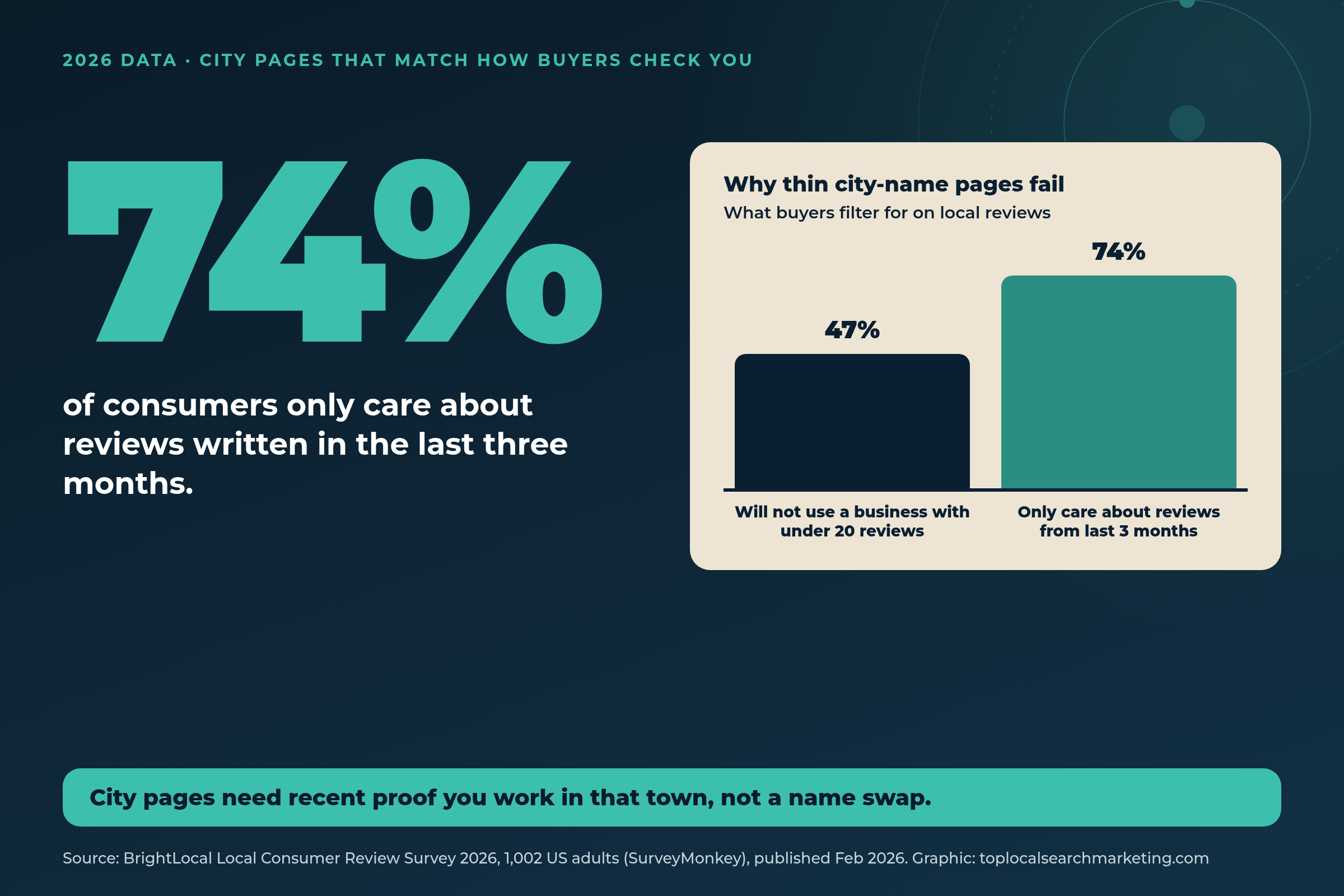
BrightLocal’s Local Consumer Review Survey 2026 (1,002 US adults via SurveyMonkey, published February 2026 (February 11, 2026)) found:
- 74% only care about reviews written in the last three months.
- 47% will not use a business with fewer than 20 reviews.
- 97% read reviews for local businesses.
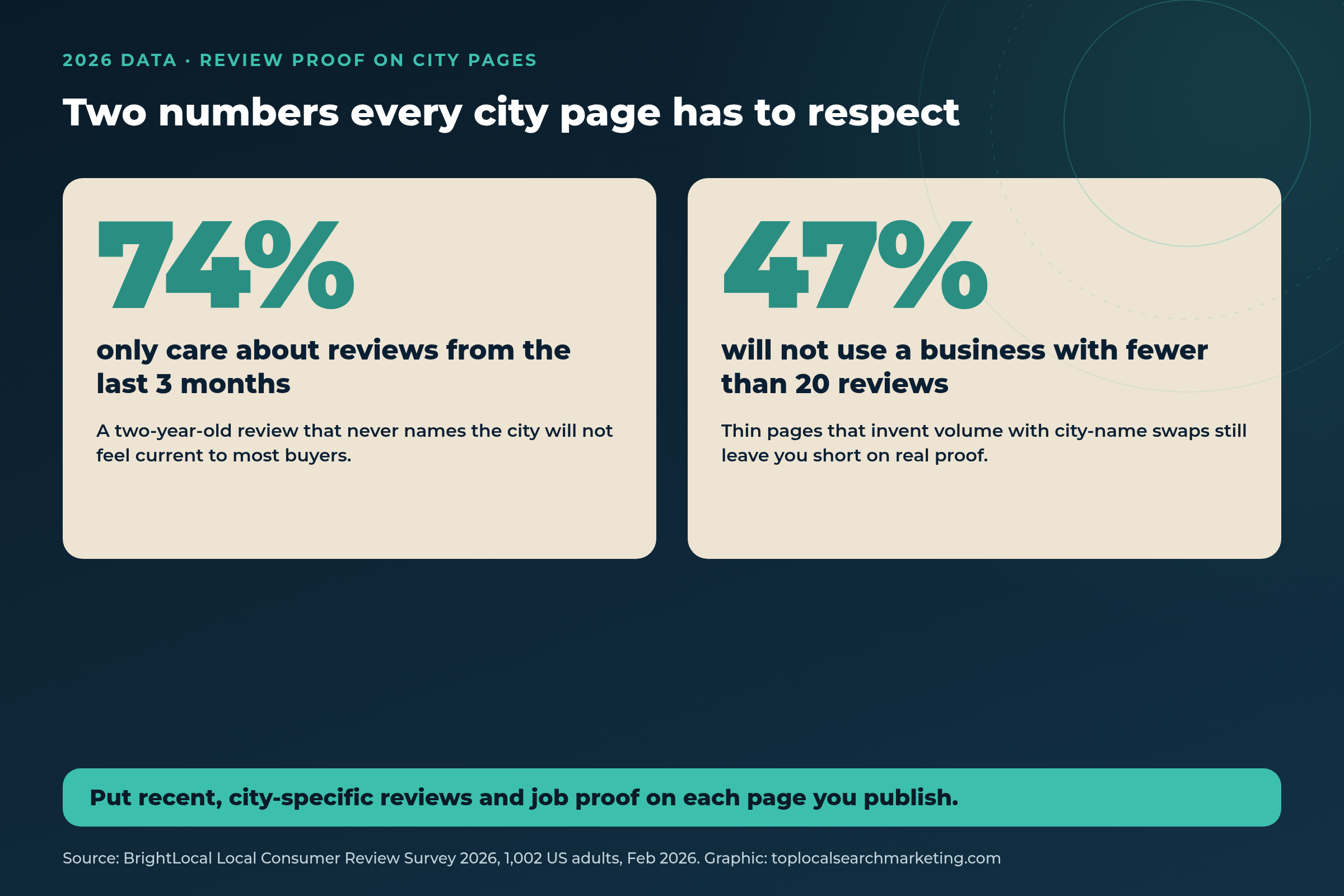
What this means for an owner: a city page that never shows a recent job photo, a review that names the town, or a neighborhood you actually serve feels stale the moment someone lands on it. Swapping “Tulsa” for “Columbus” in the same paragraph does not fix that. Our take: treat each city page like a mini landing page for people who already live there, not like a mass-produced SEO sheet.
If reviews and Maps visibility are already on your mind, our local SEO and Google Maps page covers how we keep those moving month to month.
What Google Calls Doorway Abuse
Google’s Spam Policies for Google Web Search define doorway abuse as sites or pages created to rank for specific, similar queries that lead users to intermediate pages that are not as useful as the final destination. Examples include:
- Multiple domain names or pages targeted at specific regions or cities that funnel users to one page
- Creating substantially similar pages that are closer to search results than a clearly defined, browseable hierarchy
- Generating pages mainly to push visitors into the usable part of a site
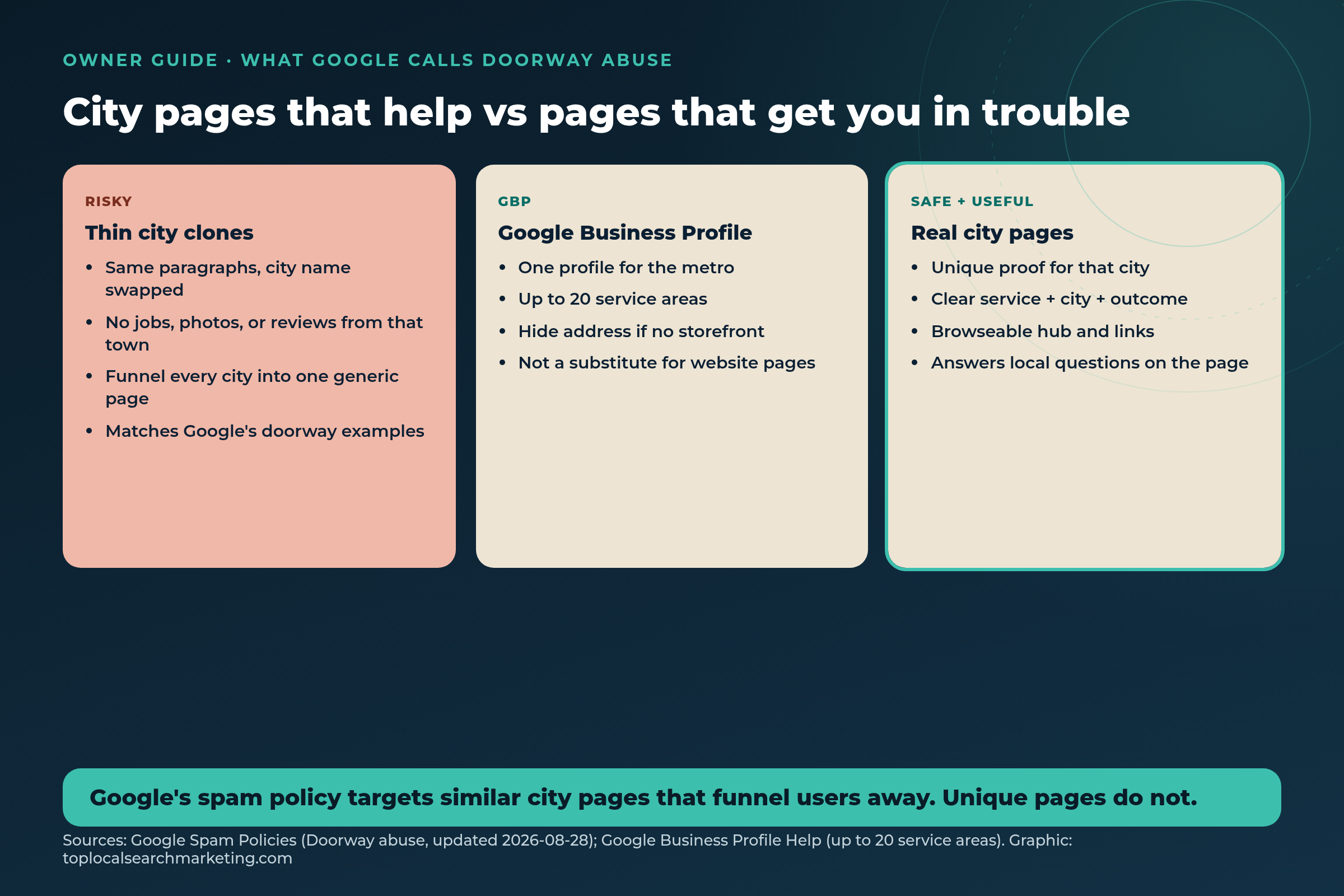
Google last updated that spam document on August 28, 2026 (UTC). Our view: the risk is not “having a page for Round Rock.” The risk is publishing twenty nearly identical pages whose only job is to catch a city keyword and send people elsewhere.

Safe pattern: a clear hub (Services / Service Areas), unique city pages under it, and internal links a person can browse. Risky pattern: fifty URLs that share the same body copy and dump everyone onto the homepage contact form.
Call now and find out why your phone isn’t ringing.
City Page vs Location Page vs Google Business Profile
Owners mix these up. They are three different tools.

- Location page: you have a real storefront or office people visit. Address, hours, parking, and staff photos belong here.
- City / service-area page: you go to the customer. The page proves you work in that city, what you do there, and how to book you.
- Google Business Profile: one profile for the metro for most service-area businesses. Google says you can set up to 20 service areas by city, ZIP, or other areas, and that overall area should usually stay within about two hours of driving. If you do not serve customers at your address, Google says to hide the address.
Our honest advice: do not invent fake addresses on the website to “look local.” That confuses buyers and can conflict with your Google profile. Say where you are based (for us, Lakeway near Austin) and which cities you actually serve.

Proximity still matters on the map. Google’s recent ranking-radius changes are covered in our note on the Google Maps proximity update. City pages help the website side; they do not replace a complete profile.
Which Cities Deserve a Page? (Owner Scorecard)
Publish a city page when you can say yes to most of these:
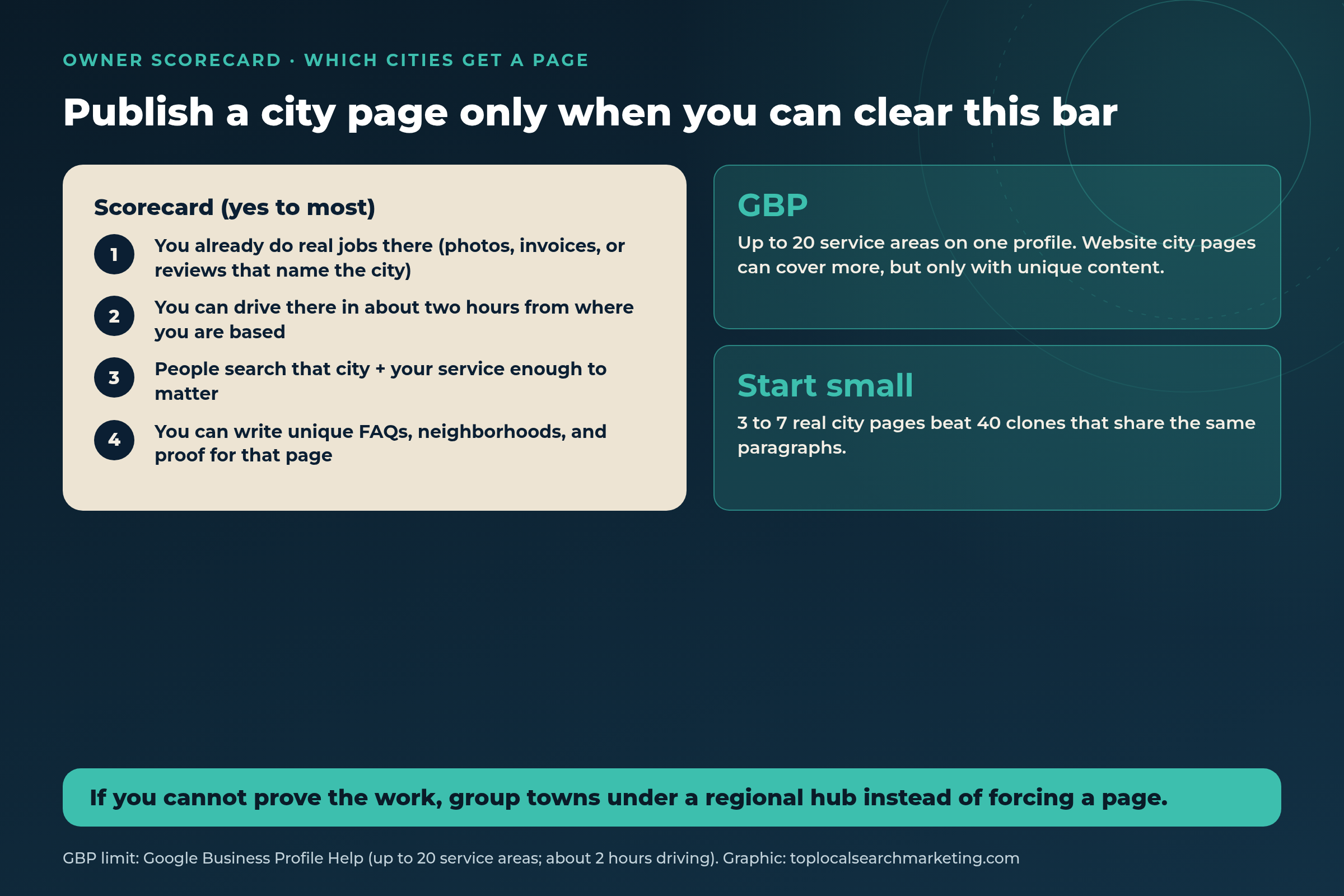
- You already complete jobs there (invoices, photos, or reviews that name the city).
- You can get there in about two hours from where you are based.
- People search that city plus your service often enough to matter for your business.
- You can write unique FAQs, neighborhoods, and proof without copying another page.

If three nearby towns fail the uniqueness test, put them on one regional hub page with clear sections instead of forcing weak clones. Our take: 3 to 7 strong city pages usually beat 40 thin ones.
National examples of the idea, not promises: a Tulsa HVAC company might start with Tulsa, Broken Arrow, and Owasso. A Columbus plumber might start with Columbus, Dublin, and Westerville. A San Francisco cleaner who also covers the Peninsula would pick the cities with the most recent jobs, not every ZIP on the map.
What to Put on Each City Page
Every useful city page answers the same buyer questions in plain words.

- Benefit-led H1: service + city + outcome (example shape: “Emergency Plumbing in Round Rock That Shows Up Fast”).
- Who you help and where: neighborhoods, landmarks, or suburbs you really cover.
- What you do there: services in short bullets, not a keyword dump.
- Proof: job photos, before/after, and reviews from the last few months that mention the area when you have them.
- Open FAQ: drive time, same-day availability, permits, what to expect on the visit.
- Clear next step: call, text, or form, with the phone number next to every CTA.
Do not hide FAQ answers in collapsed accordions. Write them out. Buyers and AI tools both read the page as it loads. For how AI tools pull local facts, see our companion guide on getting recommended by ChatGPT.
City Pages, GBP Areas, and Hub Pages Compared
Use this when you are deciding what to build next. The last row is what to avoid.
| Page type | Job it should do | Must include |
|---|---|---|
| Website city page | Prove you serve that city with unique content and recent proof. | Jobs, photos, FAQs, reviews that name the town. |
| Website location page | Describe a place customers visit. | Address, hours, parking, staff, directions. |
| Service-area hub page | Overview of towns you cover with links out. | Map or list of cities, short blurbs, links to city pages. |
| Google Business Profile areas | Up to 20 areas on one profile; about 2 hours drive tip. | Cities/ZIPs you really serve; hide address if SAB. |
| Thin city clone | Same text, city name swapped; often a doorway pattern. | Do not publish. Merge or rewrite with real proof. |
Want the wider plan around pages, Maps, and reviews? Start with our local search marketing strategy overview, or see what local SEO services include and cost.
Not sure which cities clear the bar?
Call us. We will look at your job history, Google profile service areas, and current pages, then tell you what to publish, merge, or skip.
Book a Strategy Session Free and no pressure · Call (512) 991-3840 · Text us
Call now and find out why your phone isn’t ringing.
Myth vs. Reality
A lot of city-page advice is leftover from old doorway tactics. Here is the plain version.
Myth: More city pages always means more leads.
Reality: Only useful pages help. Thin clones waste crawl time and can match Google’s doorway examples.
Myth: I need a street address in every city I serve.
Reality: Google tells service-area businesses to hide the address when customers are not served there, and to list service areas instead.
Myth: Swapping the city name is fine if the rest is accurate.
Reality: Buyers want recent local proof, and Google calls out substantially similar city-targeted pages.
Myth: My Google profile service areas replace website city pages.
Reality: GBP areas help Maps discovery. Website pages answer questions, host proof, and give you URLs you control.
Myth: If I serve 40 towns I need 40 pages on day one.
Reality: Start with towns you can prove. Group the rest on a hub until you have unique content.
Myth: City pages are only for big multi-location brands.
Reality: Service-area businesses use them every day. The rule is uniqueness and proof, not headcount.
Book a Strategy Session Free and no pressure · Call (512) 991-3840 · Text us
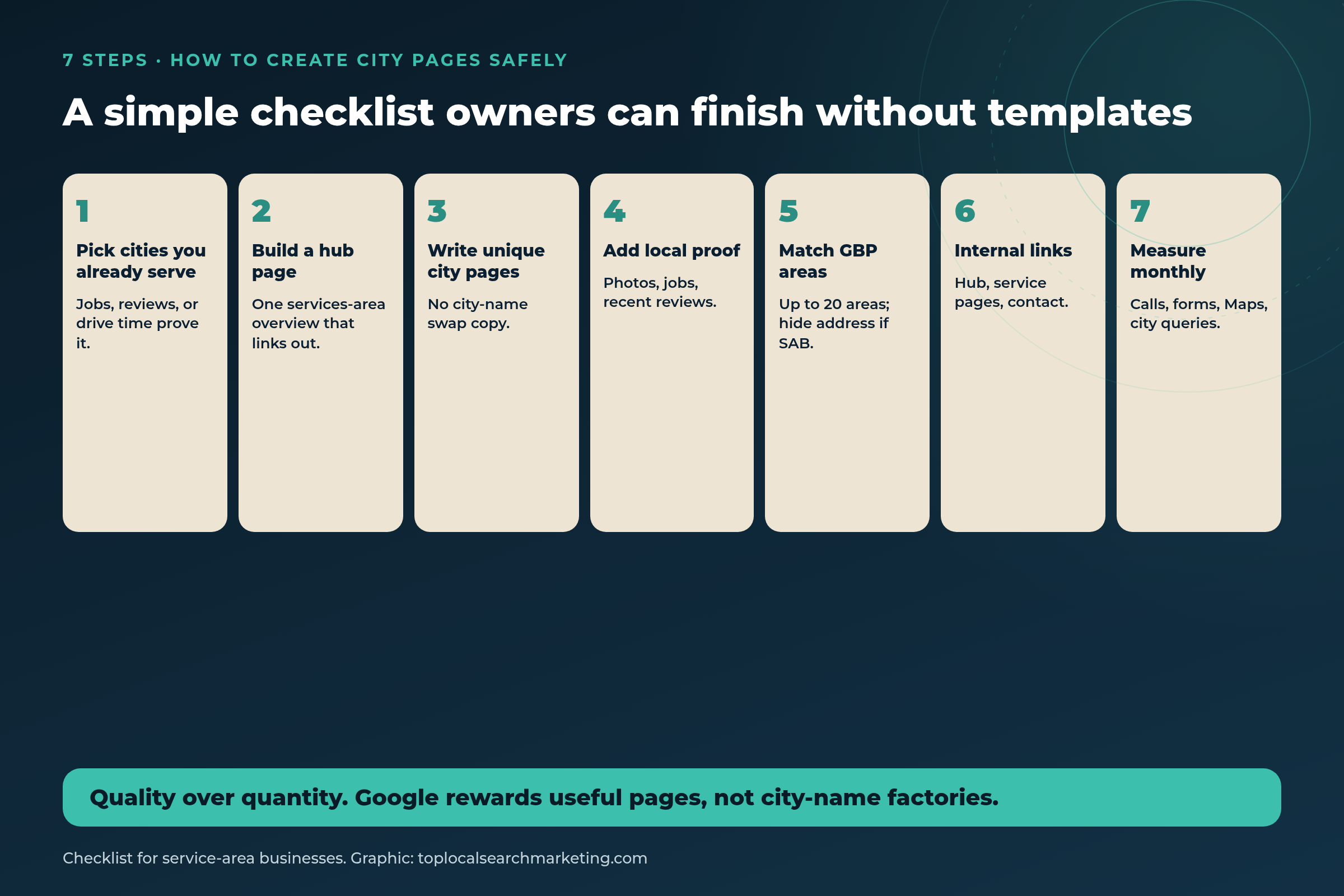
How to Create City Pages for a Service-Area Business: 7 Steps
These are our steps. Nobody can promise rankings, but this checklist keeps you on the useful side of Google’s spam examples and on the fresh side of what buyers check.
-
List cities you already serve
Pull the last 6 to 12 months of jobs, invoices, or reviews. Circle towns with real proof. Those are your first candidates.
-
Build or clean a service-area hub
One browseable page that lists the towns and links to each city page. Google wants a clear hierarchy, not orphan URLs.
-
Write unique pages, one city at a time
New H1, neighborhoods, FAQs, and proof. If you cannot write something new, do not publish that city yet.
-
Add recent local proof
Photos from jobs in that city, reviews from the last three months when you have them, and a short story of a typical visit.
-
Align Google Business Profile areas
Keep GBP to the areas you truly cover (up to 20). Hide the address if you are a service-area business. Match service names to the website.
-
Link everything that matters
Hub to city pages, city pages to main services and contact, and a couple of links back to the hub. Make it easy for a person to click around.
-
Measure monthly and prune
Watch city-name queries, Map Pack visibility, calls, and forms. Merge or rewrite pages that never earn attention.
Get a Free Strategy Session Free and no pressure · Call (512) 991-3840 · Text us
How to Measure Whether a City Page Is Working
Judge pages by booked work, not vanity rankings alone.

- Calls and forms from people who mention that city.
- Search Console queries that include the city + your service.
- Map Pack presence for those queries near that city (proximity still matters).
- Review velocity that mentions the town in the last three months.
Our view: give a new city page a few months with steady internal links and review asks before you kill it. If it still has no proof and no traction, fold it into the hub.
Quick answer
What is the fastest thing I can do today?
Open your three weakest city pages. If two of them share the same paragraphs with only the city name changed, merge them into one honest hub section or rewrite one with real job proof from that town.
What You Get and Results You Can Expect
What you get when we build or clean city pages with you:
- A scored list of cities to publish, merge, or skip
- A hub plus unique city pages written for owners, not keyword stuffing
- Google Business Profile service areas checked against the site
- Review and photo prompts so each page can stay fresh
Results you can expect (real, not guaranteed rankings):
- Pages that answer buyer questions without doorway-style clones
- Clearer paths from search to call on the towns you actually serve
- A review habit aimed at the last three months, matching what 74% of consumers care about
- A monthly read on which city pages earn attention and which to prune
We work month to month, no long-term contracts, one client per niche per market. Based in Lakeway, Texas, near Austin, serving local businesses across the United States and Canada. Full setup on our local SEO and Google Maps page. If you are comparing firms, here is how to choose a local search marketing company without the fog.
Our honest advice: if an agency offers “50 city pages this week” from a template, walk away. Ask to see how each page will differ before you pay.
Want city pages that buyers and Google can both trust?
Book a free strategy session. We will score your towns, show you what looks like a doorway risk, and outline what we would publish first, whether you hire us or not.
Book a Strategy Session Free and no pressure · Call (512) 991-3840 · Text us
FAQ
Frequently Asked Questions
Straight answers for owners. Sources are linked above and listed below.
They can be. Google’s spam policies say doorway abuse includes multiple pages targeted at specific regions or cities that funnel users to one page, and substantially similar pages that sit closer to search results than a clear site hierarchy. Unique pages with real local proof are not the same thing.
Start with the towns you already serve and can prove with jobs, photos, or reviews. For most owners that is a handful of pages, not dozens. Google Business Profile allows up to 20 service areas on one profile; website pages can cover more only when each page is genuinely useful.
No. Google says service-area businesses that do not serve customers at their address should hide the address on their Business Profile and list service areas instead. Website city pages should say where you work, not invent storefronts.
That is the pattern Google calls out. If the only difference is the city name, buyers get no local proof and the page looks like a doorway. Rewrite each page with neighborhoods, drive times, recent jobs, FAQs, and reviews that mention that town.
Your GBP is one profile for the metro, with up to 20 service areas, and Google notes overall area should usually stay within about two hours of driving. City pages live on your website and can go deeper on proof for each town. Keep names and services consistent between them.
There is no fixed timeline. Useful pages need to be indexed, linked from your hub and service pages, and backed by fresh reviews. Our view: judge them after a few months of calls, forms, and city-name queries in Search Console, not after one week.
DIY works if you can write unique pages and keep reviews coming. Hire help when you need a clear scorecard, clean architecture, and someone watching Maps and review gaps every month. See our cost guide before you buy a package of cloned pages.
Sources
Stats and policy wording come from the pages below, checked at the source on November 5, 2026. Anything marked our view, our take, or our honest advice is opinion from Top Local Search Marketing.
- BrightLocal: Local Consumer Review Survey 2026 (1,002 US adults via SurveyMonkey, published Feb 11, 2026)
- Google Search Central: Spam Policies for Google Web Search (Doorway abuse section; page updated 2026-08-28 UTC)
- Google Business Profile Help: Manage your service areas (up to 20 service areas)
- Google Business Profile Help: Guidelines for representing your business (service-area address and about 2-hour drive tip)
Next step
Build City Pages Buyers Trust
74% of consumers are filtering for recent reviews. Google is filtering for useful pages. Meet both bars: publish only the cities you can prove, keep GBP areas honest, and rewrite anything that is just a name swap.
If you want a plain scorecard for your market, book a free strategy session or contact us. We will tell you what we would do first, whether you hire us or not. You can also read what local search marketing is if you are new to this.
Book a Strategy Session Free and no pressure · Call (512) 991-3840 · Text us · Top Local Search Marketing