
Google Ads Update · October 2026
If you pay for Google Ads and spend half your week calling back leads that go nowhere, you are not alone. Wrong numbers, people outside your area, folks who were “just curious.” It wears you down and costs real money.
This week Google added two settings that can help. On October 16, 2026, Search Engine Roundtable reported that Google Ads lead forms now let you mark which answers make a good lead. Two days earlier, Google announced new controls that let you decide which places your ads show get your budget first.
Neither one is magic, but together they help you stop paying for weak leads. Here is what changed, what it means in plain English, and a simple checklist to improve Google Ads lead quality without raising your budget.
Start here
The Short Answer
- Lead forms can now sort leads for you: In a Search campaign lead form, you can pick which answers to a question count as a good lead. Those submissions get tagged as qualified leads.
- You can rank where your money goes: New channel prioritization lets you put Google Search first and Search partners or the Display Network second.
- You can cap the second tier: For Low priority channels, you can set a percentage of your daily budget as a limit. Google calls it best effort, not a hard cap.
- It is rolling out slowly: You may not see the budget controls in your account yet.
- What to do: Check where your ads show, add one qualifying question to your lead form, and judge your ads by booked jobs, not lead counts.
Get My Free Market Report Free and no pressure · Call (512) 991-3840 · Text us
Quick answer
Does this mean Google will stop sending me bad leads?
No. The new lead form setting tags answers you choose. It does not stop someone from picking any answer they like. Our take: it is still useful, because it puts your best leads at the top of the pile and gives Google a clearer picture of what a good lead looks like for you.
Tired of paying for leads that never turn into jobs? That is a fair thing to be frustrated about.
Start with your Free Market Report. We will look at where your ads show, what your leads look like, and what to change first.
Get My Free Market Report Free and no pressure · Call (512) 991-3840 · Text us
What Changed This Week (October 14 to 16, 2026)
October 14: new budget controls. Tal Akabas, Director of Product Management for Google Ads, wrote that Google is rolling out channel prioritization and budget allocation across Search, Shopping, Performance Max, and Demand Gen campaigns. You mark a channel “High priority” or “Low priority” and can limit spend on the low ones. Search Engine Land listed the channels for Search campaigns: Google Search, Search partners, and the Google Display Network.
October 15: rollout starts. PPC Land reported that Google’s help page dates the start of the rollout to October 15, 2026, with availability varying by account. It also reported that every channel starts as High priority by default, so nothing changes until you move a channel down.
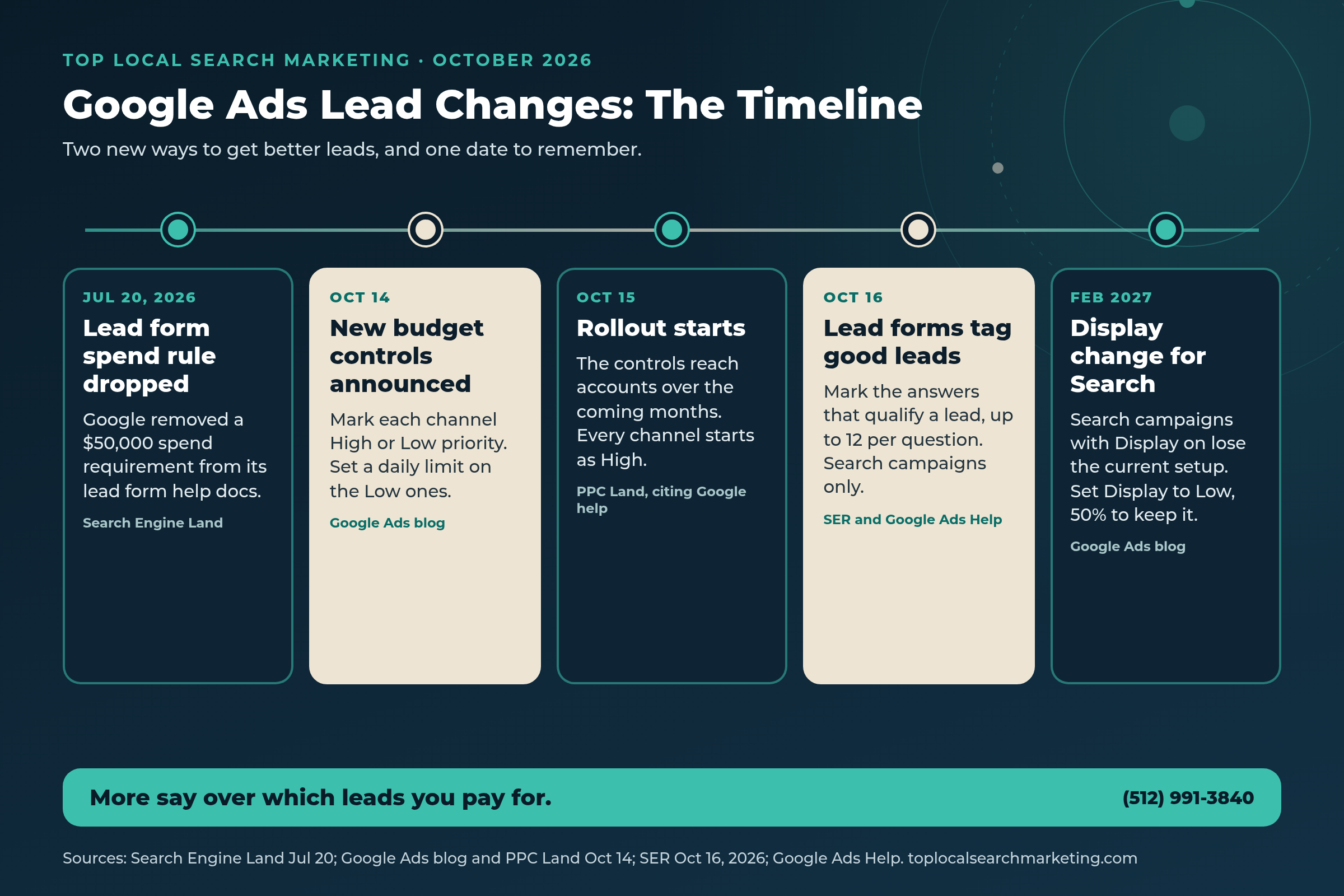
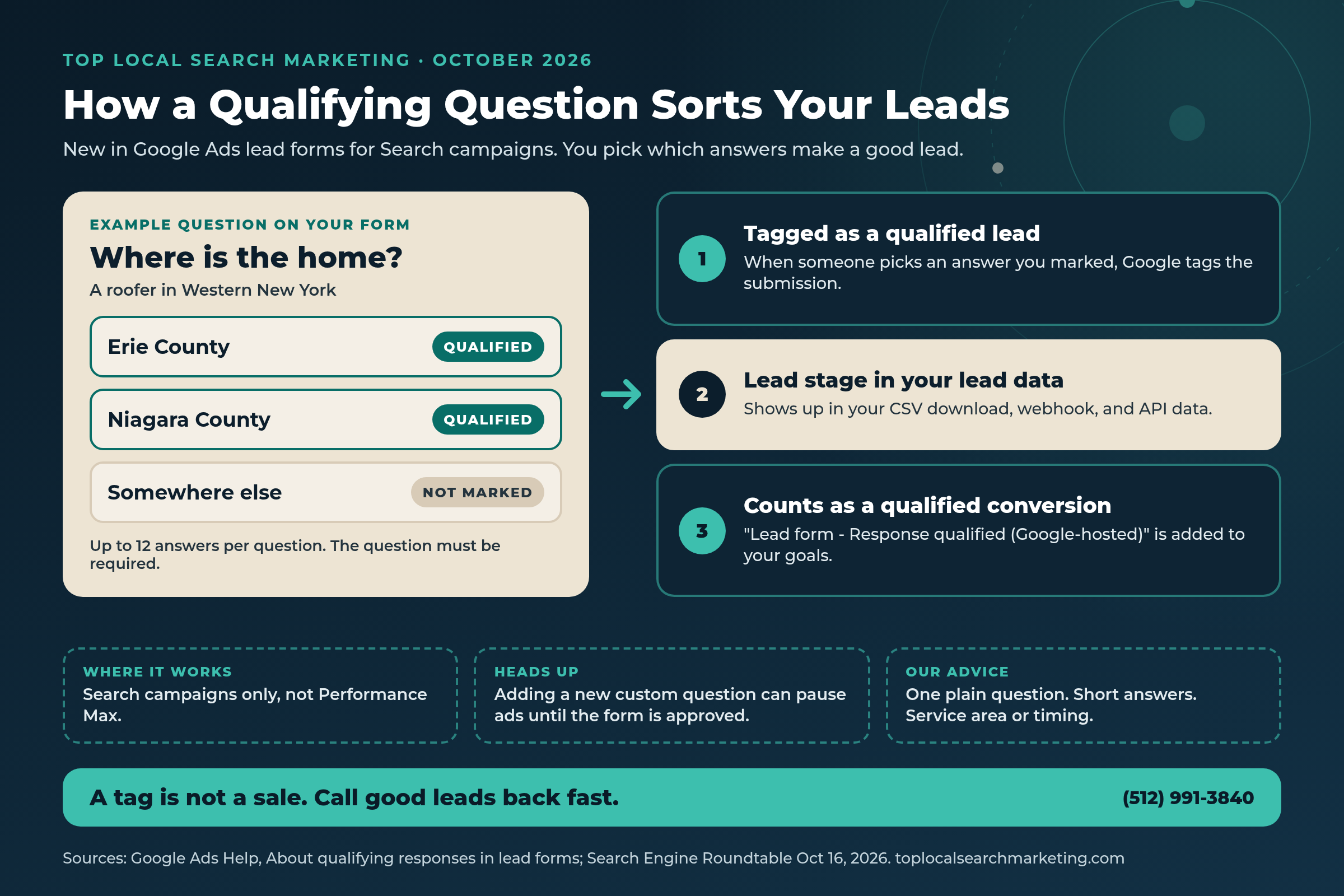
October 16: lead forms learn what a good lead is. Search Engine Roundtable reported that you can now mark which answers to a custom lead form question qualify a lead, with up to 12 answers per question. Google’s help page on qualifying responses explains how it works: when someone submits the form with an answer you marked, the lead is tagged as qualified.
Earlier this year: lead forms opened up. Back on July 20, 2026, Search Engine Land noticed that Google removed a $50,000 spend requirement from its lead form help docs. That lowers the documented bar for smaller local businesses.

Our honest view: none of this changes what a click costs. It changes how much say you have over which clicks you pay for, and which leads you call first.
AI Answer Block
What Lead Scoring and Channel Priority Mean (Plain English)
Lead form: a short form that opens right from your Google ad, so a person can send their name and phone number without visiting your website. Google’s lead form help page says you can add them to Search and Performance Max campaigns.
Qualifying question: a multiple-choice question on that form where you tick the answers that make a good lead. Google says the matching submissions are tagged as qualified, show a “Lead stage” in your lead data, and count toward a conversion called “Lead form – Response qualified (Google-hosted).” Two catches: it works in Search campaigns only, and the qualifying question has to be required, not optional.
Channel prioritization: your ad budget gets spent in tiers. High priority places get funded first. Low priority places get what is left, but only when the campaign is limited by budget.
Budget allocation: a limit on how much of your daily budget a Low priority place can use. Google’s help page, quoted by Search Engine Roundtable, gives this example: a 5% allocation on a $1,000 average daily budget means Google aims to keep that channel at or below $50 a day. Set it to 0% and Google won’t spend there.
Search partners: other sites and apps that show Google search ads. Google’s Search Network help page says they are included by default when you create a Search campaign, and that clicks from some of these sites “may not always reflect highly targeted traffic.”
Our reading: these settings let you tell Google two things it used to guess: which leads you want, and where to spend first.
Quick answer
Do I need a lead form to use the new budget controls?
No. They are separate. Channel prioritization works on regular Search campaigns whether or not you use a lead form. The qualifying answers only matter if you run a lead form in a Search campaign.
Why Local Owners Should Care
For most local businesses, Google Ads is a phone-and-form game. You pay for a click and hope it turns into a booked job. But a lead is not a customer. Every bad one costs you twice: once for the click, and again in the time it takes to chase it.
A qualifying question helps right where it hurts. Picture a roofer in Buffalo or anywhere in Western New York. One question, “Where is the home?”, with answers for Erie County, Niagara County, and Somewhere else, shows in a second which leads are in your service area. A med spa in Austin could ask what treatment someone wants. A moving company in Nashville could ask when they plan to move. A landscaping crew in Lexington, KY could ask whether it is a one-time job or weekly care.

The budget controls matter for a different reason. If Search partners are on, part of your budget may go to sites outside Google Search. Before, your choice was on or off. Now you can keep Google Search first and give partners a small, capped share, or none at all.
Our take: the owners who get the most from Google Ads are not the ones who spend the most. They know which leads turn into jobs, and they set up their ads to find more of those.
You should not have to guess whether your ad money is working.
We will look at your campaigns and your last few weeks of leads with you, then hand you a short, plain list of what to change.
Who does AI name in YOUR market?
Get the free $500 Market Report — Map Pack gaps, Ask Maps visibility, and the competitor capturing your calls.
- Who Google Maps and AI (ChatGPT, Gemini, AI Overviews, Ask Maps) recommend in your market
- The competitor getting the calls you should be getting, by name
- Your 4-point conversion check + 90-day roadmap
Prefer to talk? Call (512) 991-3840
Myth vs. Reality
A calm reset on what the October changes do and do not do.
Myth: More leads always means more customers.
Reality: Google’s own help page says qualifying responses help you avoid spending time on low-quality or irrelevant submissions. Booked jobs are the goal.
Myth: The new lead scoring stops junk leads on its own.
Reality: It tags the answers you pick. People can still choose any answer, so you still need to call fast and ask good questions on the phone.
Myth: A budget allocation is a hard spending cap.
Reality: Google calls it best effort. Its help page says spend on that channel may sometimes go over the percentage you set.
Myth: I have to change my settings right now or my ads will stop.
Reality: The new controls are optional. The one dated change is for Search campaigns with the Display Network turned on, starting in February 2027.
Myth: Lead forms are only for big advertisers.
Reality: Search Engine Land reported in July 2026 that Google removed a $50,000 spend requirement from its lead form docs. You still need a privacy policy and a good policy record.
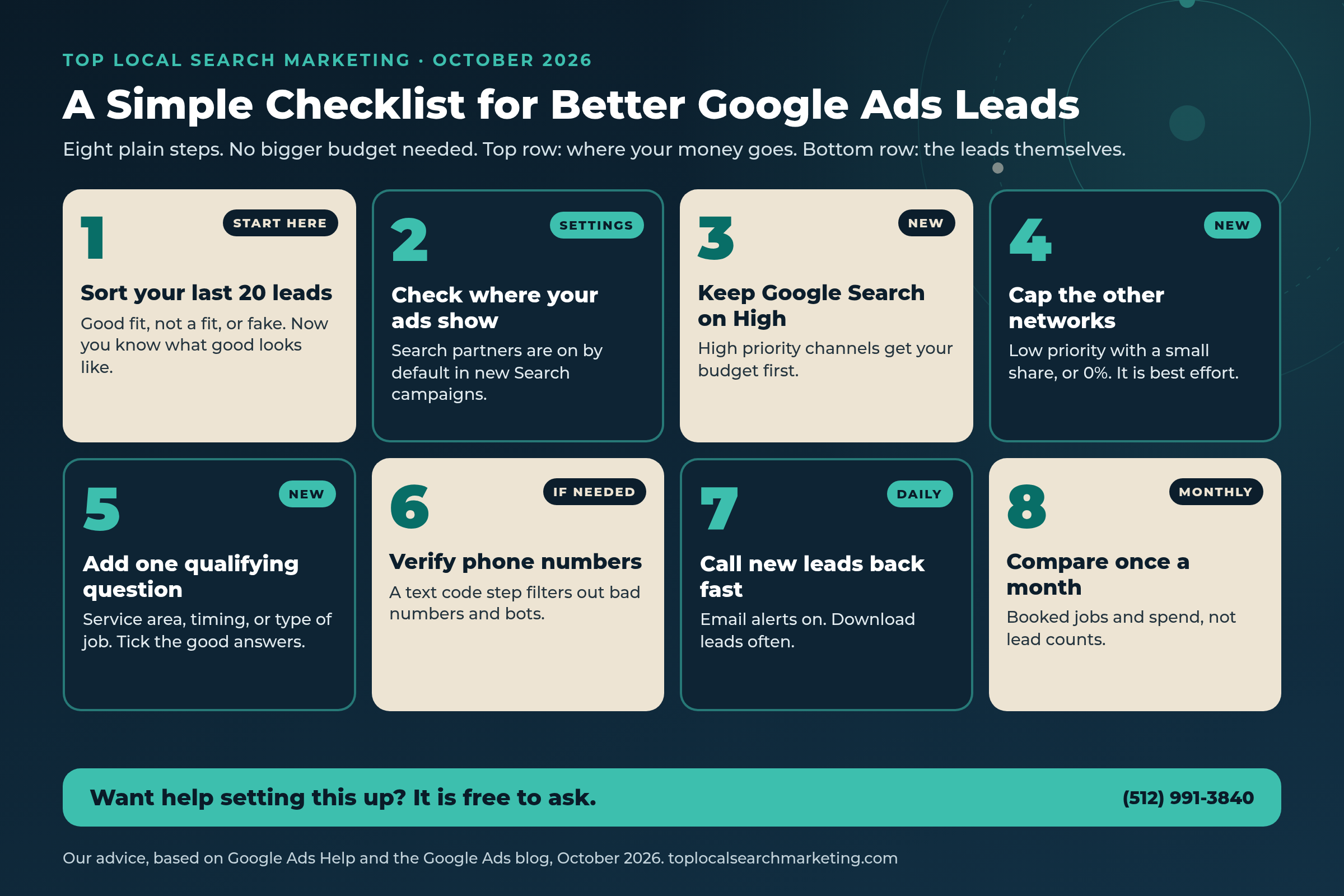
A Simple 8-Step Checklist to Improve Google Ads Lead Quality
These are our steps, not a Google product. Most take a few minutes to set up.
-
Sort your last 20 leads
Put each one in a pile: good fit, not a fit, or fake. It shows you what a good lead looks like for your business.
-
Check where your ads show
In each Search campaign, open Settings and look at Networks. Google says Search partners are included by default, so many owners have them on without knowing it.
-
Keep Google Search as High priority
When the Channel Prioritization card shows up in your Account settings, leave Google Search on High. Every channel starts as High by default.
-
Give the other networks a small, capped share
Set Search partners and Display to Low priority, then pick a small budget allocation or 0%. Remember it is best effort, so check your spend by network.
-
Add one qualifying question to your lead form
Ask about your service area, timing, or type of job, then tick the answers that make a good lead. You can add up to 12 answers per question.
-
Turn on phone number verification if you get fake numbers
Google’s help page says this adds a text code step that filters out invalid numbers, automated spam, and bots. It works in Search campaigns only.
-
Call new leads back fast
Turn on email alerts for each lead. Google keeps lead form data for 60 days and CSV downloads cover 30, so download often.
-
Compare once a month
Line up qualified leads, booked jobs, and what you spent. Ask every new customer “How did you hear about us?” and write it down.

Where to Find Each Setting
Keep this handy when you open your account. Details come from the pages in Sources. Menus can move, and the budget controls are still rolling out.
| Setting | Where to find it | What it does | Good to know |
|---|---|---|---|
| Qualifying answers | Lead form editor, Custom questions | Tags leads that pick the answers you mark as qualified | Search campaigns only; question must be required |
| Phone number verification | Lead form, advanced features | Sends a text code to confirm the phone number | Search campaigns only |
| Channel prioritization | Account settings, Channel Prioritization card | Funds High priority channels first | Only shifts spend when the campaign is limited by budget |
| Budget allocation | Same card, on Low priority channels | Sets a daily percentage limit for that channel | Best effort; 0% means Google won’t spend there |
| Search partners | Campaign settings, Networks | Shows your Search ads on sites outside Google Search | Included by default in new Search campaigns |
| Lead delivery | Lead form, Lead delivery | Email alerts, CSV, webhook, or Zapier | Leads are stored for 60 days; CSV covers 30 |
If this feels like one more thing on your plate, you do not have to sort it out alone.
You run the business. With your Free Market Report, we will walk through your ad settings and leads in plain English and show you what is worth changing.
Get My Free Market Report Free and no pressure · Call (512) 991-3840 · Text us
What NOT to Do
Do not edit your lead form the day before a busy weekend. Google’s lead form setup page says some edits, like adding a new custom question, trigger a policy review, and the campaigns using that form pause until it is approved.
Do not make the qualifying question long or confusing. It is required, so keep it to one plain question with short answers. And do not treat a “qualified” tag as a sale. Call them back, listen, and book the job.
Do not forget February 2027. For Search campaigns with the Display Network on, Google says the current spend setup goes away then. Set Display to Low priority with a 50% allocation to keep things as they are, or decide whether you want Display at all.
Do not judge your ads by lead count alone. Our advice: watch booked jobs per dollar spent.

The real question is simple: how many of last month’s leads turned into paying customers?
If you would like help finding out, and getting more of the good ones, we are easy to reach.
Get My Free Market Report Free and no pressure · Call (512) 991-3840 · Text us
FAQ
Frequently Asked Questions
Straight answers for owners. Sources are linked above and listed below.
It is a way to mark certain answers in a lead form question as the ones that make a good lead. When someone picks one of those answers, Google tags the submission as a qualified lead. Google calls this qualifying responses, and it works in Search campaigns only.
Not right now. Google’s help page says qualifying responses are available for Search campaigns only. Lead forms themselves can run in Search and Performance Max.
It can. Google says some lead form edits need a policy review, such as adding a new custom question, and the campaigns using that form pause until the updated form is approved. Our advice: make the change early in a slow week.
It lets you mark the places your ads show, like Google Search, Search partners, and the Display Network, as High or Low priority. When a campaign is limited by budget, Google spends on High priority first. Google says it is rolling out over the coming months.
Only if you run Search campaigns with the Google Display Network turned on. Google says the current spend setup for those campaigns goes away in February 2027, and you can keep it as it is by setting Display to Low priority with a 50% budget allocation.
Our advice: keep Google Search as your top priority, cap or turn off the networks that send weak leads, add one qualifying question about your service area or timing, and call new leads back fast. Then compare booked jobs once a month.
Sources
Every figure and product detail in this post comes from the pages below. Opinion is labeled as ours.
- Search Engine Roundtable: Google Ads lead form adds lead scoring (Oct 16, 2026)
- Google Ads Help: About qualifying responses in lead forms
- Google Ads Help: Create lead form assets
- Google Ads Help: About lead form assets
- Search Engine Land: Google drops $50K spend requirement for lead forms (Jul 20, 2026)
- Google Ads and Commerce Blog: Channel prioritization and budget allocation (Oct 14, 2026)
- Search Engine Roundtable: New Google Ads channel prioritization and budget allocation (Oct 14, 2026)
- Search Engine Land: Google Ads introduces channel prioritization and budget controls (Oct 14, 2026)
- PPC Land: Google Ads lets advertisers limit Display and partner spend (Oct 14, 2026)
- Google Ads Help: About the Google Search Network
Next step
Let’s Get You Better Leads, Not Just More of Them
In one week, Google gave advertisers a way to tag good leads in lead forms and a way to decide where ad money goes first. Our steps turn that into a calm habit: keep Google Search first, cap what does not work, ask one good question, and count booked jobs.
If you would like a second set of eyes, get your Free Market Report. We will look at your ads and leads and leave you with a short, plain list either way.
Get My Free Market Report Free and no pressure · Call (512) 991-3840 · Text us · Top Local Search Marketing
Where this fits: Better lead settings help, but a well-run account helps more. See our Google Ads management for local businesses and how we track which ads turn into booked jobs.