
Knowledge Panel Update · October 2026
When someone types your business name on their phone, the panel that appears is often the first — and sometimes the only — thing they read before they call. Google is testing a version of that panel that looks less like a static card and more like an AI Overview knowledge panel, with a Show more path into AI Mode.
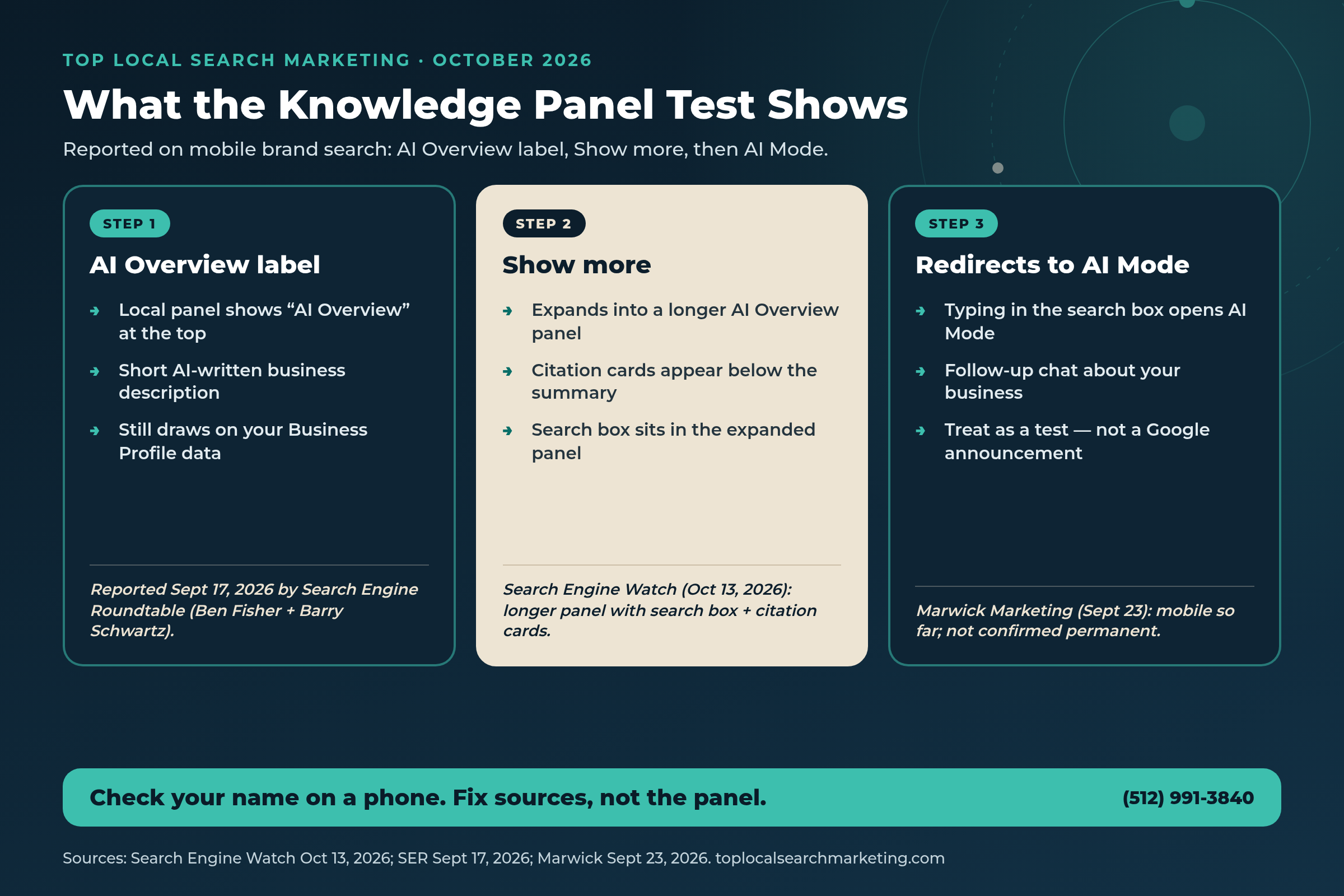
On October 13, 2026, Search Engine Watch reported Google testing a longer AI Overview panel inside Knowledge Panels. A Show more control opens a longer panel with a search box and citation cards; typing in that search box redirects into AI Mode. Earlier, on September 17, 2026, Search Engine Roundtable reported that some local knowledge panels (your Google Business Profile) already show an “AI Overview” label, with Show more expanding into an AI Mode–style chat. UK marketers at Marwick Marketing described the same pattern on September 23 — mobile so far, not announced by Google, and not confirmed as permanent.
This guide is for local owners who want a plain plan. We’ll show you what was reported, how a fused panel differs from the classic card, why mobile brand search matters, and a simple checklist — eight practical steps to check what Google’s AI says about you and fix the sources when it’s wrong.
Start here
The Short Answer
- What’s new: Google is testing an AI Overview knowledge panel — some local Business Profile panels show an “AI Overview” label and a short AI-written description.
- Show more: Expanding can open a longer AI Overview panel with citation cards and a search box that redirects to AI Mode (Search Engine Watch, Oct 13, 2026).
- Where it was seen: Reported first around Sept 17 (Ben Fisher / Steady Demand, reproduced by Barry Schwartz on Search Engine Roundtable); Marwick says mobile-only so far.
- Not a launch: Google has not announced this. Treat it as a test that may expand, change, or fade.
- What to do: Search your name on a phone, read the summary, tap Show more, ask the questions customers ask, then fix your Google Business Profile, website, directories, and outdated pages — not the panel itself.
- How this differs from our Oct 4 note: That post covered AI speaking first on a brand search. This post is about the Knowledge Panel itself becoming an AI Overview with Show more → AI Mode.
Book a Strategy Session Free and no pressure · Call (512) 991-3840 · Text us
Quick answer
Is this the same as a regular AI Overview at the top of search?
Related idea, different surface. A regular AI Overview sits above organic results for many queries. The reports here are about the local Knowledge Panel / Business Profile card itself carrying an “AI Overview” label, a short AI description, and a Show more path that can open longer overview UI or AI Mode chat — especially on mobile brand-name search.
If Google’s AI is describing your business on mobile, the description should match the business you’re proud to run.
A short strategy session is free. We’ll check what your panel says on a phone and show you what to fix first.
Book Your Free Strategy Session Free and no pressure · Call (512) 991-3840 · Text us
What Was Reported (Sept–Oct 2026)
Start with the newest public report, then work backward so you can see the pattern.
October 13, 2026 — Search Engine Watch. Sachin Patel wrote that Google is testing a longer AI Overview panel inside Knowledge Panels. Users see a Show more button for AI Overviews inside Knowledge Panels; clicking it opens a longer AI Overview panel with a search box and citation cards. Typing a query into that search box redirects to AI Mode. That is the clearest public description of the expanded UI so far.
September 17, 2026 — Search Engine Roundtable. Barry Schwartz reported that Google is turning local knowledge panels — your Google Business Profile — into an AI Overview listing. At the top of the local listing it says “AI Overview,” and Show more expands into a follow-up AI Mode–style chat interface. Schwartz said Ben Fisher posted about it first on LinkedIn, and Schwartz was able to reproduce it himself. The same story appears in SER’s daily recap for September 17, 2026.
Schwartz also shared a useful owner lesson from his own example: most of the AI description of his business was correct, but one niche section was a bit outdated. He did not blame the model alone — he noted the content on his corporate site was outdated too. Our take: when the panel is wrong, fix the sources the summary can read, starting with your site and your Business Profile.
September 23, 2026 — Marwick Marketing (UK). Marwick described the same behavior: an “AI Overview” label, a short AI-written description, and Show more into AI Mode chat. Their write-up says Google has not announced anything; UK marketers and Schwartz have replicated it; so far it has been spotted only on mobile; and it is “not confirmed as a permanent change yet.”
September 24 context — hotel side panel. Search Engine Roundtable also covered a separate hotel AI Overview test that can place the overview under a hotel knowledge panel. Schwartz noted it may relate to AI Overviews in local panels. We mention it only as neighboring context — not as proof that your local panel will look the same.

September 26 snapshot — Steady Demand (cite with caution). Ben Fisher’s agency published an AI Overview fused knowledge panel mobile study: 100 local brands, New York–anchored mobile searches on one day, four query variations per brand. Reported figures included 26% showing an AI Overview on a plain brand-name mobile search versus 6% on desktop for the same brand-name searches; about 80% of those overviews merged into the business panel; and 4 of 68 phone searches returned a similarly named wrong business. Fisher also noted layouts can change day to day. Our honest view: these numbers are suggestive, not benchmarks. One agency, one day, one city anchor. Use them as a reason to check your own results — not as a scoreboard for your market.
AI Answer Block
What a Fused AI Overview Knowledge Panel Means in Plain English
Picture a customer who already knows your name — or almost knows it — and searches on their phone. For years, Google showed a familiar card: map pin, hours, call button, photos, reviews, website. That card still matters. What’s new in these reports is that the same surface can wear an “AI Overview” label and lead with a short paragraph Google’s systems wrote about you.
When that summary sits inside the business listing — ratings, hours, and action buttons still nearby — Fisher called it a “fused” layout. That is his term, not Google’s official product name. The practical meaning for you is simple: the first words someone may read about your business on a brand search are no longer only the lines you typed into your Business Profile description. They may be a model’s paraphrase of what it found about you across profile fields, your website, and other public pages.
Show more deepens the moment. Search Engine Watch’s October 13 report describes a longer AI Overview panel with citation cards and a search box. Typing there sends the person into AI Mode — a conversational follow-up about the business. That is a different customer path than tapping Call. Some people will still call. Some will ask the chat whether you take walk-ins, cover their neighborhood, or still offer a service you stopped last year.
Our reading: you cannot edit the AI paragraph the way you edit a website H1. You can make the inputs cleaner. When Schwartz’s niche section was stale, the fix lived on his company site. That is the owner’s job — and it is doable.
Quick answer
How is this different from “AI speaks first” on a brand search?
On October 4 we covered how generative AI can name a business early on a brand search — see when AI speaks first on a brand search. This post is specifically about the Knowledge Panel / Business Profile card becoming an AI Overview surface, with Show more opening longer overview UI or AI Mode chat. Same customer intent (your name on Google). Different UI risk.
Why Local Owners Should Care
Brand-name search is late-stage intent. Someone is checking hours, legitimacy, parking, whether you still do the job they need, or which location to call. The panel is often the entire visit. If the AI summary is wrong — old service area, retired specialty, wrong category language — doubt shows up right when you want confidence.
Mobile matters more than desktop for this test, according to the reports we have. Marwick says the pattern has been spotted on mobile. Steady Demand’s snapshot found AI Overviews far more often on mobile brand-name search (26%) than desktop (6%) in that one-day New York–anchored set. We will not turn that into a universal rate. We will say this: if you only audit your listing on a laptop at the shop, you may be looking at a different experience than the customer standing in a parking lot.
There is also a wrong-business risk when names overlap. Fisher’s phone checks found cases where a search for one brand surfaced a similarly named company. If your name shares common words with other firms, you need to verify what mobile Google resolves — from your market and, carefully, from nearby markets — rather than assume the panel is always yours.
Finally, Show more can pull attention into chat. That is not automatically bad. A correct chat answer can still send someone to Call or Directions. A vague or outdated chat answer can send them to a competitor. Clear answers on your Business Profile services, Q&A, website FAQ, and about pages give the model better raw material.

Think about how your own customers already behave. A homeowner searches your exact company name after a neighbor’s referral. A salon client searches you from the car before walking in. A facilities manager searches your brand to confirm you still cover commercial work. In each case, the panel is the handshake. An AI Overview knowledge panel does not remove that handshake — it rewrites the first sentence of it.
Our take: you do not need a panic rebuild. You need a monthly habit: see what mobile Google says, fix sources, recheck. A simple checklist covers it.
You do not need to become an AI researcher. You need an accurate panel and a phone that rings.
We’ll search your name with you, read the summary out loud, and leave you a short punch list.
Who does AI name in YOUR market?
Get the free $500 Market Report — Map Pack gaps, Ask Maps™ visibility, and the competitor capturing your calls.
- Your Ask Maps™ & AI visibility score (Google, ChatGPT, Gemini, Perplexity)
- Exactly which competitor is capturing your customers right now
- Your 4 Magic Keys conversion gaps + 90-day capture roadmap
Prefer to talk? Call (512) 991-3840
Myth vs. Reality
A lot of loud advice is already racing ahead of what Google actually said. Here is a clean reset based on the public reports linked in Sources.
Myth: Google announced a permanent AI Overview knowledge panel for every local business.
Reality: Coverage from SEW, SER, and Marwick describes a test. Google has not published an official announcement that this is permanent for all listings.
Myth: If you only check desktop, you’ve audited the experience.
Reality: Marwick reports mobile spotting so far. Steady Demand’s one-day snapshot found overviews more often on mobile than desktop. Check a phone.
Myth: Wrong AI text means you should “optimize the panel” with keyword tricks.
Reality: Schwartz’s example points to outdated website copy as the source of a stale niche section. Fix sources — GBP, site, directories — not keyword stunts.
Myth: Show more is just “read the rest of the paragraph.”
Reality: SEW’s Oct 13 report describes a longer panel with citation cards and a search box that redirects to AI Mode — a conversational follow-up path.
Myth: Agency snapshot percentages are your market’s real rate.
Reality: Steady Demand’s 26% / 6% / ~80% / 4-of-68 figures are a single-day, New York–anchored, agency-run sample. Suggestive. Not a benchmark.
Myth: This replaces the need for accurate hours, categories, and reviews.
Reality: The opposite. When the panel fuses AI text with profile data, messy hours, weak categories, and stale services become part of the story customers read first.
A Simple 8-Step Checklist
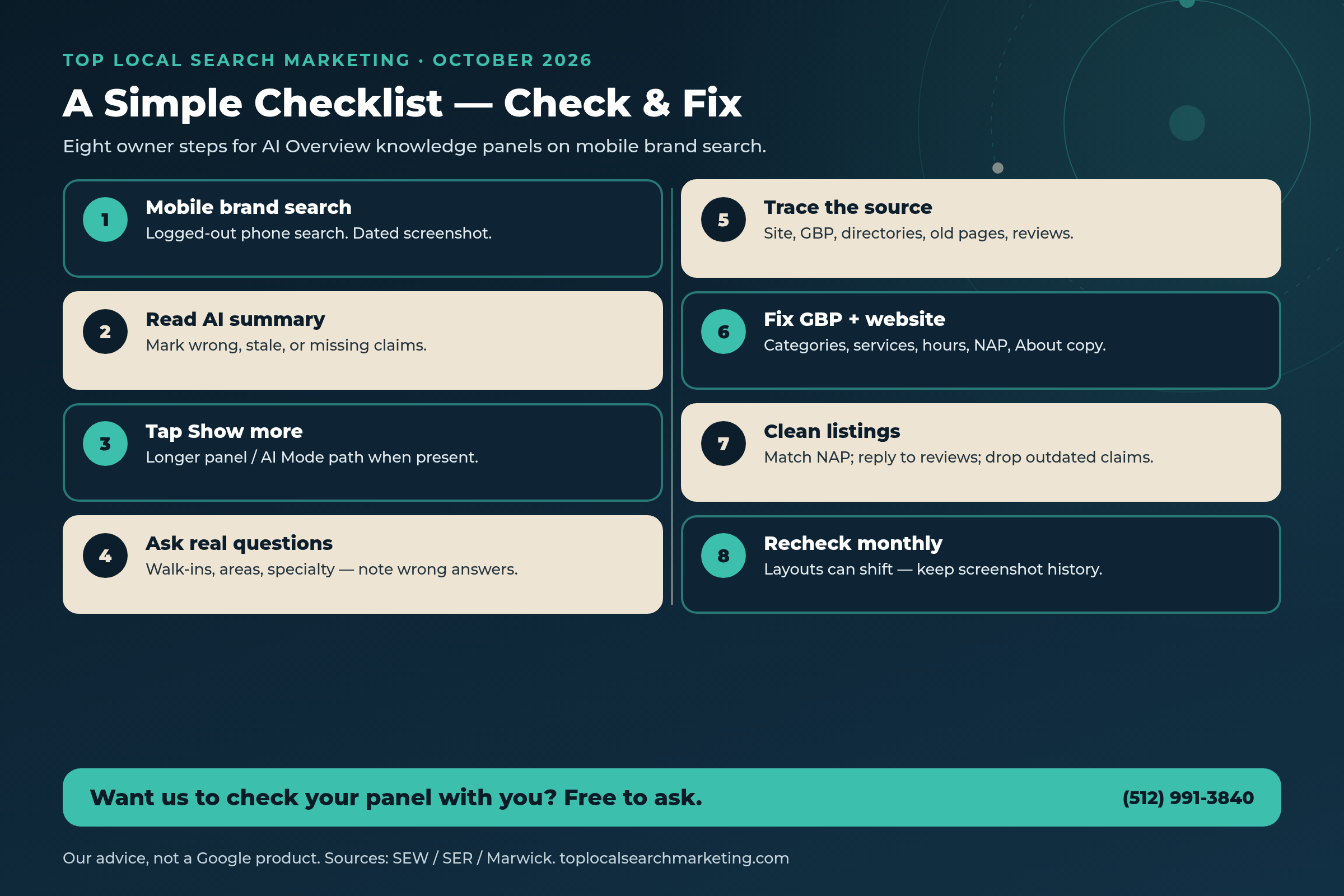
This is a simple checklist we use with owners — not a Google product. Google is testing the look. The checklist helps you see what mobile searchers see and fix the facts behind it.
Owners sometimes ask whether this replaces local SEO, reviews, or classic service pages. It does not. It sits on top of them. Your map listing still has to be accurate. Your phone still has to get answered. This checklist simply adds a monthly loop for a newer risk: an AI-written first impression inside the panel, plus a Show more path into chat.
-
Search your exact business name on a phone
Use a phone browser while logged out of Google (or a private window). Search the name customers actually use. Screenshot the result with the date visible. Repeat once with “reviews” after your name if that is a common follow-up.
-
Read the AI Overview summary line by line
If you see an “AI Overview” label, read every sentence. Mark anything wrong, outdated, missing, or oddly emphasized — retired services, old neighborhoods, wrong specialty, confusing category language.
-
Tap Show more
Open the longer panel if it appears. Note citation cards, extra claims, and whether a search box is present. Per Search Engine Watch’s Oct 13 report, that expanded panel can include a search box that redirects to AI Mode.
-
Ask the questions real customers ask
In the AI Mode–style follow-up (when available), ask about walk-ins, service areas, typical timelines, and whether you still offer a flagship service. Write down wrong or vague answers.
-
Trace every error to a source
For each problem, ask: is this on our website, Business Profile, a directory, an old landing page, or a review thread? Schwartz’s niche-section example tracked back to outdated company-site copy. Start there.
-
Fix Google Business Profile and your website first
Align categories, services, description, hours (including holidays), NAP, and photos. Update About and services pages so they match what you do this month — not last year.
-
Clean directories and review language
Match name, address, and phone across major listings. Reply to recent reviews. Do not script fake reviews. Third-party pages can shape how systems talk about you — Fisher’s study discussed citation patterns with that caution baked in.
-
Recheck on a monthly cadence
Layouts can change day to day in reported testing. Keep dated screenshots in one folder. After major service or location changes, recheck within a week.
Quick answer
What if I do not see an AI Overview label on my panel?
That can mean the test is not showing for your listing, device, or location today. Our advice: still keep GBP and site facts accurate, and recheck monthly on mobile. Absence today is not a promise about next month.
Classic Panel vs AI Overview Panel vs Show More → AI Mode
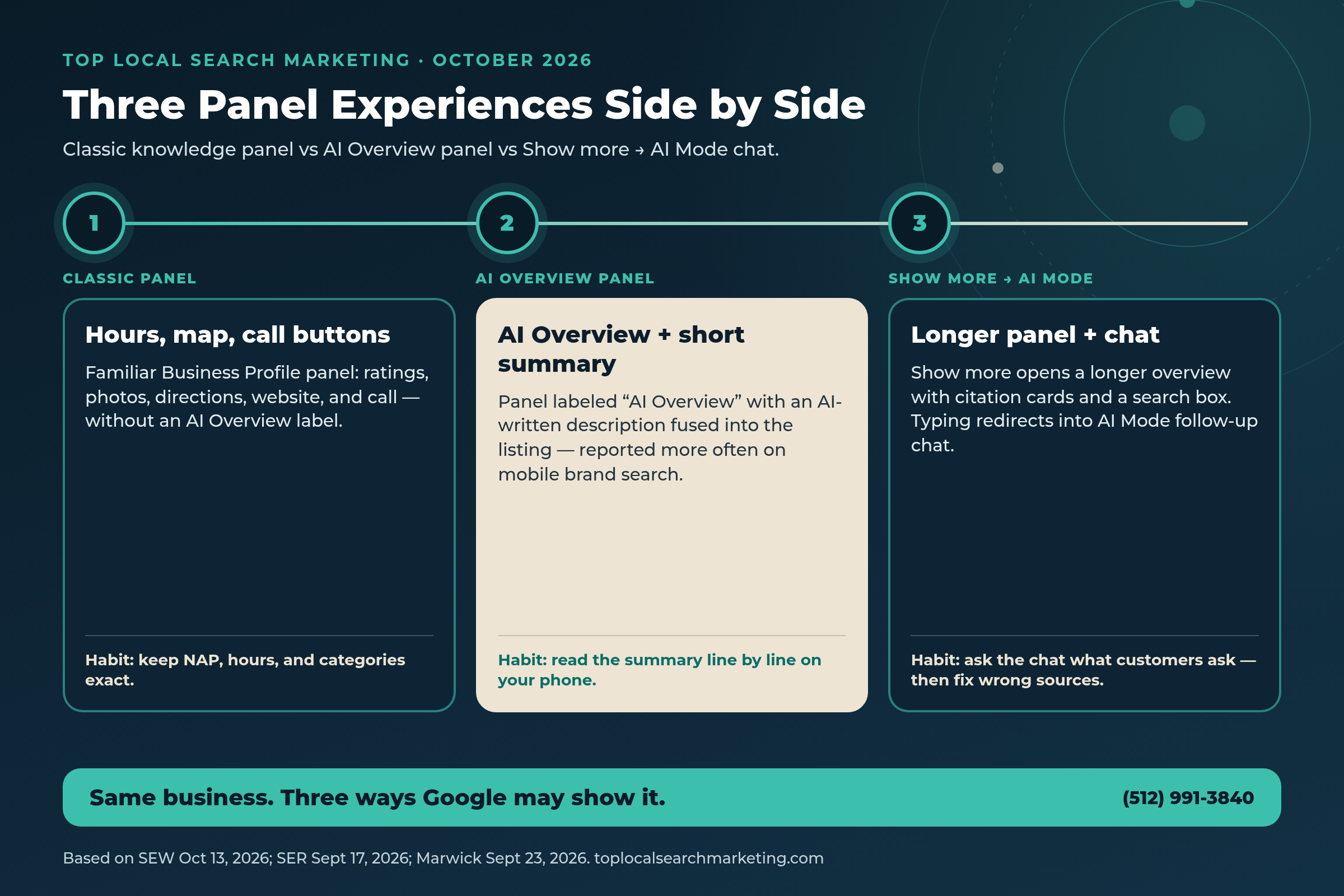
Use this table when you explain the three experiences to a partner or manager. Product behavior below comes from the SEW, SER, and Marwick reports linked in Sources — treated as reported tests, not a Google help-doc guarantee.
| Question | Classic Knowledge Panel | AI Overview panel | Show more → AI Mode |
|---|---|---|---|
| What the customer sees first | Familiar card: hours, map, call, photos, reviews | “AI Overview” label plus a short AI-written business description (per SER Sept 17) | Longer overview UI; may include citation cards and a search box (per SEW Oct 13) |
| Primary risk | Stale hours, weak photos, wrong category | Wrong or outdated first paragraph about your business | Wrong chat answers; attention shifts into follow-up questions |
| Owner edit path | Edit Google Business Profile fields and site facts | Fix sources the summary can read (GBP, site, directories) | Publish clear answers customers ask; keep services and FAQ current |
| Device note | Desktop and mobile | Reported more often / first on mobile (Marwick; Steady Demand snapshot) | Follow the mobile path when auditing |
| Announcement status | Long-standing local panel pattern | Reported test; not a Google launch announcement | Reported test UI; SEW documents search box → AI Mode |
| What to screenshot | Full panel + hours + actions | Label + full AI paragraph | Expanded panel + any chat answers that are wrong |
| Owner action this week | Confirm NAP and holiday hours | Read the summary aloud; list errors | Ask three customer questions; fix sources behind wrong answers |
| Goal for a local business | Easy call / directions / website tap | Accurate first impression on brand search | Accurate follow-ups that still lead to a call |
Your Monthly Checklist
Block 30–40 minutes once a month — or sooner after a big service change. This is our advice based on the public reports, not a claim that Google requires a monthly ritual.
-
Mobile brand-name search (logged out)
Screenshot the panel. Note whether an AI Overview label appears.
-
Read the summary out loud
If a partner would flinch at a sentence, mark it.
-
Open Show more when present
Capture the longer panel and any citation cards.
-
Ask three customer questions in chat
Walk-ins, area covered, and one specialty you actually offer.
-
Spot-check GBP services and hours
Remove retired services. Fix holiday hours before they bite.
-
Spot-check website About + services pages
Delete or update copy that no longer matches the business.
-
Match NAP on the three places customers trust
Business Profile, website contact/footer, and your main directories.
-
Reply to new Google reviews
Clear, human replies. No scripted praise requests.
-
File the screenshots
One folder per month. Compare when something feels “off.”
-
Pick one fix and finish it
One page, one GBP field set, or one directory cleanup — done beats dabbling.

If the monthly checklist feels like a lot, we can run the first pass with you.
You’ll still own the business. We’ll own the mobile check and the punch list.
What to Fix on GBP, Website, Directories, and Reviews
When an AI Overview knowledge panel is wrong, owners often want a magic toggle. Public reporting does not give one. Marwick notes there is no clear business-side opt-out beyond a viewer filtering AI results with the Web results toggle — which is the searcher’s choice, not yours. So we fix inputs.
Google Business Profile
- Categories: few, specific, truthful
- Services and products: real and current
- Description: honest, no promo spam
- Hours including holidays and seasonal changes
- Photos that match the real storefront and work
- Q&A answered in plain language
Website + directories + reviews
- About and services pages match today’s offer
- Remove retired locations and old specialty claims
- NAP identical on site and main directories
- Reply to reviews; never fake them
- Fix thin or outdated pages that still rank for your brand
- Keep contact CTAs obvious on mobile
Our advice: treat every public sentence about your business as raw material. If you stopped offering a niche service, do not leave that niche celebrated on an old page. If you expanded into a new city, say so clearly in one place Google and customers can both trust.
Also watch entity confusion. If another company shares part of your name, make your legal name, city, and category combination as clear and consistent as possible. Fisher’s phone checks showed wrong-business panels can happen for similarly named brands. That is not a reason to panic — it is a reason to verify.
Our take: the same clean-up that helps classic local search also helps AI summaries. Accurate hours help callers. Accurate services help summaries. Matching NAP helps both.
What NOT to Do
Do not stuff keywords into your Business Profile name to “feed the AI.” Google’s Business Profile guidelines expect the name customers know. Name violations can get your information changed or your listing restricted. An AI Overview knowledge panel does not change that rule.
Do not invent opt-out folklore. We found no official Google announcement of a business toggle that turns this test off for your listing. Marwick’s reporting points to a viewer-side Web results filter — not an owner control panel.
Do not treat one snapshot study as a ranking contest. Do not chase “26%” as if it were a Google KPI. Use reported figures only as motivation to check your own phone results.
Do not rewrite your whole site overnight because a paragraph looked weird once. Screenshot, confirm on another day, then fix the specific sources behind specific errors. Steady Demand noted layout volatility day to day in limited repeat checks — another reason for calm verification.
Do not ignore the classic panel while you obsess over AI text. Call buttons, hours, and photos still convert. The AI layer sits on top of a listing that still has to work.

Brand search is where trust is confirmed. If the first paragraph is wrong, the call can die quietly.
If you want a partner to check the mobile panel with you and turn errors into a punch list, we’re easy to reach.
Book a Strategy Session Free and no pressure · Call (512) 991-3840 · Text us
FAQ
Frequently Asked Questions
Straight answers for owners. Sources linked above and listed at the end.
It is a reported test where some local Knowledge Panels / Google Business Profile listings show an “AI Overview” label above a short AI-written description of the business. Search Engine Roundtable reported this on September 17, 2026, after Ben Fisher posted about it and Barry Schwartz reproduced it.
On the local panel reports, Show more expands into an AI Mode–style follow-up chat. Search Engine Watch’s October 13, 2026 article also describes a longer AI Overview panel inside Knowledge Panels with citation cards and a search box that redirects to AI Mode when you type a query.
No public Google announcement confirms a permanent, universal rollout. Marwick Marketing’s September 23, 2026 write-up says Google has not announced it, it has been spotted on mobile so far, and it is not confirmed as permanent. Treat it as a test.
No. Check on a phone while logged out. Marwick reports mobile spotting. Steady Demand’s one-day snapshot found AI Overviews more often on mobile brand-name searches than on desktop in that sample. Desktop-only audits can miss what customers see.
Trace the error to a source and fix the source. Schwartz’s September example found most of his AI description correct, with one outdated niche section that matched outdated content on his company website. Update your Business Profile, website, and directories so the public facts are current.
Treat them as suggestive only. They come from a September 26, 2026 agency study of 100 local brands with New York–anchored searches on one day. Useful motivation to audit your own results — not a score for your city or category.
We found no official business-side opt-out for this test. Marwick reports that the only option it found was a viewer filtering AI results with the Web results toggle. Focus on accurate sources rather than waiting for a switch that may not exist.
Our advice: monthly for most businesses, plus an extra check after major service, hours, or location changes. Keep dated screenshots. Reported testing can change layout day to day, so one look is not forever.
Sources
Every figure and product claim in this post comes from the pages below. Opinion is labeled as ours.
- Search Engine Watch — Google tests longer AI Overview panel inside Knowledge Panels (Oct 13, 2026)
- Search Engine Roundtable — Google Local Knowledge Panel As An AI Overview (Sept 17, 2026)
- Search Engine Roundtable — Daily Recap Sept 17, 2026 (confirms local KP AI Overview story)
- Marwick Marketing — Google Is Turning Local Knowledge Panels Into AI Overviews (Sept 23, 2026)
- Steady Demand — AI Overview Fused Knowledge Panel on Mobile Study (Sept 26, 2026; cite with caution)
- Search Engine Roundtable — Google Testing Hotel AI Overviews On Side Panel (Sept 24, 2026; related context)
Next step
Let’s Check What Google’s AI Says About Your Business
Google is testing an AI Overview knowledge panel on local brand search — with Show more opening a longer overview and, per Search Engine Watch, a path into AI Mode. A simple checklist turns that into a calm habit: see it on a phone, fix the sources, recheck.
If you’d like a second set of eyes, book a free strategy session. Bring your phone. We’ll leave you with a short punch list either way.
Book a Strategy Session Free and no pressure · Call (512) 991-3840 · Text us · Top Local Search Marketing