
Google Search Console Update · October 2026
Google just opened a new window into how people find you with a camera. If someone points their phone at a storefront, a haircut, a logo, or a job site and lands on your website, you can finally see that traffic in Search Console — and turn more of it into phone calls.
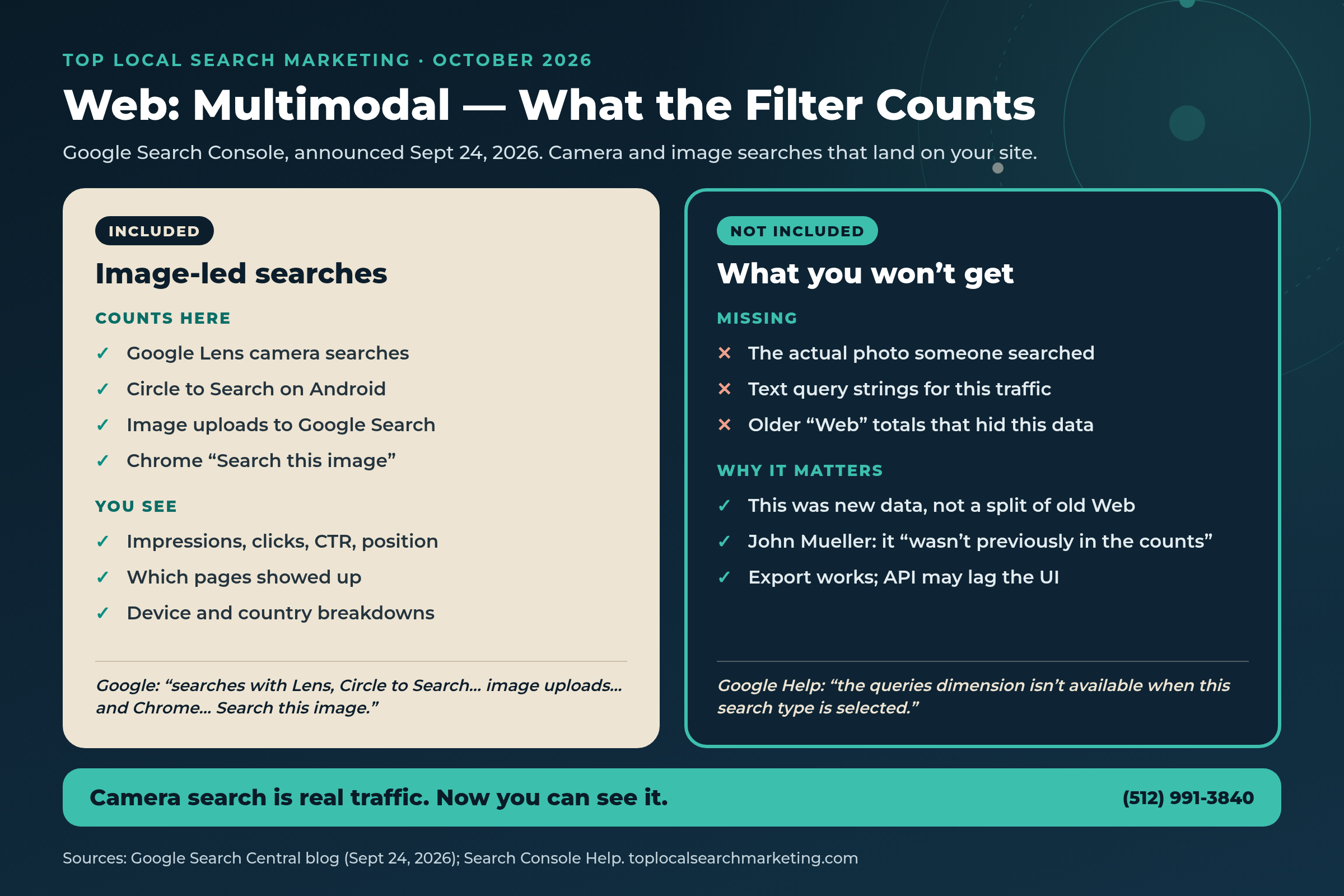
On September 24, 2026, Google announced web multimodal Search performance reporting in Search Console. The new Web: multimodal filter covers searches with Google Lens, Circle to Search on Android, image uploads to Google Search, and Chrome’s right-click “Search this image” feature. The same day, Google’s help docs confirmed that filter also shows up in the Generative AI features report — the report that tracks impressions from AI Overviews and AI Mode.
This guide is for local business owners who want a plain-English plan. We’ll show you what the filter includes, what it doesn’t, why it matters next to typed search and AI Mode, and a simple 8-step weekly checklist — a practical habit that turns visual and AI search into calls.
Start here
The Short Answer
- What’s new: Google Search Console multimodal reporting can filter Performance by Web: multimodal — camera and image searches that surface your pages.
- What it includes: Lens, Circle to Search on Android, image uploads, and Chrome “Search this image,” per Google’s Sept 24, 2026 announcement.
- What you won’t see: The photo someone searched, and usually no text query strings for this traffic.
- Was it in your old “Web” numbers? Google’s John Mueller said this was new data that wasn’t previously in the counts.
- AI side: The Generative AI performance report (AI Overviews and AI Mode impressions) rolled out worldwide as of August 31, 2026.
- What to do: Open the filter, export your top multimodal pages, fix those landing pages for calls, upgrade real photos, match your Google Business Profile, and check the AI report weekly. Our full system is below.
Book a Strategy Session Free and no pressure · Call (512) 991-3840 · Text us
Quick answer
What does “multimodal” mean in Search Console?
In plain English: someone searched with an image, not only with typed words. Google’s help page describes Web: multimodal as web search results where an image was used as part of the search. Lens, Circle to Search, uploads, and Chrome image search are the examples Google named on September 24, 2026.
If people are already finding you with a camera, your website should make the next step obvious: call, text, or book.
A short strategy session with our team is free. We’ll open Search Console with you, find your multimodal pages, and show you what to fix first.
Book Your Free Strategy Session Free and no pressure · Call (512) 991-3840 · Text us
What Google Announced (September 24, 2026)
Google’s Search Central blog post, signed by Harsh Kharbanda (Product Manager Lead, Google Lens) and Moshe Samet (Product Manager Lead, Search Console), introduced reporting for web multimodal search in two places:
- The Performance report for Search results
- The report for Generative AI features
Google’s own words: the update is designed to give you insights into how your content is surfaced when users search using images, such as with a smartphone camera. The data includes searches with Lens, Circle to Search on Android, image uploads to Google Search, and the Chrome right-click “Search this image” feature.
To view it, use the new multimodal search type filter in the performance reports. You can export the data. Google said the integration is rolling out globally starting that day, and you’ll see metrics if your site is receiving traffic from these queries.

Search Engine Roundtable and Search Engine Land reported the same day that under Web you now see Text-based and Multimodal. Roundtable also quoted Google Help: because multimodal searches mostly use images rather than text, specific text query data isn’t available, so the queries dimension isn’t available for this search type.
One clarification matters for your charts. When people asked whether multimodal impressions used to sit inside the old Web totals, Google’s John Mueller said he’d check — then confirmed with the team that the data wasn’t previously in the counts; the report has new data. Our take: if your “Web” line moved after the rollout, compare Web: text-based and Web: multimodal side by side before you panic.
AI Answer Block
What Multimodal GSC Means in Plain English
Imagine a customer walks past a competitor’s window, likes a paint color, a salon finish, a truck wrap, or a menu board, and searches with their camera instead of typing. Google tries to match that image to pages and images across the web. If your page shows up and they tap through, that visit can now appear under Web: multimodal in Search Console.
You still won’t see the picture they pointed at. You will see which of your pages got the attention — impressions, clicks, click-through rate, and average position — the same core metrics you’re used to for typed web search, filtered to image-led searches.
Pair that with the Generative AI performance report: when AI Overviews or AI Mode show links to your site, those impressions live there. Together, typed search, camera search, and generative AI impressions give you three different doors into the same shop — and three reports to watch.
Quick answer
Is multimodal the same as the Image tab in Search Console?
No. The long-standing Image search type covers the Images tab of Google Search. Web: multimodal is a filter under Web for searches where an image was part of the query (Lens, Circle to Search, uploads, Chrome image search). Keep them separate when you read your reports.
Why Local Owners Should Care
Local customers already shop with their eyes. They screenshot a competitor’s van. They circle a haircut on Android. They upload a photo of a roof stain or a logo and ask Google what it is. Until September 24, 2026, most owners had almost no clean way to see whether that behavior ever reached their site.
Now you do — if you look. Camera search can send someone to a service page, a gallery, a blog post with project photos, or your homepage. If that page hides your phone number, loads slowly on mobile, or shows outdated hours, the visit dies quietly. The report doesn’t fix that. You do.
There’s a second local angle: AI. BrightLocal’s Local Consumer Review Survey 2026 (1,002 U.S. adults, published Feb 11, 2026) found that 97% of consumers read reviews for local businesses, and that use of ChatGPT and other generative AI tools for local recommendations rose from 6% the prior year to 45%, becoming the third most popular source of business recommendations. Google remained the leading review source at 71% (down from 83%). After positive reviews, 54% of consumers then check the business website.
Our take: typed Google search still matters. Camera search is newly measurable. AI recommendations are growing fast. Owners who only watch classic keyword rankings miss two of the three doors.
Think about how your own customers already behave in the real world. A homeowner photographs a neighbor’s new fence and asks Google what company built it. A salon client circles a color on Instagram stories using Circle to Search. A facilities manager uploads a photo of a worn commercial carpet tile to find a matching product line — then looks for a local installer. None of those moments start with a carefully typed “best [your trade] near me” query. They start with a picture.
Until this report, you were mostly guessing whether any of that energy reached your site. Now the guesswork shrinks. You still will not see the picture, and you still will not get a tidy keyword list for multimodal traffic. You will see the URLs. For a busy owner, the URL is enough to act: open it on your phone, fix the call path, improve the photos, and make sure the page matches the business people will find on Maps.

If you’ve been following our recent notes on how AI names a business first — see when AI speaks first on a brand search and how AI shortlists can change — this multimodal update is the visual counterpart. Same goal: when someone is ready, your phone should ring.
You don’t need to become a Search Console expert overnight. You need a short list of pages and a habit.
We’ll build that list with you on a free call — multimodal pages, AI impression pages, and the one landing-page fix that usually frees up the most calls.
Want help reading your multimodal and AI reports?
Book a free strategy session. We’ll open Search Console with you, find the pages camera search and AI are already sending, and show you what to fix so more of those visits become calls.
- Your Ask Maps™ & AI visibility score (Google, ChatGPT, Gemini, Perplexity)
- Exactly which competitor is capturing your customers right now
- Your 4 Magic Keys conversion gaps + 90-day capture roadmap
Prefer to talk? Call (512) 991-3840
Myth vs. Reality
A lot of well-meaning advice about “image SEO” and “AI search” gets ahead of what Google actually said. Here’s a clean reset.
Myth: Multimodal is just a rename of Image search.
Reality: Web: multimodal is a Web filter for image-led searches (Lens, Circle to Search, uploads, Chrome image search). The Image search type for the Images tab is separate.
Myth: You’ll see the photo someone searched.
Reality: Google and John Mueller were clear you don’t get the photo. You get page-level performance for that traffic.
Myth: You’ll always get query keywords for camera search.
Reality: Google Help says the queries dimension isn’t available for this search type because these searches mostly use images rather than text.
Myth: This traffic was always inside your Web totals.
Reality: Mueller said the team confirmed it wasn’t previously in the counts — it’s new data in the report.
Myth: The Generative AI report shows clicks and queries like the main Performance report.
Reality: Google’s Generative AI performance report is built around impressions for AI Overviews and AI Mode. Roundtable and Search Engine Land both noted the continued lack of click/query detail there compared with classic Performance.
Myth: Excluding yourself from generative AI “protects” your rankings elsewhere.
Reality: Google’s Search generative AI control help page says the control isn’t used as a ranking or inclusion signal for other parts of Search. Excluding stops those AI features from showing your links and content.
Our 8-Step Weekly Checklist
This is our name for a practical habit — not a Google product. Google gave you the data. The system is how we help owners use it without drowning in charts.
Owners sometimes ask whether this system replaces local SEO, Google Business Profile work, or classic keyword pages. It does not. It sits on top of them. Typed search still drives a huge share of calls. Your profile still has to be accurate. Reviews still matter — BrightLocal’s 2026 survey found 85% of people are more likely to use a business after reading positive reviews. This checklist simply adds a weekly loop for the two newer report surfaces Google handed you in August and September 2026: generative AI impressions and multimodal web performance.
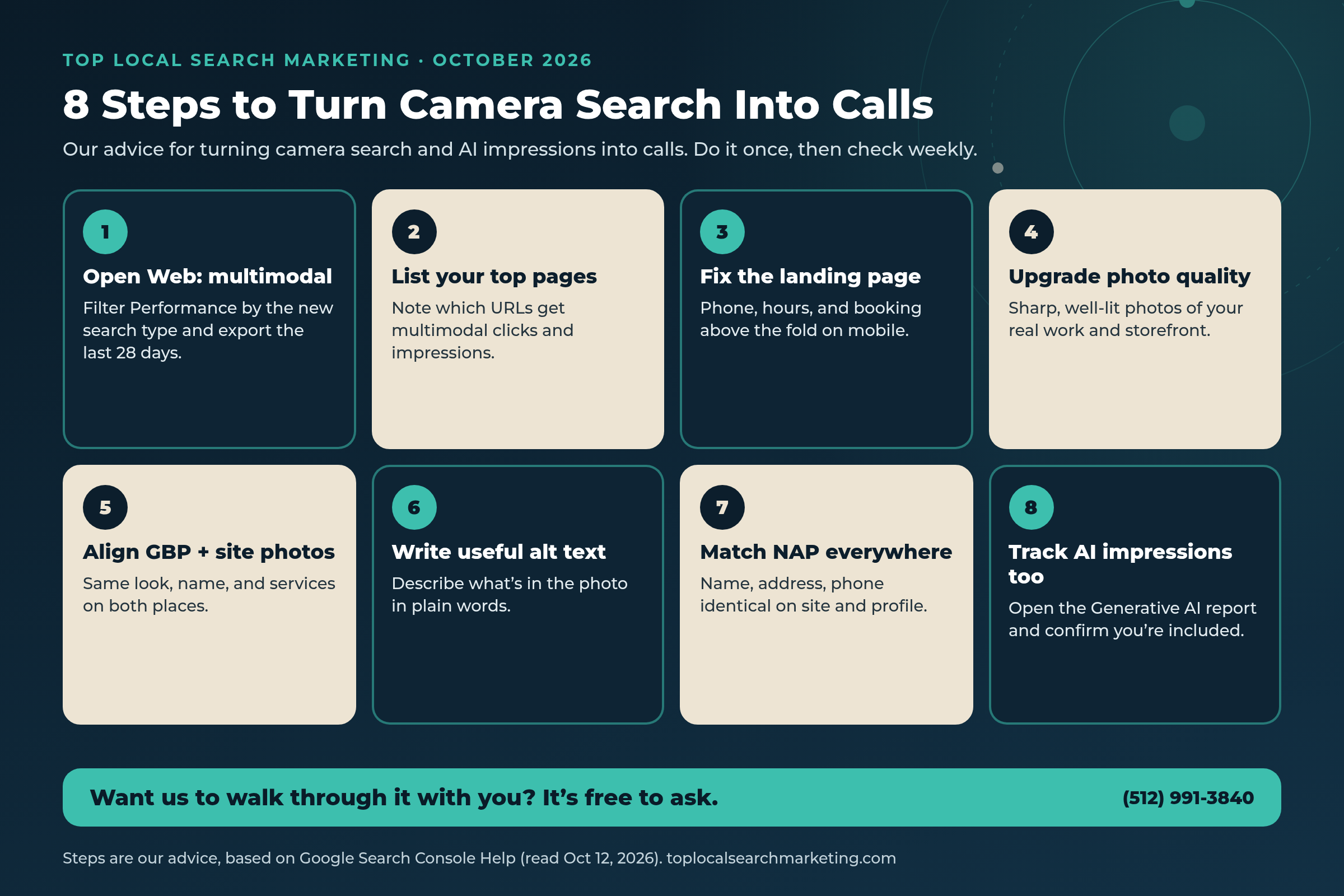
The idea is simple: find the pages camera search already touches, make those pages easy to call from, make your photos and Google Business Profile tell the same story, then watch multimodal and generative AI reports every week.
-
Open Web: multimodal in Search Console
Go to Performance → Search results. Set the search type filter to Web: multimodal. Look at the last 28 days. If you see little or nothing yet, check a longer range — Google said you’ll see metrics if your site receives this traffic, and the rollout started September 24, 2026.
-
Export and list your top pages
Export the table. Sort by clicks, then impressions. Write down the top five to ten URLs. Those are your visual-search landing pages whether you planned them that way or not.
-
Fix the landing page for a phone call
On a real phone, open each URL. Can you see the number without hunting? Are hours correct? Is there a clear tap-to-call or book path above the fold? Our advice: fix that before you rewrite the whole site.
-
Upgrade photo quality on those pages
Replace soft, dark, or tiny images with sharp photos of your real work and storefront. Google’s announcement is about understanding visual performance — weak photos don’t help you or the visitor.
-
Align Google Business Profile photos with site photos
Same business, same look. If Maps shows a remodeled storefront and your site still shows the old one, you create doubt. Keep categories, services, and NAP matching too — especially after recent Business Profile listing vs. posts policy updates.
-
Write useful alt text
Describe what’s in the image in plain words: “Crew standing on a completed metal roof in North Austin,” not a keyword pile. Alt text helps accessibility and gives image-led systems a clearer text signal.
-
Match NAP everywhere
Name, address, and phone should be identical on your site footer, contact page, and Google Business Profile. Camera search visitors still need to trust they’re in the right place.
-
Open the Generative AI performance report
Confirm you’re included under Settings → Search generative AI (default is include). Note which pages get AI Overview / AI Mode impressions. You don’t need vanity charts — you need the URLs that already appear.
Quick answer
What if I have zero multimodal rows?
That can mean you aren’t getting that traffic yet, or the property is new to the filter. Our advice: keep publishing clear photos of your real work, make sure key pages are indexable, and re-check in two weeks. Don’t invent a crisis from an empty table.
Typed Search vs. Multimodal vs. Generative AI Impressions
Use this table when you’re explaining the three reports to a partner or manager. Figures and product names below come from Google’s own pages linked in Sources.
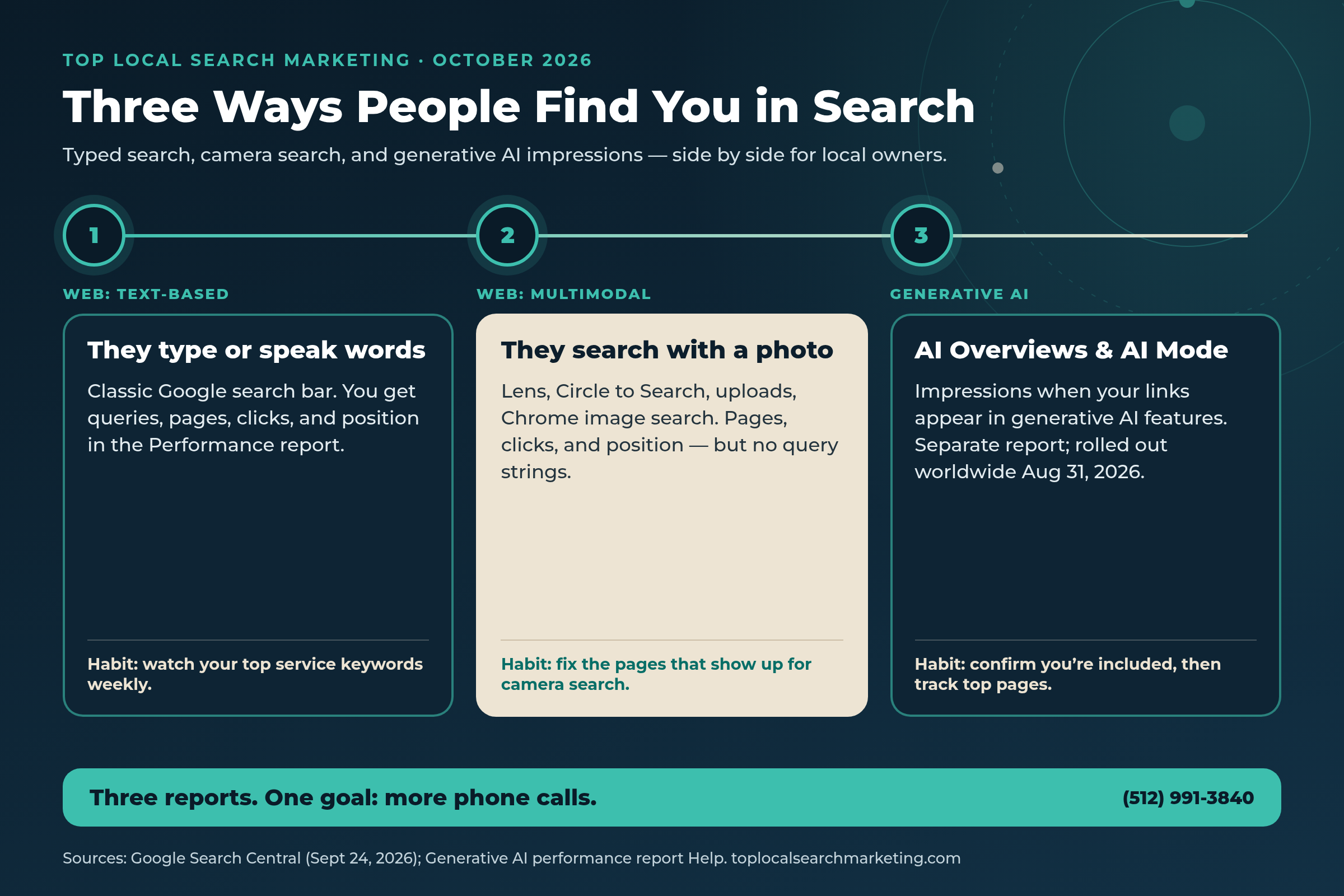
| Question | Web: text-based | Web: multimodal | Generative AI report |
|---|---|---|---|
| How did they search? | Typed or spoken words in the search bar | Image-led (Lens, Circle to Search, upload, Chrome image search) | Saw your link inside AI Overviews or AI Mode |
| Where in Search Console? | Performance → Search results → Web: text-based | Performance → Search results → Web: multimodal (also available in Generative AI features report filters) | Generative AI performance report |
| Core metrics | Clicks, impressions, CTR, position; queries available | Clicks, impressions, CTR, position; queries dimension not available | Impressions (pages, country, device, date) |
| See the query text? | Yes (with normal Search Console limits) | No — Google says query data isn’t available for this type | Not like classic Performance query reports |
| See the photo? | N/A | No | N/A |
| Rollout note | Long-standing Web reporting; now split from multimodal | Announced Sept 24, 2026; new data per Google | Worldwide as of Aug 31, 2026 per Google Help |
| Owner action | Track service keywords and landing pages | Fix multimodal pages for calls + photo quality | Stay included; improve pages that earn AI impressions |
| Goal for a local business | Calls and bookings from classic search | Calls from camera-driven visits | Visibility when AI answers, then a click or branded follow-up |
Your Weekly Checklist (10 Steps)
Block 30–40 minutes once a week. Same day each week helps. This is our advice based on the reports Google documented — not a claim that Google requires a weekly ritual.
-
Open Performance → Web: multimodal (28 days)
Screenshot or export. Note clicks and impressions vs. last week.
-
List the top 5 multimodal pages
Write the URLs in a simple note. Star any new entrants.
-
Spot-check those pages on your phone
Tap-to-call, hours, forms, and speed. Fix anything broken the same day if you can.
-
Scan new site photos before publish
Sharp, well-lit, faces and storefronts fully in frame. No blurry upscales.
-
Compare one GBP photo set to the homepage
Do they look like the same business this month?
-
Open Generative AI performance (28 days)
Note total impressions and top pages. Empty report often means too little AI traffic yet — or exclusion.
-
Confirm Search generative AI control
Settings → Search generative AI. Default include is usually right for local service businesses.
-
Check NAP on contact page vs. Maps
One mismatch can undo good visual trust.
-
Reply to new Google reviews
BrightLocal’s 2026 survey found 89% of consumers expect owners to respond to reviews, and 80% are more likely to use a business that responds to every review.
-
Pick one improvement for the week
One page, one photo set, or one CTA — finish it. Don’t open ten tabs and freeze.

If the weekly checklist feels like a lot, we can run the first month with you.
You’ll still own the business. We’ll own the report reading and the punch list.
Landing Pages That Convert Camera Traffic
Camera search visitors often arrive mid-decision. They already saw something. Your page should confirm “yes, that’s us,” then make the call easy.
Above the fold on mobile
- Business name that matches your sign and Maps listing
- Tap-to-call button with your real number
- City or service area in plain language
- One clear photo of the real work or storefront
Further down the page
- Short proof: recent jobs, licenses, years in market — only what you can stand behind
- Hours and directions
- A simple form as a backup to the call button
- Matching photos to your Google Business Profile gallery
Our honest view: fancy animations don’t convert camera traffic. Clarity does. If someone circled your logo on Android and landed on a page that still says “lorem ipsum” in the hero, or hides the phone in a footer hamburger, you paid for the click with attention you can’t get back.
Here is a simple test we use with owners. Hand your phone to someone who does not work at your company. Open one of your multimodal landing pages. Ask them to call you in under ten seconds without coaching. If they hesitate, squint, or open a new browser tab to search your name again, the page is not ready for camera traffic. Fix the hesitation — larger tap targets, a sticky call button, hours in plain text, and a photo that matches what they might have searched — before you invest in more content.
Our take: treat multimodal landing pages like a front door after dark. The visitor already decided to knock. Your job is to turn on the porch light and put the doorbell where a thumb can find it.
Also watch soft 404s and thin gallery pages. If multimodal impressions pile up on a URL that isn’t meant to convert, either strengthen that URL or point internal links and content so the stronger service page earns the visit next time.
Photos, Alt Text, and Your Profile
Google’s Sept 24 post says the new data helps you optimize your visual content. For a local owner, that doesn’t mean hiring a Hollywood crew. It means:
- Real work, really sharp. Job-site photos, before/afters, team shots, and the storefront in good light.
- Consistent story. The building, trucks, uniforms, and interiors should match across your website and Google Business Profile.
- Useful filenames and alt text. “north-austin-roof-replacement-crew.jpg” plus alt that describes the scene beats “IMG_4533.jpg” with empty alt.
- No bait-and-switch. Don’t use a luxury stock lobby if you run a warehouse counter. Trust breaks fast.
A note on Google Business Profile photos versus website photos. They do not need to be identical files, but they should feel like the same place. If customers search a storefront photo and land on a homepage that looks five years older, doubt creeps in. Rotate fresh, accurate photos on both surfaces on a steady cadence — monthly is plenty for most local businesses — and retire images that no longer match your hours, branding, or location.
Alt text is not a place to stuff every town name you serve. Write one honest sentence about the image. If the photo is a crew in front of a finished kitchen in Round Rock, say that. Screen readers get a better experience, and image-led systems get a cleaner text companion to the pixels.
Our reading of the multimodal report: it’s a mirror. It shows which visual pages already get attention. Polish those first. Then expand.

Generative AI Report + the Inclusion Control
Google’s Generative AI performance report includes impressions for AI Overviews and AI Mode. You can group by pages, countries, dates, and devices. Chart totals aggregate at the property level; the pages table aggregates by page. Preliminary data may show as a dotted line.
If you don’t see the report, Google says that usually means your site hasn’t received enough impressions in those features — or you’ve excluded the site. The Search generative AI control lets you include (default), exclude, or inherit from a parent property. Exclusion generally takes a few days to propagate; Google notes some content may take longer because of caching.
Google also states this control isn’t a ranking signal for the rest of Search, doesn’t replace choices like Merchant Center or Ads, and doesn’t replace Google-Extended if your concern is model training. To block Search entirely you’d use noindex — a different, much bigger decision.
Our advice for most local service businesses: stay included, measure impressions, and make sure the pages earning AI impressions are the ones you’re proud to send a customer to. If a thin or outdated URL shows up there, fix or consolidate it.
Camera search and AI Mode are not science projects. They’re new ways customers already look for a business like yours.
If you want a partner to turn the reports into a punch list — and then into calls — we’re easy to reach.
Book a Strategy Session Free and no pressure · Call (512) 991-3840 · Text us
FAQ
Frequently Asked Questions
Straight answers for owners. Sources linked in the sections above and listed at the end.
It’s a new search type filter Google announced on September 24, 2026. It shows how your pages perform when people search using images — including Google Lens, Circle to Search on Android, image uploads to Google Search, and Chrome’s right-click “Search this image” feature. You find it under the Performance report’s search type filter, and it also appears in the Generative AI features report.
Usually no. Google’s help documentation says that because multimodal searches mostly use images rather than text, specific text query data isn’t available for this traffic, and the queries dimension isn’t available when this search type is selected. You still see which pages got impressions and clicks, plus device and country breakdowns.
Google’s John Mueller said the team confirmed the data wasn’t previously in the counts — the report has new data. Search Engine Roundtable and Search Engine Land covered that clarification on the same day as the announcement. Our take: don’t treat a drop in “Web” numbers after the split as a traffic loss until you’ve checked multimodal separately.
It’s a Search Console report that shows impressions when links to your site appear in generative AI features on Google Search — specifically AI Overviews and AI Mode. Google says it rolled these insights out to all websites worldwide as of August 31, 2026. It does not include Search Labs experiments.
Our advice: usually no, unless you have a clear reason. The default control includes your site. If you exclude it, Google says your links and content won’t appear in those features, and you won’t get traffic or impressions from them. Other sites can still show up. Measure first with the Generative AI performance report, then decide.
Someone sees your work — a storefront, a haircut, a roof, a logo — searches with their camera, lands on your page, and calls if the page makes it easy. Our advice: put your phone number, hours, and booking path above the fold on mobile, match your Google Business Profile photos and NAP to your site, and fix the specific pages Search Console shows under Web: multimodal.
You need clear, real photos of your business and your work. Google’s announcement is about measuring how visual searches surface your content, not about buying stock photos. Our take: sharp photos of your real storefront, team, and completed jobs beat generic stock every time — and they should match what people see on your Google Business Profile.
Our advice: once a week is enough for most local owners. Export the last 28 days of Web: multimodal, note your top pages, check the Generative AI report for impression trends, and fix one weak landing page before you chase new ones. Small, steady checks beat a once-a-year scramble.
Sources
Every figure and product claim in this post comes from the pages below. Opinion is labeled as ours.
- Google Search Central — Announcing web multimodal Search performance reporting (Sept 24, 2026)
- Google Search Console Help — Generative AI performance report
- Google Search Console Help — Search generative AI control
- Search Engine Roundtable — Multimodal search type filter (Sept 24, 2026)
- Search Engine Land — Performance reports get multimodal filter (Sept 24, 2026)
- BrightLocal — Local Consumer Review Survey 2026 (published Feb 11, 2026)
Next step
Let’s Look at Your Reports Together
Google gave local owners something useful on September 24: a way to see camera search traffic beside typed search and generative AI impressions. Our 8-step checklist is how we turn that into a weekly habit — pages fixed, photos sharpened, NAP matched, phone ready.
If you’d like a second set of eyes, book a free strategy session. Bring Search Console access if you have it. We’ll leave you with a short punch list either way.
Book a Strategy Session Free and no pressure · Call (512) 991-3840 · Text us · Top Local Search Marketing