
Google Ads Update · October 2026
If you pay for Google Local Services Ads (the ads with the “Google Guaranteed” or “Google Screened” badge at the top of search results), a call you never answered can now show up on your bill.
Since October 1, 2026, Google can charge you for a missed call when it comes in during your business hours and the caller stays on the line for more than 20 seconds. Google spelled out the details in a rewritten “How leads work” help page, which Search Engine Roundtable reported on October 8.
If that stings a little, you’re not alone. You’re on a roof, with a client, at a showing, or under a car. The phone rings and you can’t get to it. Now that missed call can cost you a lead fee and the job.
The good news: the fixes are simple, and most of them win you more customers anyway. This guide walks you through what changed with Local Services Ads missed calls, what it means in plain English, and a step-by-step plan so you only pay for calls you actually get to talk to.
Start here
The Short Answer
- What changed: Since October 1, 2026, a missed call to your Local Services Ad during business hours can be charged as a lead if the caller stays on the line for more than 20 seconds.
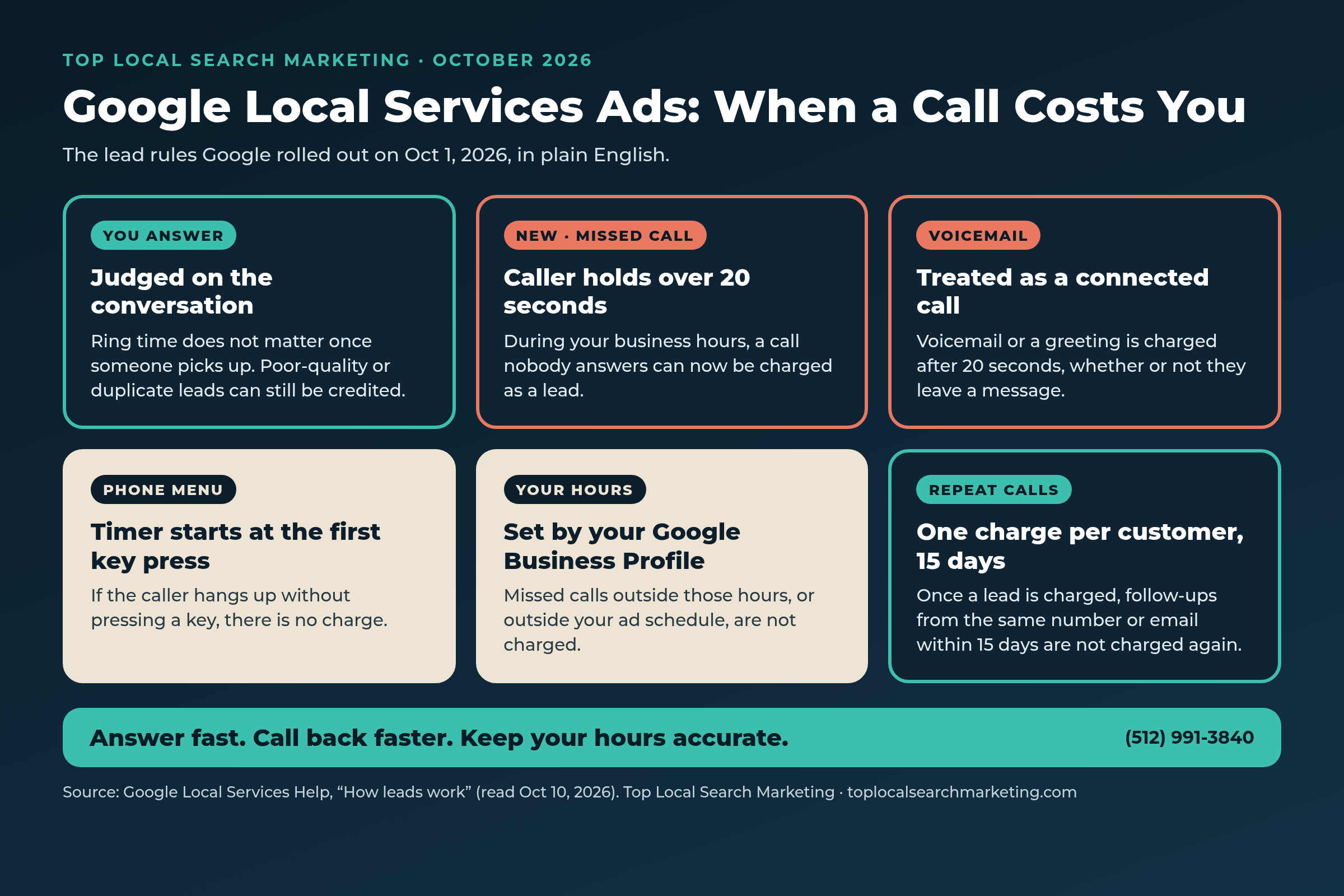
- Voicemail counts: If the call goes to voicemail or a recorded greeting, Google treats it as a connected call and charges it after 20 seconds, whether or not the caller leaves a message.
- Phone menus: If your system asks callers to press a key and they hang up without pressing one, there’s no charge. Once they press a key, the 20-second timer starts from that key press.
- Your hours decide it: Google uses the hours on your Google Business Profile. Missed calls outside those hours, or outside your ad schedule, are not charged.
- Repeat callers: Once a lead is charged, follow-up calls and messages with that customer aren’t charged again, as long as you’ve been in touch within 15 days from the same number or email.
- What to do: Check your hours, answer more calls, call back fast, and look at your charged leads every week. Our full plan is below.
Quick answer
Does Google charge for missed calls on Local Services Ads now?
Yes, in some cases. Since October 1, 2026, Google can charge a Local Services Ads lead fee for a missed call that comes in during your business hours when the caller stays on the line for more than 20 seconds. Calls that reach voicemail or a recorded greeting are charged the same way. Missed calls outside your business hours, or outside your ad schedule, are not charged.

A missed call can now cost you twice: the lead fee, and the job if that caller moves on to someone else.
Let’s make sure the calls you pay for turn into booked work. A short call with our team is free.
What Changed on October 1, 2026
Google first told Local Services Ads advertisers in an email titled “Upcoming changes to lead charge policy.” Search Engine Roundtable published that email on August 25, 2026. It said: “On October 01, 2026, we are updating how and when you are charged for call leads originating from Local Services Ads.”
The email named two changes:
- Missed calls. “Missed calls during business hours will now be charged as valid leads if a user stays on the line for more than 20 seconds,” with a few exceptions.
- Follow-up calls. If a first call doesn’t qualify as a charged lead, later calls between you and that customer that meet Google’s lead rules can be charged.
Then, in early October, Google rewrote its public “How leads work” page with much more detail. Search Engine Roundtable flagged the update on October 8 and called the 20-second missed-call rule “the biggest change.” The page also added lead charge statuses, a 30-day review period for credits, and a list of common questions.
Why does this matter so much? Under the older help page, as PPC Land described it, a missed call with no voicemail became a valid lead only after you returned it and either spoke with the customer or left a voicemail. In other words, you used to pay when you made contact. Now, a caller who simply waits more than 20 seconds during your business hours can be enough.
How a Call Gets Charged Now
Here is Google’s current list of valid leads, in plain English, from the How leads work page (we read it on October 10, 2026):
- You answer a call, or you call the customer back and speak with them.
- You miss a call during your business hours and the caller stays on the line for more than 20 seconds.
- You get a text message or email from the customer.
- You get a voicemail from the customer.
- You get a booking request (U.S. and Canada only).
The details that decide your bill
- Answered calls are judged on the conversation. Google says that if someone at your business answers, “even after 20 seconds of ringing,” you aren’t charged based on ring time. The call is judged like any answered call.
- Short missed calls. If the phone rings for less than 20 seconds and the customer later calls you back, that callback is judged by the answered-call rules.
- Phone menus. If your system asks callers to press a key and they hang up without pressing one, you aren’t charged, even if the menu played for more than 20 seconds. Once they press the first key, the 20-second timer resets. Extra key presses in a longer menu don’t reset it again.
- Voicemail or a greeting. During business hours, a call that reaches voicemail or a recorded greeting without a key press is treated as a connected call. It’s charged if the caller stays on the line for more than 20 seconds, whether or not they leave a message.
- Business hours. These are the hours on your Google Business Profile. If your ad schedule is different, unanswered calls are only charged when they happen during your active ad schedule and inside your business hours.
- Repeat contact. Once a lead is charged, follow-up calls or messages with that customer aren’t charged again, as long as there’s been contact within 15 days and it’s the same phone number or email. After 15 quiet days, a new call can count as a new lead.
Quick answer
Does a voicemail count as a charged Local Services Ads lead?
Yes. If a call during your business hours goes to voicemail or a recorded greeting, Google treats it as a connected call. It can be charged once the caller has been on the line for more than 20 seconds, even if they never leave a message.
Why Google Says It Made This Change
In its email, Google said people who use Local Services Ads have immediate needs and want “to connect quickly with a trusted local professional.” It said the update “helps ensure our platform continues to meet these customer expectations while rewarding businesses that provide excellent responsiveness.”
Our take (opinion): Google is saying, pretty plainly, that answering the phone is now part of the deal. That’s fair to the person calling. It’s also a real cost for a small team that can’t always get to the phone. Both things are true, and the plan below is built around both.
What Google says protects you
The email listed two protections. One is the key-press rule for phone menus. The other is “new safeguards to help limit robot calls and address spam call abuse.”
The help page adds that Google’s automated systems filter out invalid activity like spam and duplicate contacts. It also says Google keeps checking each lead for 30 days, and if a lead turns out to be poor quality, a duplicate, or invalid, a credit is applied to your account automatically.
One important exception: Google’s page says lead credits aren’t available for health care categories or tax specialists in the U.S., or for accounts in the European Economic Area. If that’s you, answering every call matters even more.
What Is Still Unclear
We want to be straight with you about what isn’t known yet.
When Google’s email first went out, PPC Land noted that it described the spam and robocall safeguards as a commitment without saying how they would work. A month later, in its September 25 report, PPC Land said there was still no mechanism, threshold, appeal route, or timeline for them. Google’s help page now explains voicemail and phone menus in detail, but it still doesn’t say exactly how a spam call gets caught before you’re charged.
PPC Land also pointed out that Google hasn’t said whether a missed-call lead is priced the same as an answered call. Our advice: until Google says more, plan as if a missed call costs about what any call lead costs in your area.
A note on the math. You may see calculators online. PPC Land looked at one called CallMath. Its default example (40 calls a month, 70% answered, a $40 lead) works out to $230.40 a month in missed-call charges. PPC Land was careful to say that figure is gross, not extra cost, because some of those calls, like voicemails, could already be charged before October 1. The calculator’s builder also disclosed referral fees from two AI receptionist products it ranks. Use your own call log, not someone else’s example.
Why Every Local Business Should Care, Even Without These Ads
Maybe you don’t run Local Services Ads at all. This still matters, because the bigger lesson isn’t about Google’s billing. It’s about how many customers never reach a person.
Invoca, a call tracking company, analyzed more than 70 million calls for its Lead Conversion Benchmarks Report 2026, released July 13, 2026. It found that 44% of callers to businesses never reach a person. On the calls that were answered, 38% were qualified leads, and 42% of those converted on the call. These are averages from Invoca’s own customer base, not every business in America, but the direction is hard to ignore.
The same report found that calls referred by ChatGPT had a 49% lead rate, the highest of any channel Invoca measured. Invoca said ChatGPT is still a small share of call volume, but those callers arrive more informed and closer to a decision.
So whether a customer finds you through an ad, Google Maps, or an AI answer, the moment that matters most is when the phone rings. If nobody picks up, all the work it took to earn that call goes to waste.
One more thing: because Google uses your Business Profile hours to decide when a missed Local Services Ads call counts, your profile hours are now a billing setting, not just a listing detail.
Quick answer
How do business hours affect Local Services Ads charges?
Google uses the hours on your Google Business Profile as your business hours, and missed calls are only charged during those hours. If your ad schedule is different, unanswered calls are only charged during your active ad schedule and inside your business hours. Keep both accurate, including holiday hours.
Not sure how many calls you’re missing?
Most owners don’t know their real answer rate until someone pulls the call log with them. We’ll do that with you on a free strategy call and show you the first fixes.
Want to know how many calls you’re missing?
Book a free strategy call. We’ll review your Google Business Profile hours, your Local Services Ads setup, and how your calls get answered, then show you the first fixes.
- Your Ask Maps™ & AI visibility score (Google, ChatGPT, Gemini, Perplexity)
- Exactly which competitor is capturing your customers right now
- Your 4 Magic Keys conversion gaps + 90-day capture roadmap
Prefer to talk? Call (512) 991-3840
Myth vs. Fact
We hear these from owners all the time. Here’s what Google’s own help page says.
Myth: If I don’t pick up, I don’t pay.
Fact: Since October 1, a missed call during your business hours can be charged once the caller has stayed on the line for more than 20 seconds.
Myth: Voicemail protects me, because nobody talked to them.
Fact: Voicemail or a recorded greeting is treated as a connected call. It’s charged after 20 seconds, message or not.
Myth: A phone menu means I’ll never get charged.
Fact: Only callers who hang up without pressing a key aren’t charged. Once they press a key, a new 20-second timer starts. Menus can also lose real customers who don’t want to press buttons, a trade-off flagged in PPC Land’s coverage.
Myth: Answering more calls will shrink my Google bill.
Fact: Not necessarily. Answered calls are leads too. In PPC Land’s walk-through of the CallMath example, answering more calls actually raised total spend with Google a little. The real win is more booked jobs, not a smaller invoice.
Myth: If I call the same customer back three times, I pay three times.
Fact: Once a lead is charged, follow-ups with that customer aren’t charged again, as long as you’ve been in touch within 15 days from the same number or email.
Myth: Bad leads are just a cost of doing business now.
Fact: Google says it reviews leads for 30 days and applies credits automatically for poor-quality, duplicate, or invalid leads (with exceptions for U.S. health care, tax specialists, and EEA accounts). You can also leave feedback on each lead.
Every Call Type, Side by Side
A simple comparison of what Google says now and what we suggest you do about it. Rules are from Google’s How leads work page; the “What to do” column is our advice.
| Call type | What Google says now | What to do |
|---|---|---|
| You answer | Judged on the conversation. Ring time doesn’t matter. Poor-quality leads can be credited. | Answer with your business name, ask what they need, and book it. |
| Missed call, under 20 seconds | Not charged as a missed call. If they call back, the callback is judged like an answered call. | Call back within minutes. Speed wins the job. |
| Missed call, over 20 seconds, during business hours | Can be charged as a lead. | Treat it like a paid lead: call or text back right away. |
| Voicemail or recorded greeting | Charged after 20 seconds, whether or not they leave a message. | Keep the greeting short, promise a fast callback, then keep that promise. |
| Phone menu (press a key) | No key press, no charge. The timer starts at the first key press. | Keep menus short or skip them. Call your own line to test it. |
| Call outside business hours or ad schedule | Missed calls aren’t charged. | Match your Business Profile hours and ad schedule to when someone can really answer. |
| Same customer calls again | Not charged again within 15 days of contact, same number or email. | Don’t hesitate to follow up. It won’t add a second charge inside that window. |
| Spam or wrong-service lead | Reviewed for 30 days; automatic credits for poor-quality, duplicate, or invalid leads (some exceptions). | Check charge statuses weekly and leave feedback on bad leads. |
Who Feels This the Most
Any business that pays per lead and can’t always get to the phone. Google’s migration notes name the first group of U.S. categories moving into Google Ads: plumbing, HVAC, electrical, appliance repair, house cleaning, lawn care, roofing, pest control, and moving. But the same habits matter for anyone whose customers call first.
Home services and roofers
You’re on a job with your hands full and the phone is in the truck.
What helps: Forward calls to an office line or an answering service during your posted hours.
Law firms
Intake calls often land while attorneys are in court or with clients.
What helps: One trained intake person or service, plus a same-day callback promise.
Med spas, clinics, and other health care
Front desks juggle check-ins and calls at the same time. And Google says lead credits aren’t available for U.S. health care categories.
What helps: Put a dedicated person on the phones during your busiest hours.
Auto repair
Service advisors are at the counter with customers when the phone rings.
What helps: Add a second phone to ring, so a call never rings out at one desk.
Real estate agents
Showings and closings mean you miss calls all day.
What helps: A quick text-back the moment a call is missed, then a real callback.
Restaurants, retail, and everyone else
Even if you never buy these ads, Invoca’s finding that 44% of callers never reach a person is the real warning.
What helps: Find out your answer rate, then work on picking up more of those calls.

Our 8-Step Plan to Stop Paying for Calls You Miss
Simple steps, in order. Most owners can finish the first four this week.
-
Fix your Google Business Profile hours.
Google uses these hours to decide when a missed call counts, so make sure they match when someone can actually answer. Add special hours for holidays and short closures. Google’s special hours guide shows you how, for closures of up to six days in a row.
-
Match your ad schedule to your real phone coverage.
If you use an ad schedule, missed calls only count during that schedule and inside your business hours. Run your ads when someone is there to pick up. Invoca also recommends lining up paid ad schedules with the hours your team can take calls.
-
Pull your call log and find your answer rate.
Look at the last 30 days. How many calls came in during business hours? How many were missed? How long did those callers wait? Compare your answer rate with Invoca’s benchmark that 56% of calls to businesses reach a live person. If you’re near that number, there’s room to grow.
-
Make sure someone, or something, answers.
Options include having a second phone ring at the same time, an answering service, a trained person during your busiest hours, or an AI voice receptionist (we offer this too). Pick the one that fits your budget and the way your customers like to be helped.
-
Choose your voicemail and phone menu on purpose.
Voicemail counts as a connected call after 20 seconds. A phone menu delays the timer, but it can also lose callers. Our take: for most small businesses, one short greeting and a fast callback works better than a long menu.
-
Call or text back within minutes.
Google won’t charge again for follow-ups with the same customer inside the 15-day window, so there’s no reason to wait. You can reply to message leads right from the Leads page in Google Ads. The call you return quickly is the job you keep.
-
Check your charge statuses every week.
On the Leads page, each lead shows as Charged, Not charged, In review, or Credited. Google keeps checking leads for 30 days. Leave feedback on bad leads, and if you keep getting the wrong kind, tighten your service areas, categories, and service types in your campaign settings.
-
Save your reports before the move to Google Ads.
Local Services Ads are moving into Google Ads, and Google says your old performance reports won’t carry over. Download your history before your switch date so you can still compare cost per lead before and after October 1.

The Move to Google Ads: What to Know
This billing change lands in the middle of a bigger shift. Google is moving Local Services Ads into the main Google Ads platform as a Performance Max campaign type with pay-per-lead goals. Google says that “where and how your ads appear to local customers on Google Search and Google Maps remains exactly the same.”
Here’s the timeline from Google’s transition help page:
- August 2026: The first phase began for select U.S. home and storefront service advertisers.
- Late 2026: It expands to more advertisers, including service-area businesses without storefronts and accounts with custom bidding or booking setups.
- 2027: Non-U.S. accounts and all remaining categories move over.
What to expect when your turn comes:
- You get an email 14 days before your migration date, plus a banner in your current dashboard.
- Your old Local Services Ads performance reports won’t carry over, so save them first.
- Manual bidding, such as setting a maximum cost per lead, is no longer supported in Google Ads.
- Your average weekly budget is divided by 7 to set a daily average budget, and monthly spend is capped at that daily budget times 30.4.
Google’s timeline puts service-area businesses without a storefront in late 2026. Our take: save your reports and set up your phone coverage now, so you aren’t learning a new dashboard and a new billing rule in the same week.
A 15-Minute Weekly Phone Check
Put this on your calendar for the same time every week. It’s the simplest habit that protects your ad budget.
- Open your Leads page and look at the Charge Status column. Note anything that looks wrong.
- Count the missed calls that came in during business hours this week.
- Call or text back anyone you missed who hasn’t heard from you yet.
- Leave feedback on any spam or wrong-service leads.
- Check your Business Profile hours for any upcoming holidays or closures.
- Once a month, call your own number during business hours, like a customer would, and time how long it rings.

FAQ: Straight Answers to What Owners Ask Next
Answers based on Google’s own help pages, read on October 10, 2026.
Yes, in some cases. Since October 1, 2026, a missed call during your business hours can be charged as a valid lead if the caller stays on the line for more than 20 seconds. Calls that reach voicemail or a recorded greeting are charged the same way. Missed calls outside your business hours or ad schedule are not charged.
More than 20 seconds, during your business hours, for a call nobody answers. If your phone menu asks callers to press a key, the 20 seconds start after the first key press, and callers who hang up without pressing a key aren’t charged.
Yes. Google treats voicemail or a recorded greeting during business hours as a connected call. It’s charged if the caller stays on the line for more than 20 seconds, whether or not they leave a message.
No, not inside the 15-day window. Once a lead is charged, follow-up calls or messages with that customer aren’t charged again, as long as there’s been contact within 15 days and it comes from the same phone number or email. After 15 quiet days, a new call can count as a new lead.
Not as missed calls. Google uses the hours on your Google Business Profile as your business hours. If your ad schedule is different, unanswered calls are only charged during your active ad schedule and inside your business hours.
Google says it filters out spam and duplicate contacts and keeps reviewing leads for 30 days. Poor-quality, duplicate, or invalid leads get an automatic credit, except for U.S. health care categories, tax specialists, and accounts in the European Economic Area. You can also leave feedback on each lead.
Our honest view: not automatically. Look at your own numbers first. If you can answer most calls during your posted hours, the change mostly rewards you. If you can’t, fix your hours and phone coverage before you decide. We’re happy to look at it with you.
Google says your ads will show in the same places on Search and Maps. You’ll get an email 14 days before your switch, your old reports won’t carry over, and manual bidding such as a maximum cost per lead goes away. Save your reports before your switch date.
Sources
We paraphrase with credit, and every figure belongs to its publisher. Rules can change, so check Google’s help pages for the latest wording.
- Google Local Services Help — “How leads work” (read October 10, 2026) — source
- Search Engine Roundtable — “Google Local Service Ads Expands How Leads Work Information” (October 8, 2026) — source
- Search Engine Roundtable — “Google To Charge For Missed & Subsequent Calls On LSAs” (August 25, 2026, with the Google Ads Liaison update) — source
- PPC Land — “Google charges Local Services advertisers for missed calls over 20 seconds” (August 25, 2026) — source
- PPC Land — “Google LSA advertisers face missed-call charges from October 1” (September 25, 2026) — source
- Google Ads Help — “Local Services Ads transition to Performance Max campaigns with pay-per-lead goals” — source
- Invoca — “New Invoca Data Finds the Best Leads Now Start in ChatGPT” (press release, July 13, 2026) — source
- Invoca — “Call Answer Rate: 2026 Benchmarks and Tips to Improve” (August 19, 2026) — source
- Google Business Profile Help — “How to set Special hours” — source
Let’s Look at Your Calls Together
You didn’t start your business to babysit a phone system. We get it. On a free strategy call, we’ll walk through your Google Business Profile hours, your Local Services Ads settings, and how your calls get answered today. You’ll leave with a short list of fixes in plain English.
And if these ads aren’t the right fit for you, we’ll tell you that too.
Book Your Free Strategy Call Call (512) 991-3840 · Text us
Prefer to talk now? Call or text (512) 991-3840. Tell us your business and your city, and we’ll take it from there.
Top Local Search Marketing · Lakeway, Austin, and Lake Travis · Buffalo and Western New York · serving local businesses across the U.S.