
Google Business Profile Update · October 2026
Google just put in writing what belongs on your Google Business Profile and what doesn’t. If your profile has a sale, a price, or a “call today” line in the description, this is worth a few minutes of your week.
On October 6, 2026, Search Engine Roundtable reported that Google rewrote the advertising section of its content policy for Google Maps and Business Profiles. For the first time, that section has rules written just for business owners. The short version: your listing should describe your business, and your posts are where your offers belong.
If you were ever told to pack your description with deals, or to put your phone number in every post, you’re not alone. A lot of owners were taught exactly that, often by people who meant well. The rules are clearer now, and the fix is simple.
This guide walks you through what changed, what it means in plain English, two other profile changes Google made in the past three weeks, and a step-by-step cleanup you can do yourself or with our team.
Start here
The Short Answer
- What changed: Google’s Maps content policy now has a “For merchants” section. In your listing, it doesn’t allow promotional content that contains time-bound promotions, pricing, or direct calls to action.
- Posts are still for selling: Google says offers and updates that may look promotional “are otherwise permitted in posts.”
- What doesn’t belong in posts: email addresses, phone numbers, social media links, or links to other websites that aren’t related to your business.
- A related September change: Google may remove posts with contact information it can’t verify. It suggests a Call now button instead, which uses your verified number.
- Another September change: when Google tells you about a suggested edit, you have 4 days to accept or reject it. If you don’t answer, Google may publish it when your website or other public information backs it up.
- What to do: move deals and prices out of your description and into Offer posts, use buttons instead of typed phone numbers, make your website match your profile, and check your profile every week. Our full plan is below.
Get a Free Strategy Call Free and no pressure · Call (512) 991-3840 · Text us
Quick answer
Can I still advertise deals on my Google Business Profile?
Yes, in your posts. Google’s updated Maps policy says your listing shouldn’t include promotional content with time-bound promotions, pricing, or direct calls to action. But it also says offers and updates that may look promotional are “otherwise permitted in posts.” The easiest home for a deal is an Offer post with a title, dates, and terms.
Your Google Business Profile is often the first thing a new customer sees. It should make them want to call you, not make Google want to hide something.
If you’d like a second set of eyes on it, a short call with our team is free. We’ll show you what to keep, what to move, and what to fix first.
Book Your Free Strategy Call Free and no pressure · Call (512) 991-3840 · Text us
What Google Changed (Reported October 6, 2026)
When people talk about Google Business Profile policy, this is the page that matters most. Google keeps one big policy page for everything people add to Google Maps, from reviews and photos to the details owners write about their own business. It’s called “Prohibited & restricted content.” The advertising and solicitation section now opens with this line:
“Contributions to Google Maps should reflect genuine experiences or define a business’s permanent identity. This helps users discover listings and ensures the platform remains reliable rather than a marketplace.”
Then Google added a “For merchants” part with two rules:
- In the listing: “Promotional or commercial content that contains any of the following: Time-bound promotions, pricing, or direct calls-to-action.”
- In posts: “Email addresses, phone numbers, social media links, or links to other websites in your posts that are not related to your business. Offers and updates that may be seen as promotional or commercial content are otherwise permitted in posts.”

Search Engine Roundtable reported the change on October 6, after a local search consultant spotted it and shared before-and-after screenshots on LinkedIn.
Two things are worth knowing. First, Google hasn’t published a blog post or an effective date. October 6 is the day the change was reported, not a date Google announced. Second, the idea isn’t brand new. Google’s Guidelines for representing your business already said your business description shouldn’t “focus on special promotions, prices, and offer sales.” Google’s own examples of what’s not allowed are “Everything on sale, -50%” and “Best bagels in town for $5!” The same guidelines say no links of any kind belong in the description.
What’s new is that the main Maps policy now says it plainly for the whole listing, and it adds “direct calls-to-action” to the list.
Quick answer
What counts as my Google Business Profile “listing”?
Google doesn’t define it on the policy page. Our reading: it’s the lasting information about your business, like your name, description, and the other text you write about who you are. Posts are separate, dated updates. Keep the listing about who you are, and save the selling for your posts.
Your Listing vs. Your Posts: What Goes Where
Here’s the simplest way we explain it to owners. Your listing is your sign out front. It tells people who you are, what you do, and when you’re open, and it stays the same week after week. Your posts are the specials board by the register. That’s where this week’s deal, this month’s event, and today’s news go.
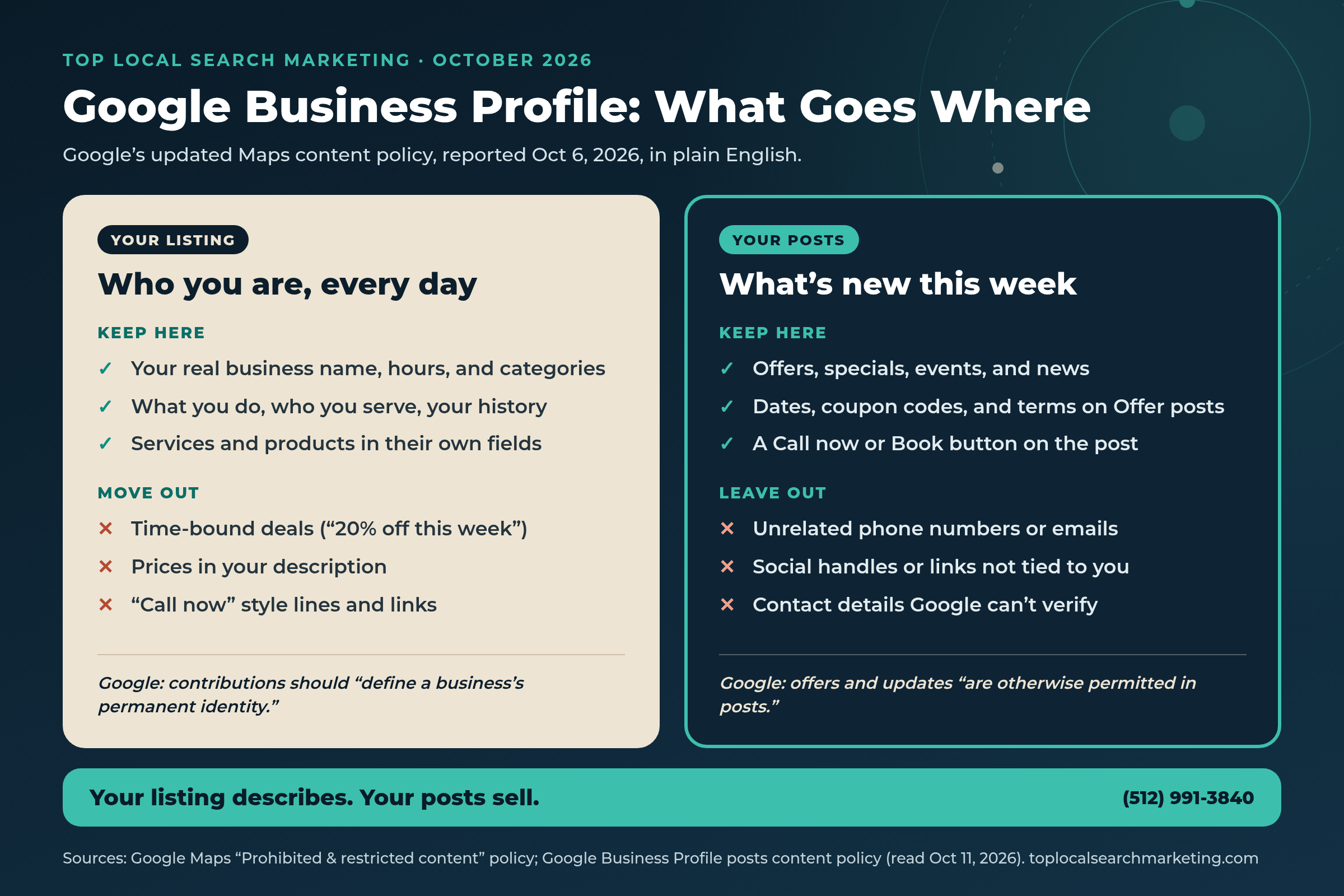
Keep in your listing
- Your real business name, the way it appears on your sign and website.
- A description of your services and products, plus your mission and history. That’s how Google’s guidelines describe the field.
- Your hours, categories, service area, phone number, and website, each in its own field.
Move to your posts
- Sales and specials with dates, like “20% off through Friday.”
- Prices and “starting at” lines.
- Lines like “Call now for a free quote” or “Book today.”
What a good post looks like now
Google’s guide to creating posts lists three post types:
- Updates share news about your business. You can add a description, photo, video, and an action button with a link. Google says the button should send customers to a website where they can finish the action, like booking, ordering online, or learning more.
- Offers are for promotional sales or deals. They need a title, dates, and a time, and they automatically get a “View Offer” button. You can add a coupon code, a link, and terms and conditions.
- Events need a title plus start and end dates and times. You can add a description, photo, video, and a button.
Two more details from Google’s guide: posts older than 6 months are archived unless you set a date range, and you can schedule posts or set them to repeat weekly or monthly. One exception to know about: Google’s posts content policy says hotels can’t create Offer posts or posts that mention deals, promotions, special offers, or discounts.
Why This Matters More Than It Looks
It’s easy to shrug at a policy page. Here’s why we wouldn’t.
Customers read your profile before they ever call. In BrightLocal’s Local Consumer Review Survey 2026, a survey of 1,002 U.S. adults, 97% of consumers said they read reviews for local businesses, and Google was the most used review site at 71% (down from 83% the year before). After reading positive reviews, 54% said they go on to check the business’s website. That path, from profile to website to phone call, only works if every step tells the same story.
More people are asking AI for recommendations. The same survey found that 45% of consumers used ChatGPT or other AI tools for local business recommendations, up from 6% the year before. BrightLocal’s advice was to keep your website up to date and to watch your business listings for mistakes.

Our take: AI tools and Google’s own features pull the facts about your business from many places. A clean, consistent profile and a website that matches it give them less to get wrong.
Posts that break the rules get hidden. Google’s posts guide says a post marked “Not approved” doesn’t show on Search or Maps. A question mark next to that status tells you which policy the post broke.
The guidelines tie into suspensions. Google’s guidelines open by saying that, to make sure your Business Profile won’t be suspended, Google requires you to avoid prohibited content and follow its product guidelines. We haven’t seen Google say it will suspend a profile over this exact rule, and we won’t pretend otherwise. But a profile that follows the rules is one less thing to worry about.
It’s simply better marketing. Our take: a description that says what you do, who you serve, and why people trust you keeps working all year. A coupon line that ran out months ago makes a business look like nobody is minding the store.
Two Other Profile Changes From the Same Month
The October 6 policy change didn’t come out of nowhere. In the two weeks before it, Google changed two other help pages that every owner should know about.
1. You have 4 days to answer a suggested edit (reported September 23)
Anyone can suggest a change to your profile, like new hours or a different phone number. Google added a section to its help page on Google updates to your Business Profile, which Search Engine Roundtable reported on September 23. It says:
- “If a suggested edit requires your review, you may receive an email or an in-product notification. Once notified, you have 4 days to accept or reject the suggestion.”
- “If you don’t respond within 4 days, Google may automatically publish the update if it is supported by other publicly available information, such as your business website.”
The page also says Google may apply some suggested edits without asking you first, in cases where the edits are needed to meet policy guidelines. In the profile editor, blue text shows info that Google changed.
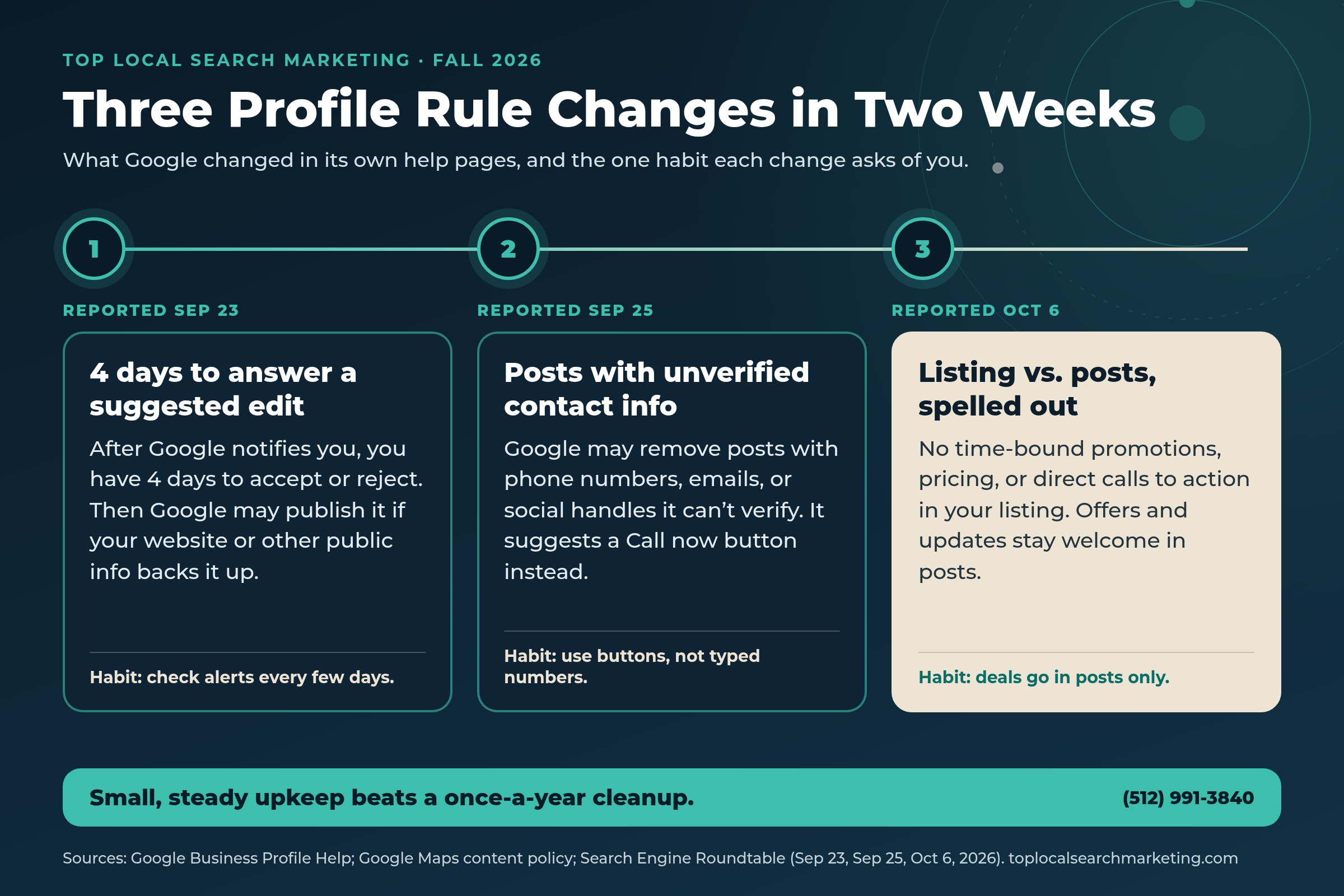
2. Posts with unverified contact info may be removed (reported September 25)
Google’s posts content policy used to say, “To avoid the risk of abuse, we do not allow your post content to include a phone number.” As Search Engine Roundtable reported on September 25, it now says: “To avoid fraud or abuse, we may remove posts with unverified contact information. This includes phone numbers, email addresses, and social media handles.”
Google’s suggested fix is to “attach a Call now button to your post. This uses your verified Business Profile phone number so customers can contact you.” Its posts guide adds that posts with a phone number in the description “might get rejected if they cannot be verified as being connected to the business.”
Our take: put all three changes side by side and Google’s message is consistent. Keep your facts clean and verified, and keep selling in the places built for selling.
Quick answer
Can I put my phone number in a Google Business Profile post?
Google may remove posts with contact information it can’t verify, including phone numbers, emails, and social handles. The safer choice is the Call now button, which uses the verified phone number on your profile. Your number still shows in the phone field of your listing.
Not sure what Google sees when it looks at your profile?
It’s easy to lose track of what your description says after a few years. We’ll go through it with you on a free strategy call, side by side with your posts and your website, and give you a short list of fixes.
Get My Free Strategy Call Free and no pressure · Call (512) 991-3840 · Text us
Want a second set of eyes on your Google Business Profile?
Book a free strategy call. We’ll go through your listing, your posts, and your website with you and show you what to fix first.
- Your Ask Maps™ & AI visibility score (Google, ChatGPT, Gemini, Perplexity)
- Exactly which competitor is capturing your customers right now
- Your 4 Magic Keys conversion gaps + 90-day capture roadmap
Prefer to talk? Call (512) 991-3840
What Google Hasn’t Said Yet
We want to be straight with you about what isn’t known.
- No announcement or start date. Google changed the policy page without a blog post. The date we have is the day it was reported.
- No exact definition. The policy doesn’t spell out which fields count as “the listing,” or exactly what a “direct call-to-action” is.
- Prices in Google’s own fields. Google’s profile tools have their own places for products and services. The new policy doesn’t say how the pricing rule fits with those. Our advice: until Google says more, treat the rule as covering the promotional text you write, like your description, and keep using Google’s product and service fields the way they were designed.
- How contact info gets verified. Google says posts with unverified contact details may be removed. It doesn’t say how it checks them.
- Older content. Google hasn’t said whether it will review descriptions that were written before the change.
None of that changes the plan below. Every step in it follows Google’s own written guidelines, so it holds up no matter how the details shake out.
Myth vs. Fact
We hear these from owners all the time. Here’s what Google’s own help pages say.
Myth: Google banned promotions on Business Profiles.
Fact: No. Google says offers and updates that may look promotional are “otherwise permitted in posts.” It’s the listing itself that should stay free of time-bound promotions, pricing, and direct calls to action.
Myth: Putting my phone number in every post helps people call.
Fact: Google may remove posts with contact info it can’t verify. It recommends a Call now button, which uses your verified profile number.
Myth: Adding keywords or a location to my business name helps me show up.
Fact: Google’s guidelines say your name should match your real-world name, and that adding unnecessary information “isn’t permitted, and could result in the suspension of your Business Profile.”
Myth: Google will always ask me before it changes my profile.
Fact: Google says it notifies you about certain suggested edits and gives you 4 days. It also says some edits may be applied without your review.
Myth: My website has nothing to do with my Google profile.
Fact: Google says an unanswered suggested edit may be published if it’s “supported by other publicly available information, such as your business website.”
Myth: Once I post something, it stays up forever.
Fact: Google says posts older than 6 months are archived unless a date range is set.
Every Part of Your Profile, Side by Side
A simple guide to each part of your profile. The middle column comes from Google’s help pages. The last column is our advice.
| Part of your profile | What Google says | What to do |
|---|---|---|
| Business name | Your real-world name. No taglines, phone numbers, hours, or location details unless they’re truly part of your name. | Match your sign, your website, and your invoices exactly. |
| Business description | Services, products, mission, and history. It shouldn’t focus on promotions, prices, or sales, and no links are allowed. | Say what you do, who you serve, and why people trust you. |
| Other listing text | No promotional content with time-bound promotions, pricing, or direct calls to action. | Move deals and “call now” lines into posts. |
| Phone and website fields | A phone number under your direct control and a website for your location. No redirects to other pages or numbers. | Use your main local number and your real website. |
| Offer posts | Need a title, dates, and a time. Can include a coupon code, link, and terms. | Put every deal here, with an end date. |
| Update and Event posts | Description, photo, video, and an action button. Events need dates and times. | One clear button. No typed phone numbers. |
| Contact info inside posts | Unverified phone numbers, emails, and social handles may get a post removed. | Use the Call now or Book button instead. |
| Suggested edits | You get 4 days after Google’s notice to accept or reject. | Keep email alerts on and check every few days. |
| Promotions and contests | Should clearly link to the terms and conditions. | Post the terms on your website and link to them. |
Have Us Check Yours Free and no pressure · Call (512) 991-3840 · Text us
What This Looks Like for Your Kind of Business
These rules apply to every business with a Google Business Profile. Here’s where we usually see them come up, by type of business.

Home services
Descriptions often say “Free estimates! Call now!” or list a seasonal tune-up price.
What helps: Keep the description to your services and the areas you serve. Run seasonal specials as Offer posts with an end date.
Law firms
“Injured? Call today!” is a common description opener.
What helps: Describe your practice areas and who you help. Put any time-limited message in a post.
Health care, med spas, and clinics
Monthly specials with prices tend to land in the description.
What helps: Move specials to posts. Google’s posts guide also says regulated industries, including pharmaceutical products and health and medical devices, can post but shouldn’t include content about those products.
Auto repair
Shops often list an oil change price right in the description.
What helps: Turn the price into an Offer post. Use the description for the services you offer and the vehicles you work on.
Real estate agents
Posts sometimes include a personal cell or a link to a listing on another site.
What helps: Use a button that links to your own website, and let Call now use your verified number.
Restaurants and cafés
Happy hour prices often sit in the description.
What helps: Use Offer or Event posts for specials. Google’s guidelines also say a menu link can’t go straight to a third-party ordering or delivery service.
Retail shops
Weekend sale lines and “stop in today” get added to the description.
What helps: Run sales as Offer posts with dates. Google’s product editor is the place for products.
Gyms, pet care, accountants, and everyone else
Lines like “First class free!” or “New clients save 15%” end up in the description.
What helps: Same rule for everyone: the description says who you are, and the offer goes in a post with dates and terms.
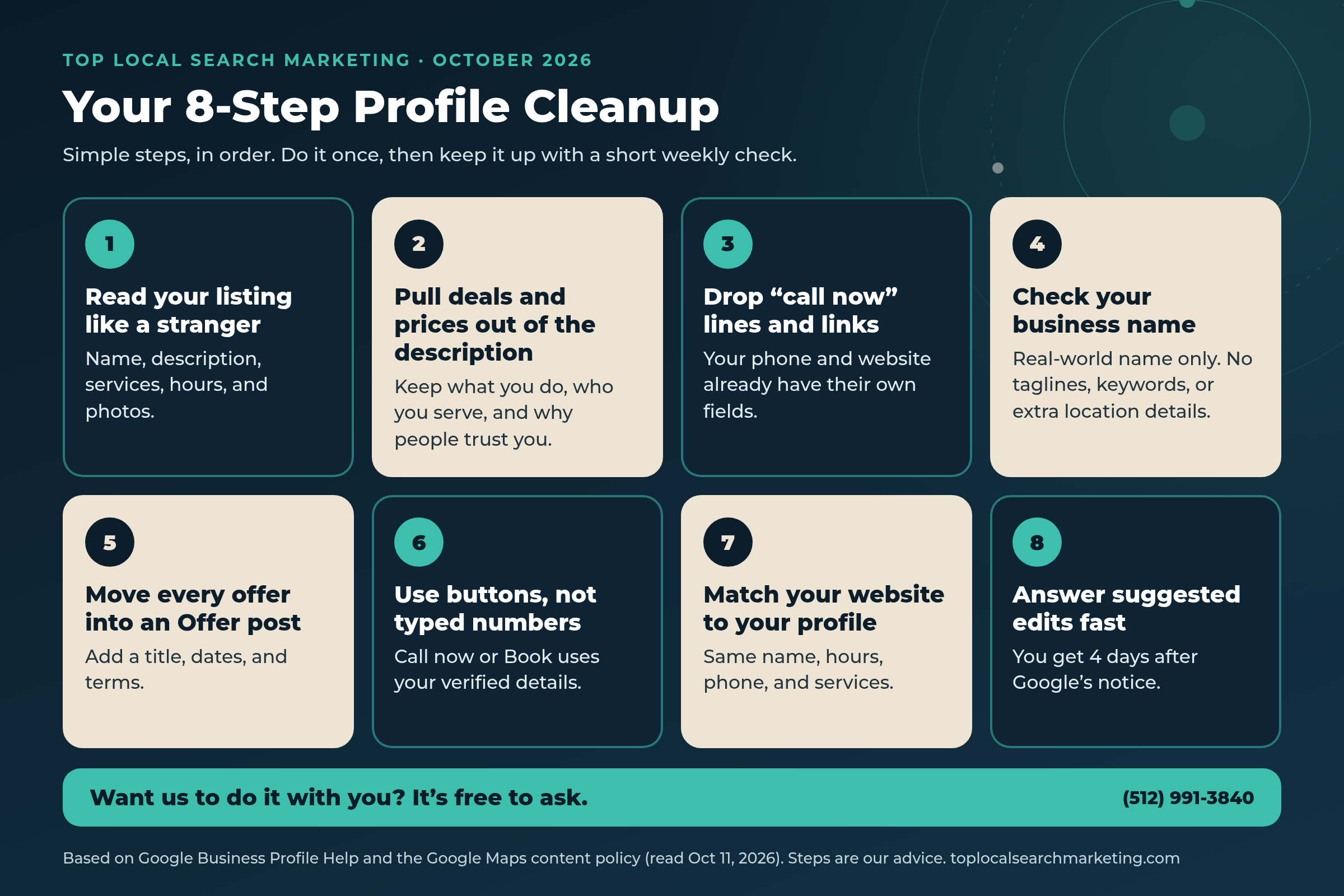
Our 8-Step Profile Cleanup
Simple steps, in order. You can likely finish the first four in one sitting.
-
Read your listing like a stranger would.
Open Google Maps on your phone and search for your business by name. Read your name, description, services, hours, and photos as if you’d never heard of yourself. Write down anything that sounds like an ad, anything with a date or a price, and anything that’s out of date.
-
Pull deals and prices out of your description.
Keep what Google’s guidelines say the description is for: your services and products, your mission, and your history. Take out sales, percentages, prices, and anything with an end date.
-
Drop “call now” lines and links from your listing text.
Your phone number and website already have their own fields, so customers can tap them. Lines like “Call today for a free quote” or a web address typed into the description don’t need to be there.
-
Check your business name.
Google’s guidelines say to use your real-world name, the way it appears on your sign, website, and stationery. Taglines, service keywords, extra location details, phone numbers, and hours don’t belong in the name unless they’re really part of it.
-
Move every offer into an Offer post.
Give it a clear title, start and end dates, and terms. If a special repeats, Google lets you schedule posts and set them to repeat, so you don’t have to remember each time.
-
Use buttons, not typed numbers.
On any post that should bring a call, add the Call now button. It uses your verified phone number. For bookings or orders, use a button that links to the page on your website where customers finish the task.
-
Make your website match your profile.
Same business name, address or service area, hours, phone number, and services. Google says an unanswered suggested edit may be published when your website backs it up, so your website is your best proof. BrightLocal’s survey also found that 54% of consumers check a business’s website after reading positive reviews.
-
Answer suggested edits fast.
Turn on email notifications for your profile. When Google tells you about a suggested edit, you have 4 days to accept or reject it. Check for blue text in the profile editor, which shows info that Google changed.
Get Help With This Plan Free and no pressure · Call (512) 991-3840 · Text us
Before and After: Simple Rewrites You Can Copy
These examples are made up to show the idea. Use them as a starting point and put them in your own words. Your description should sound like you.
A home services description
Before: “The best plumbers in town! 20% off all drain cleaning through October 31. Call now for a free quote!”
After: “Family-owned plumbing company serving homes and small businesses across the area. We fix leaks, install and repair water heaters, clear drains, and handle repiping. Licensed, insured, and known for showing up when we say we will.” Then the 20% deal goes in an Offer post with an end date.
A law firm description
Before: “Hurt in a wreck? Call today! Free consultation!”
After: “Personal injury law firm helping people and families after car and truck accidents. Consultations in English and Spanish.” Any limited-time message goes in a post.
A restaurant description
Before: “Happy hour $5 margaritas, 4 to 6 every day! Follow us on Instagram for deals!”
After: “Neighborhood Mexican kitchen with a sunny patio, family recipes, and fresh tortillas made every morning.” Happy hour becomes a repeating Offer or Event post.
A post with a typed phone number
Before: “Fall tune-up special! Call or text the owner’s cell to book.”
After: An Offer post titled “Fall furnace tune-up” with dates and terms, plus a Call now button that uses your verified number.
Our take: the “after” versions are calmer, and that’s the point. A plain, specific description builds more trust than a shouting one, and your posts give you a place to sell every week.
A Short Weekly Profile Check
Put this on your calendar for the same time every week. It’s the easiest habit that keeps your profile clean and working for you.

- Open your profile and look for any notifications, or blue text that shows info Google changed.
- Answer any suggested edits. Remember the 4-day window.
- Check that your newest post is Live, not Pending or Not approved. If it wasn’t approved, tap the question mark to see why.
- Make sure every offer you’re running has an end date that hasn’t passed.
- Look ahead for holidays or closures and set special hours.
- Once a month, read your description out loud. If you hear a price, a date, or “call now,” move it into a post.
Have Us Do This With You Free and no pressure · Call (512) 991-3840 · Text us
FAQ: Straight Answers to What Owners Ask Next
Answers based on Google’s own help pages, read on October 11, 2026.
Google rewrote the advertising and solicitation section of its Maps content policy and added rules for business owners. In your listing, it doesn’t allow promotional content that contains time-bound promotions, pricing, or direct calls to action. In posts, it doesn’t allow email addresses, phone numbers, social media links, or links to other websites that aren’t related to your business. Search Engine Roundtable reported the change on October 6, 2026.
Yes. Google says offers and updates that may be seen as promotional are otherwise permitted in posts. Use an Offer post with a title, dates, and terms, and add a coupon code or link if you have one.
Google’s guidelines say your description shouldn’t focus on special promotions, prices, or sales, and the Maps policy says your listing shouldn’t include promotional content with pricing. Put prices in an Offer post or on your website. Our advice: keep using Google’s own product and service fields as designed until Google says otherwise.
Google may remove posts with contact information it can’t verify, including phone numbers, emails, and social handles. Add the Call now button instead. It uses the verified phone number on your profile.
Google doesn’t define it on the policy page. Our reading: lines that push someone to act right now, like “Call now” or “Book today,” written into your description or other listing text. Your phone and website fields already let customers act, so those lines aren’t needed.
Google reviews posts after you publish them. A post marked Not approved doesn’t show on Search or Maps, and the question mark next to that status tells you which policy it broke. You can edit the post and try again.
Four days. Google says that once it notifies you by email or in your profile, you have 4 days to accept or reject the suggestion. If you don’t respond, Google may publish it when your website or other public information supports it. Some edits may be applied without your review.
Our honest view: Google hasn’t said this rule affects rankings, so we won’t claim it does. What we do know is that posts that break the rules may be removed or hidden, and Google ties its guidelines to keeping your profile from being suspended. A clean, accurate profile is the safer place to be.
Sources
We paraphrase with credit, and every figure belongs to its publisher. Google updates its help pages often, so check them for the latest wording.
- Google Maps User Contributed Content Policy Help — “Prohibited & restricted content,” advertising and solicitation section (read October 11, 2026) — source
- Search Engine Roundtable — “Updated Google Maps Policy: What Merchants Can’t Post In Listings Or Posts” (October 6, 2026) — source
- Google Business Profile Help — “Guidelines for representing your business on Google” (read October 11, 2026) — source
- Google Business Profile Help — “Business Profile photos, videos & posts content policy” (read October 11, 2026) — source
- Google Business Profile Help — “Create & manage posts on your Business Profile” (read October 11, 2026) — source
- Search Engine Roundtable — “Google Posts Cracks Down On Unverified Contact Information” (September 25, 2026) — source
- Google Business Profile Help — “Understand Google updates on your Business Profile” (read October 11, 2026) — source
- Search Engine Roundtable — “Google Business Profiles Gives You Four Days To Reject User Edits” (September 23, 2026) — source
- BrightLocal — “Local Consumer Review Survey 2026” (survey of 1,002 U.S. adults, published February 11, 2026) — source
Let’s Look at Your Profile Together
You’ve got a business to run, and keeping up with Google’s help pages shouldn’t be your second job. We get it. On a free strategy call, we’ll walk through your Google Business Profile, your posts, and your website with you. You’ll leave with a short, plain-English list of what to keep, what to move, and what to fix first.
If your profile is already in great shape, we’ll tell you that too.
Book Your Free Strategy Call Free and no pressure · Call (512) 991-3840 · Text us
Prefer to talk now? Call or text (512) 991-3840. Tell us your business and your city, and we’ll take it from there.
Top Local Search Marketing · Lakeway, Austin, and Lake Travis · Buffalo and Western New York · serving local businesses across the U.S.