
The short answer
Google is sending invites to an early-access pilot that puts an AI messaging agent on your Business Profile. According to the email, it is free, it answers common questions and helps with bookings, and it hands complex questions to you. Customers use their phone’s own messaging app through RCS. The best move is to get your facts, your handoff plan and your team ready before the invite shows up.
We covered this pilot when it first surfaced on Oct. 29 in Google Puts an AI Agent on Business Profiles. This is the follow-up for owners who are now seeing the email: what it says, line by line, and what to do about it. If you are invited, Top Local can help you get your profile, answers and handoff plan ready, and it ties into Grace, our own AI assistant. Call or text (512) 991-3840.
By the Top Local editorial team. Facts about the pilot come from Google’s invite email, which we reviewed with the recipient removed. Anything else is cited in the sources below. Advice is ours.
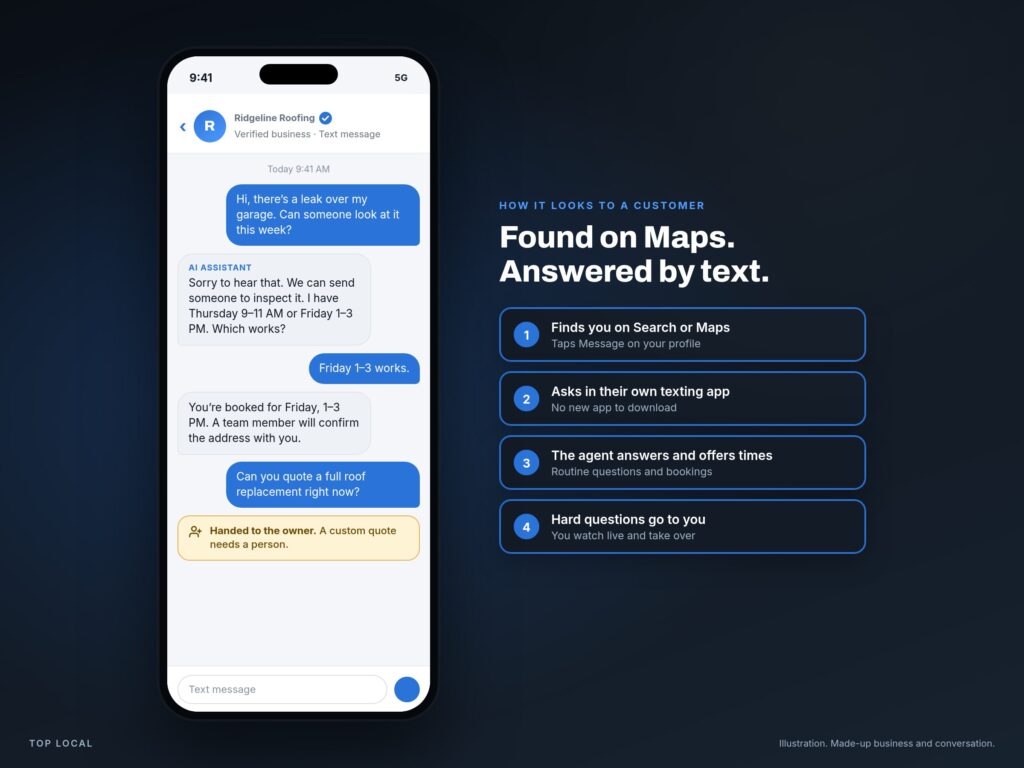
What a customer would see
Illustration: a made-up roofing company and a made-up conversation, drawn by Top Local to show the idea. It is not Google’s interface.
The news
What does Google’s AI agent invite say?
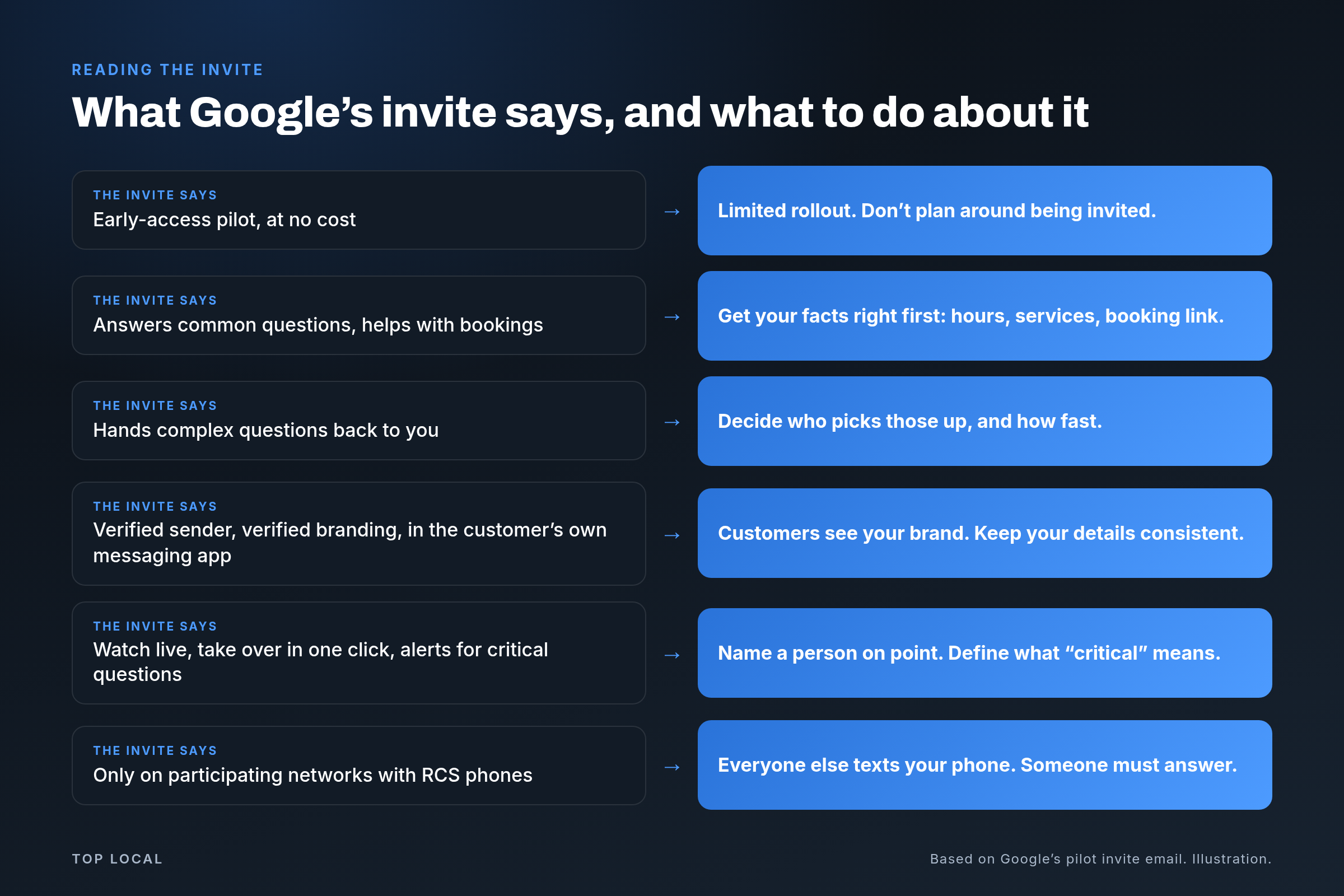
The invite offers early access to an AI-powered messaging pilot on your Business Profile on Search and Maps. These are the six facts in it:
An early-access pilot for an AI-powered messaging agent on your Business Profile on Search and Maps.
The agent answers common customer questions and helps with bookings.
The agent hands complicated questions back to the owner.
Customers reach it in their phone’s own messaging app, through RCS.
Watch chats in real time, take over with one click, and get alerts for critical questions.
Messages come from a verified sender with verified branding.
Who gets the AI agent?
Not everyone, and nobody can promise you an invite. The email calls it an early-access pilot. We have not seen Google publish an eligibility list, and neither has Search Engine Roundtable in its Oct. 29 report on the rollout. If someone offers to get you in for a fee, ask what they know that Google has not said.
What you can control is whether your business is ready on the day it arrives.
What happens when a customer’s phone does not support RCS?
The agent only answers customers on participating mobile networks with RCS-capable phones. Everyone else’s text goes straight to your phone, and standard text rates may apply. Google has not told us which networks participate, so plan for a mix.
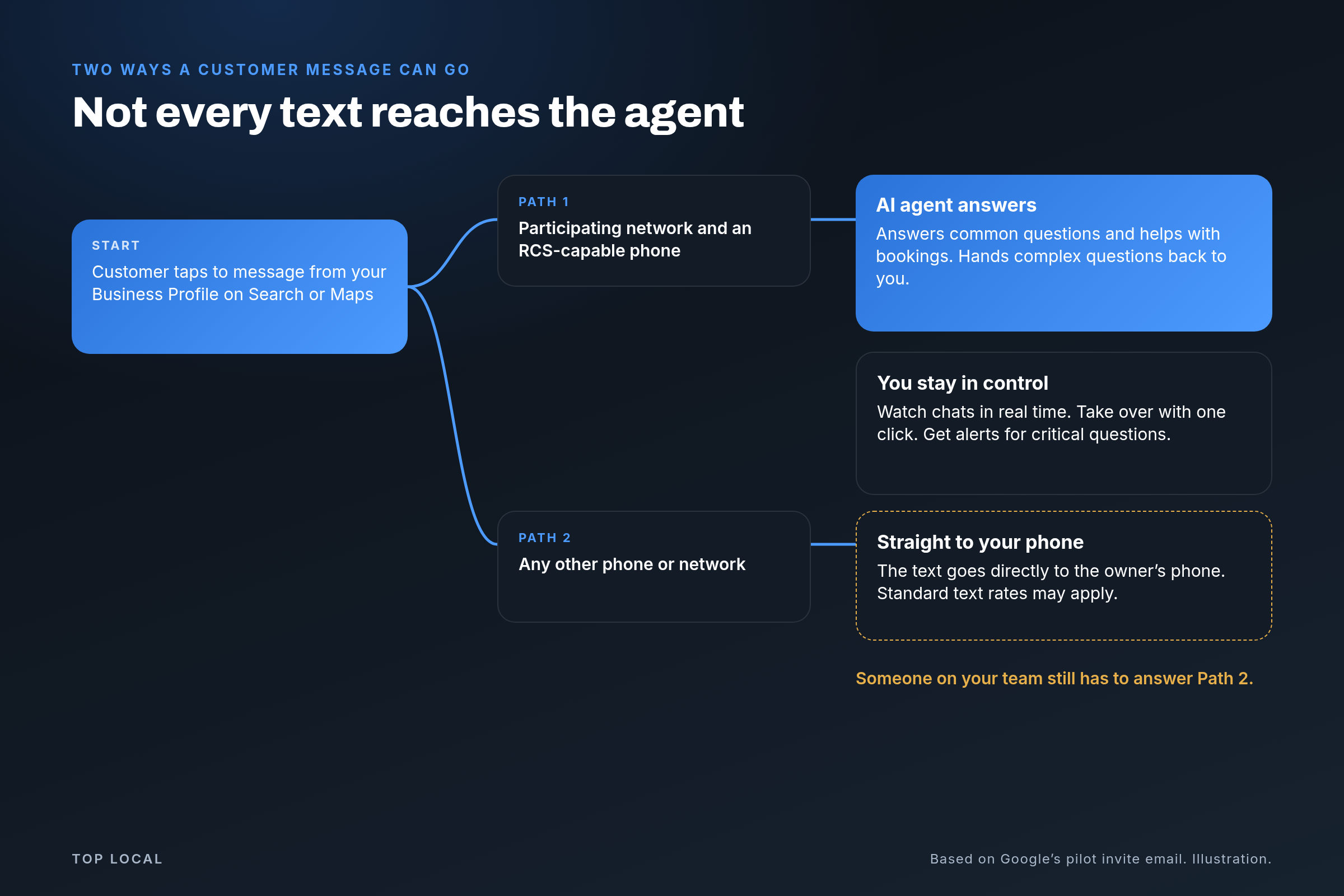
That means the pilot does not replace your phone. It adds a second channel, and someone still has to answer the first one.
Prep steps
How should you get ready for Google’s AI agent?
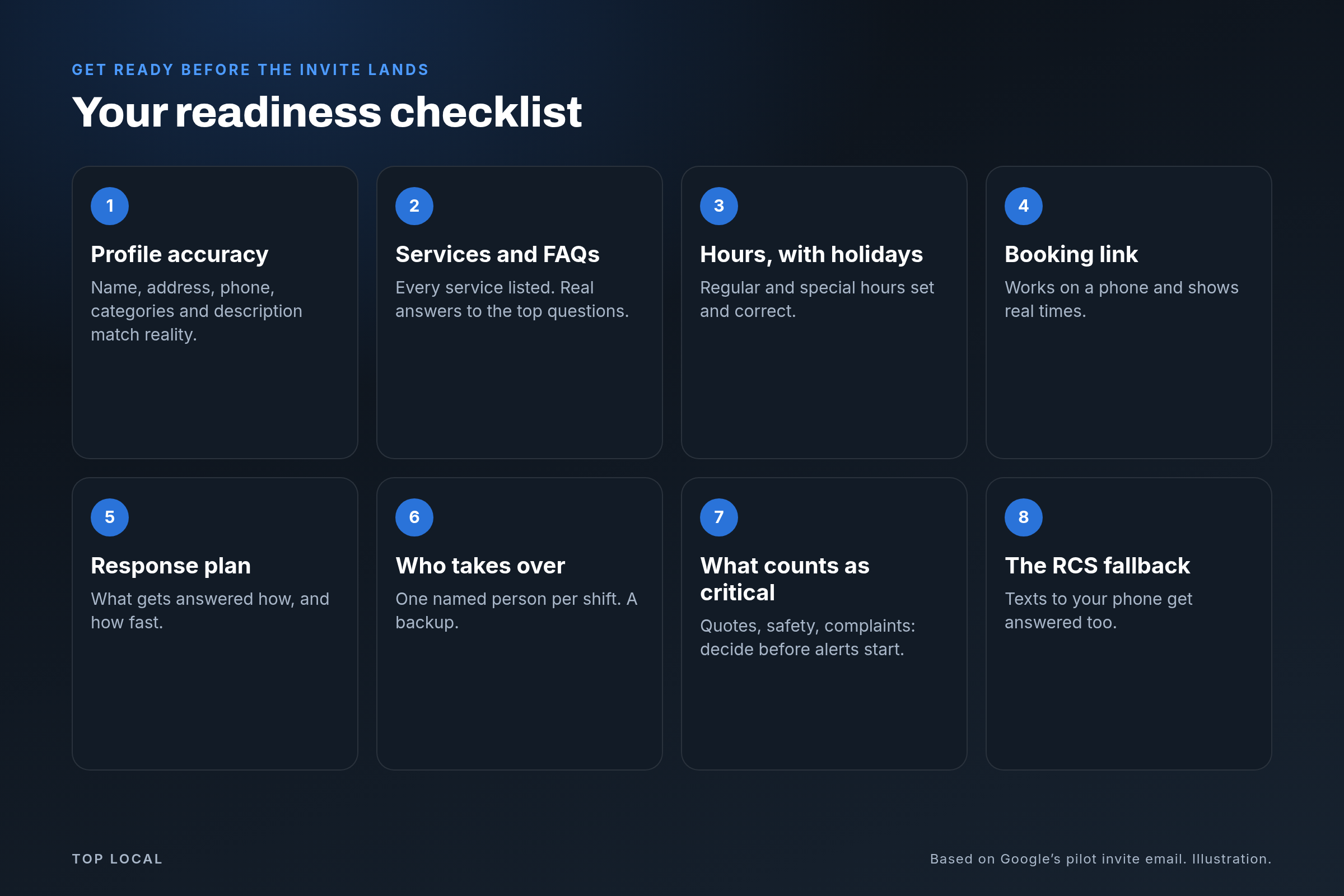
Eight steps. None of them depend on whether you are invited, and all of them make your Business Profile better today.
-
Make your Business Profile accurate
Check your name, address, phone, categories and description against reality. The agent can only work with what exists, and wrong facts get repeated. Our Business Profile guide covers each field.
-
Fill out your services and FAQs
List every service you offer. Write plain answers to the five questions your phone gets most, and put them on your profile and your website.
-
Set your hours, holidays included
Regular hours, holiday hours and closures. “Are you open Saturday?” is exactly the kind of common question an agent will field.
-
Test your booking link on a phone
Tap it the way a customer would. Make sure it loads fast and shows times you can actually keep.
-
Write a response plan
Sort questions into three piles: routine (hours, services, booking), yours (custom quotes, safety issues, complaints, billing) and urgent. Write the rule for each pile on one page.
-
Decide who takes over
Google’s email says you can watch chats and take over with one click. That only helps if a named person is watching. Pick one person per shift and a backup.
-
Define what counts as critical
The invite promises alerts for critical questions. Decide now what you want flagged, and where the alert should land so it is seen within minutes. Check the exact options when you are invited.
-
Plan for the RCS fallback
Some customers will text your phone directly, and standard text rates may apply. Make sure that phone is answered on the same schedule you would promise anyone else.
Where Top Local fits
Call now and find out why your phone isn’t ringing.
How do Top Local and Grace fit in?
If you are invited, Top Local can help you get your profile, answers and handoff plan ready. That means getting your facts in order first, writing the handoff rules and naming who takes over. We cannot get you invited, we do not operate Google’s agent for you, and we do not promise rankings or results.
Grace is the AI assistant on our own website chat. She answers questions and hands the conversation to a person when it needs one. She is separate from Google’s agent and lives on our site, not on your profile. But the idea is the same: AI covers the routine so people can focus on the rest. We help local businesses plan that same kind of setup.
Call (512) 991-3840Text (512) 991-3840
Call or text (512) 991-3840 and we will tell you what to fix first. Learn more about our Local SEO and Google Maps work and AI search optimization.
Should you turn it on if you are invited?
If your answers are accurate and someone is ready to take over, an early-access pilot at no cost looks worth a try. If your hours, services or booking link are wrong, fix those first. If most of your work needs a custom quote, expect many chats to come back to you, and staff for that. The pilot is early, so watch your first conversations closely.
FAQ
Frequently asked questions
What is in Google's AI agent invite?
Google's invite offers early access to an AI-powered messaging pilot on your Business Profile on Search and Maps, at no cost. The agent answers common customer questions and helps with bookings, and it redirects complex questions to you. Customers reach it in their phone's native messaging app through RCS. You can watch chats in real time, take over with one click, and get alerts for critical questions. Messages come from a verified sender with verified branding.
Is Google's AI agent for Business Profiles free?
The invite describes early access to the pilot at no cost. It also says that on networks or phones without RCS support, customer texts go straight to your phone and standard text rates may apply.
Will every business get an invite?
Nobody can promise that. The email describes an early-access pilot, and we have not seen Google publish an eligibility list. Be wary of anyone who says they can get you in.
What happens if a customer's phone does not support RCS?
The agent only works on participating mobile networks with RCS-capable phones. For everyone else, the customer's text goes straight to your phone, so someone on your team still has to answer it.
Can I take over a conversation with the AI agent?
Yes. Google's invite says you can watch chats in real time and take over with one click, and that you get alerts for critical questions. Decide ahead of time who does the taking over.
How do I get my business ready for the AI agent?
Make your Business Profile accurate, fill out your services and FAQs, set regular and holiday hours, test your booking link on a phone, write a response plan, name who takes over chats, decide what counts as critical, and plan for texts that come straight to your phone.
How can Top Local help with Google's AI agent?
If you are invited, Top Local can help you get your profile, answers and handoff plan ready. We cannot get you invited, we do not operate Google's agent for you, and we do not promise rankings or results. Call or text (512) 991-3840.
Is Grace the same as Google's AI agent?
No. Grace is the AI assistant on the Top Local website chat. Google's agent lives on your Business Profile. They follow a similar idea, with AI handling routine questions and a person taking the rest, but they are separate tools.
Sources
- Google Business Profile invite email, “AI-powered messaging pilot,” reviewed by Top Local with the recipient business removed. Source of the six facts above.
- Search Engine Roundtable: Google Business Profiles AI-Powered Messaging Expands (Oct. 29, 2026).
- Top Local: Google Puts an AI Agent on Business Profiles: What It Will Say About You (Oct. 29, 2026).
- Google for Developers: RCS for Business, background on RCS branding and the Verified icon.
Our advice and opinions are labeled as ours. The made-up business and chat in the animation are illustrations, not real customers or a real conversation.